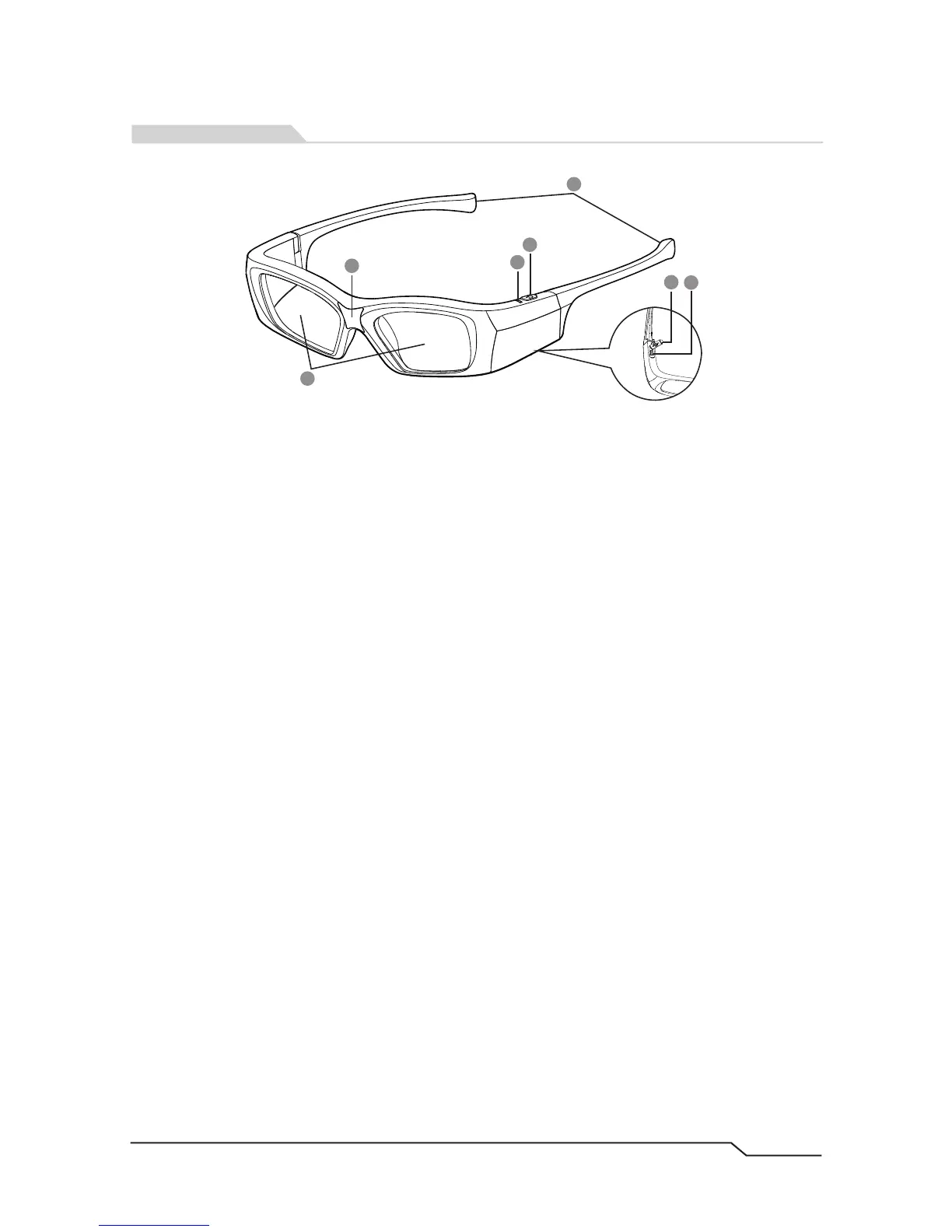
1. Liquid Crystal Lenses
The fast response, high transmittance and contrast LCD lenses
please avoid any external force when using or when storing.
are subject to scratching
2. IR Signal Receiver
When watching TV in 3D, It is recommend to face toward the direction of the emitter
which is built into the TV for a better viewing experience.
3. LED Indicator
Power ON: green LED is on for 1.5 seconds;
Power OFF: green LED blinks three times;
Low Battery: green LED blinks once every second;
In Charging: red LED is on;
Full Charged: red LED goes out;
4. Power Button
Turn ON: Press the button once;
Turn OFF: Hold the button for about 1.5 seconds.
5. Earpieces
Compact design, Folding earpieces.
6. Mini-USB Charge Port Cover
Keep the cover closed to prevent dust go inside.
7. Mini-USB Charge Port
Charge the glasses by connecting your glasses to USB port of your TV or computer.
2
1
3
4
6
7
5
2
Product Features


 To Next Page