GB - 30 -
Notes on Discs
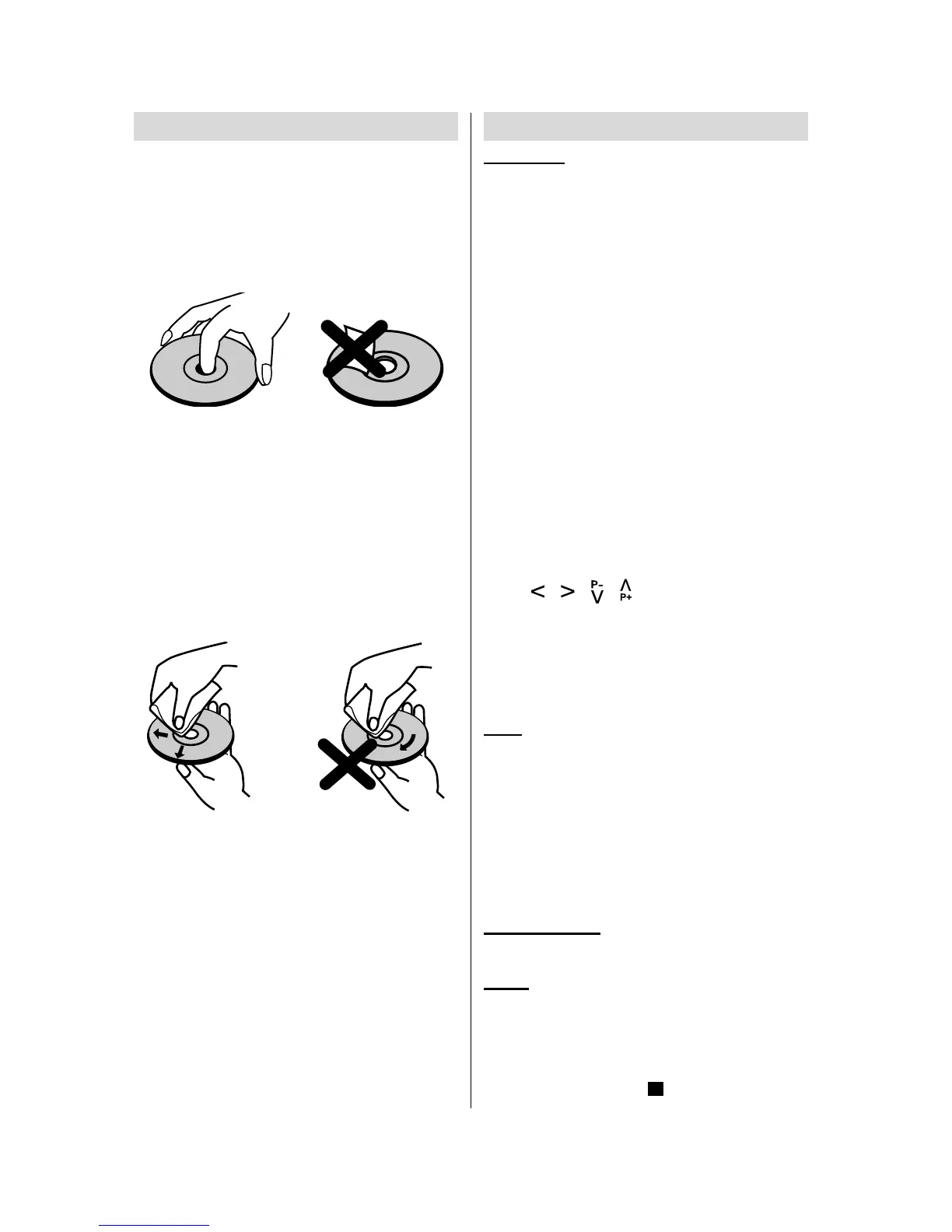
On handling discs
To keep the disc clean, handle the disc by its
edge. Do not touch the surface.
Do not stick paper or tape on the disc.
If the disc is contaminated with any sub-
stance like glue remove before using it.
Do not expose the disc to direct sunlight or
heat sources such as hot air ducts, or leave
it in a car parked in direct sunlight as the
temperature can rise quickly and damage
the disc.
After playing, store the disc in its case.
On cleaning
Before playing, clean the disc with a clean-
ing cloth. Wipe the disc from the center out.
Do not use solvents such as benzine, thin-
ner, commercially available cleaners or
anti-static spray intended for vinyl LPs.
DVD Playback
Basic Play
1. Switch the TV on (Please see Page 7).
2. Press OPEN/CLOSE to open the disc
tray.
3. Place a disc onto the tray
Hold the disc without touching either of its
surfaces, position it with the printed title side
facing up, align it with the guides, and place
it in its proper position.
4. Press OPEN/CLOSE.
The disc tray is automatically closed and
play commences.
A menu may appear on the TV screen after
a few moments or the film may start imme-
diately after the introduction of the Film
Company. This behaviour depends on the
disc content and may change.
NOTE: Step 5 is available only when a menu
is shown after the disc is inserted.
Press
/ / / or the number button(s)
to select the preferred menu item.
5. Press SELECT
Play of the selected items now commences.
The played item may be a film, a still picture
or another submenu depending on the disc.
Note:
When using menus the disc controls the
behaviour of the player.
Stopping play and returning to the menu
screen (when a menu is available on the
disc)
Press MENU or TITLE button depending on
the disc. Play is suspended, and the Disc
menu screen is displayed.
After operation
When the unit is not in use, remove the disc.
NOTE:
The disc continues to rotate while the
menu is displayed even after the player has
finished playing a particular item. When no
further selections are to be played, be sure
to press the STOP ( ) button to clear the
menu display.


 To Next Page