GB - 3 -
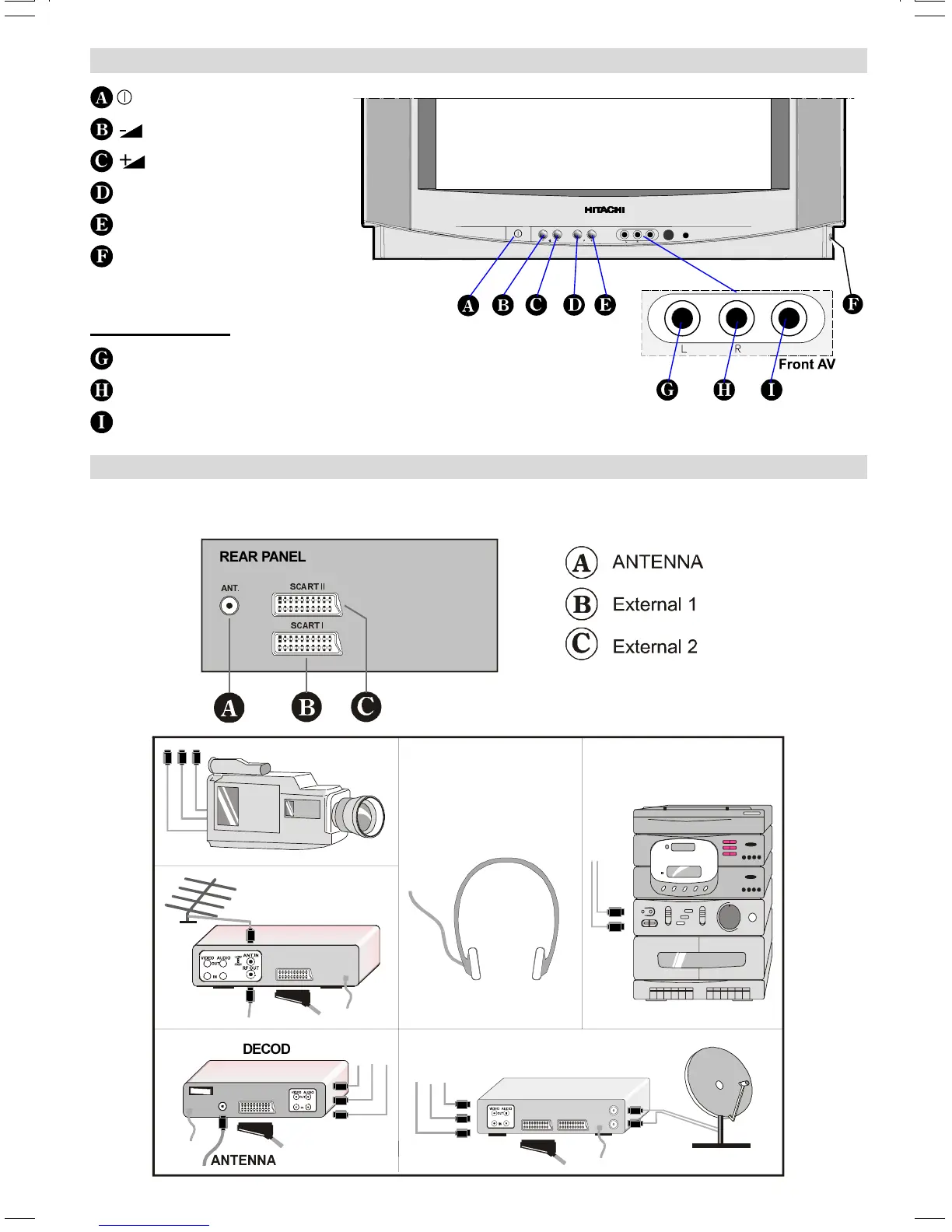
Control Panel Buttons
Connect Peripheral Equipment
There is a wide range of audio and video equipment that can be connected to your TV.
The connection diagrams show the back of the TV where the different equipment should be connected.
6&$57,
6&$57,,
REAR PANEL
DECODER
FOR SATELLITE RECEIVER
VIDEO
HEADPHONE
AUDIO
CAMERA
= Power On / Off
= Volume -
= Volume +
- P = Program -
P + = Program +
H-PHONE = Headphone 3,6 mm Ø
Front AV input
AUDIO L = Audio left (white)
AUDIO R = Audio right (red)
VIDEO = VCR (yellow)
(C2143S)-ENG&2172HAV-2217-VST-BSI-AK30-STEREO-7P-HITACHI.p65 08.01.2003, 10:113




 To Next Page