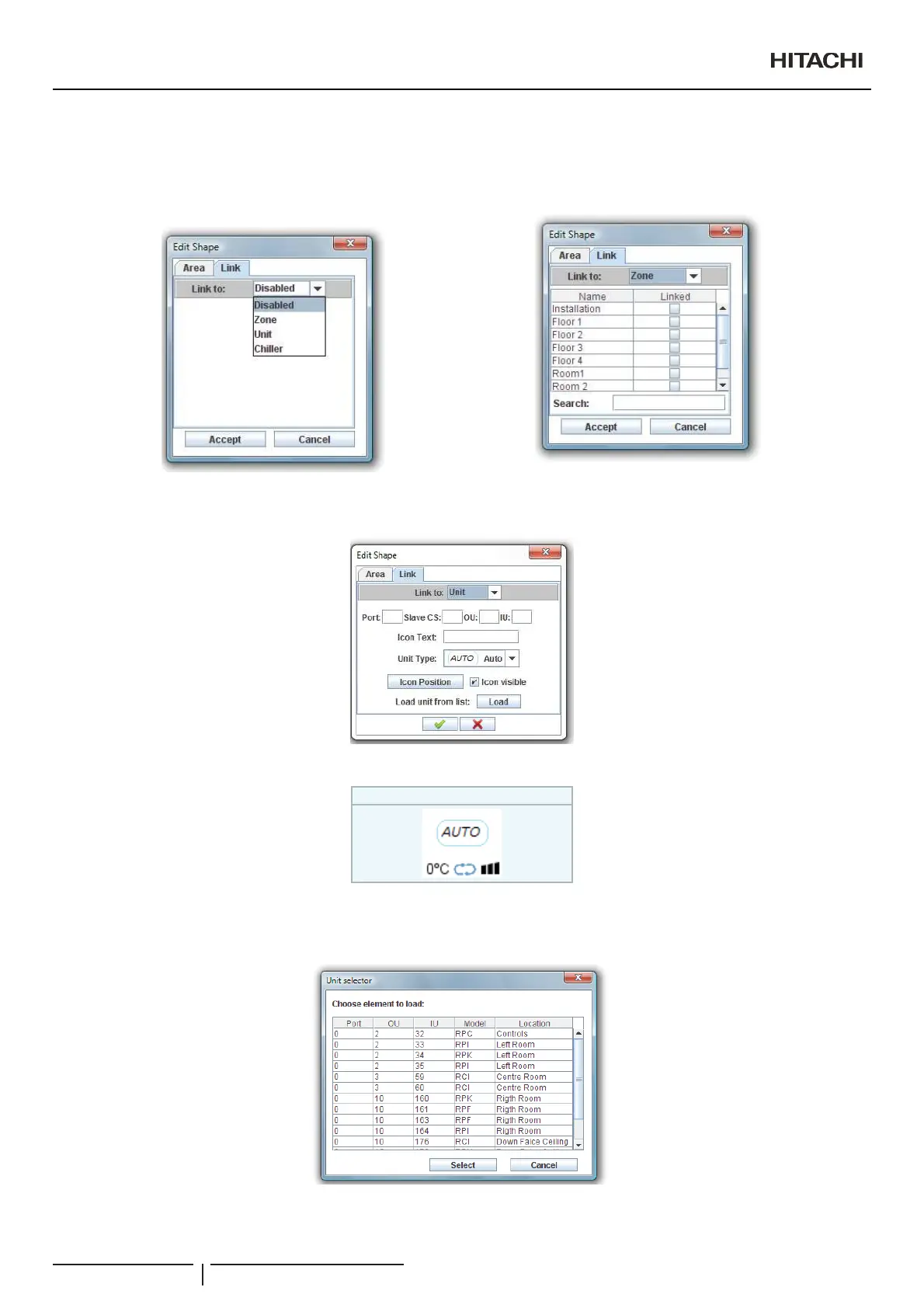
To link a shape you must select the tab link on the shape dialogue and chose the link type.
If you want to link to a zone you must select which will be the destination zone. To do this, you must use the zones table.
<RXFDQVHDUFKIRUD]RQHXVLQJVHDUFK¿OH
,I\RXZDQWWROLQNWRD8QLW\RXPXVWFRPSOHWHDOOWKHLQIRUPDWLRQ¿HOGV
In both links you can select what kind of Unit is it. If you select Auto option CSNET Manager will automatically set the kind of Unit.
During the edition you will see:
Icon for Packaged units
7RPDNHHDVLHU\RXUZRUNLI\RXKDYHLPSRUWHGFRQ¿JXUDWLRQ¿OHVRI&61(70DQDJHUDVSUHYLRXVO\H[SODLQHG\RXFDQORDGWKH
¿HOGVVHOHFWLQJORDGEXWWRQ8QLWVHOHFWRUGLDORJXHZLOODSSHDU
Select the unit you want to load and press select button.
Creation of Building Layout
PMML0409A rev.1 - 10/201694


 To Next Page
 Loading...