4.6.7 ,QWHUORFN
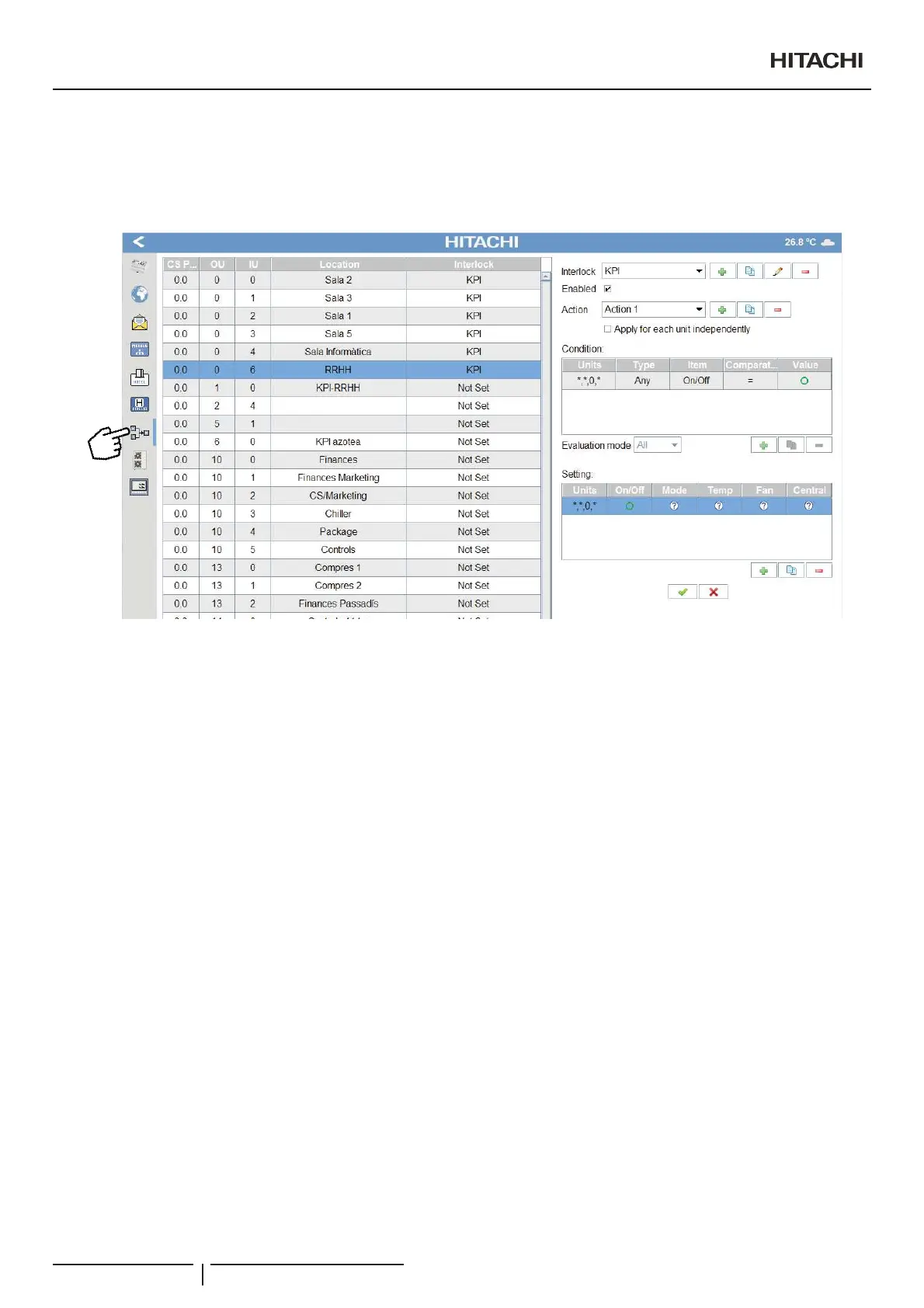
Interlock function let create links between units.
&61(70DQDJHUFKHFNVWKHVWDWXVRIDQLQGRRUXQLWSDUDPHWHUDQGVHQGDQRUGHULIWKHYDOXHRIWKHSDUDPHWHUUHDFKDVSHFL¿HG
condition.
Interlock elements could be easily enabled/disabled.
(DFK,QWHUORFN(OHPHQWKDVGLIIHUHQWDFWLRQVWREHGH¿QHG$QDFWLRQLVDSDLURI
Conditions: parameters to be checked on a unit or group of units.
Setting: order to be send to a single or group of units.
&RQGLWLRQVWDEOHOHWFRQ¿JXUH
Units: units were the condition will be checked
- All: all existing units.
- 6SHFL¿FVLQJOHRUJURXSRIXQLWVVSHFL¿HG
Type: condition type:
- All: all the selected units should achieve the condition.
- Any: some of the selected units should achieve the condition.
- None: none of the selected units should achieve the condition.
- Average: the average of all the selected units should achieve the condition.
Item: parameter to be checked
- Tin
- THM4
- RCS Sensor
- Outdoor temperature
- Alarm
- On/Off
- Fan
- Louver
- Central
- Hour
- Date (Day of the year)
- CN3 – Input 1 (for compatible units and HC-A64NET second generation)
- CN3 – Input 2 (for compatible units and HC-A64NET second generation)
2SHUDWLRQDQGFRQ¿JXUDWLRQRISDFNDJHGXQLWV
PMML0409A rev.1 - 10/201654


 To Next Page
 Loading...