Description of parameters
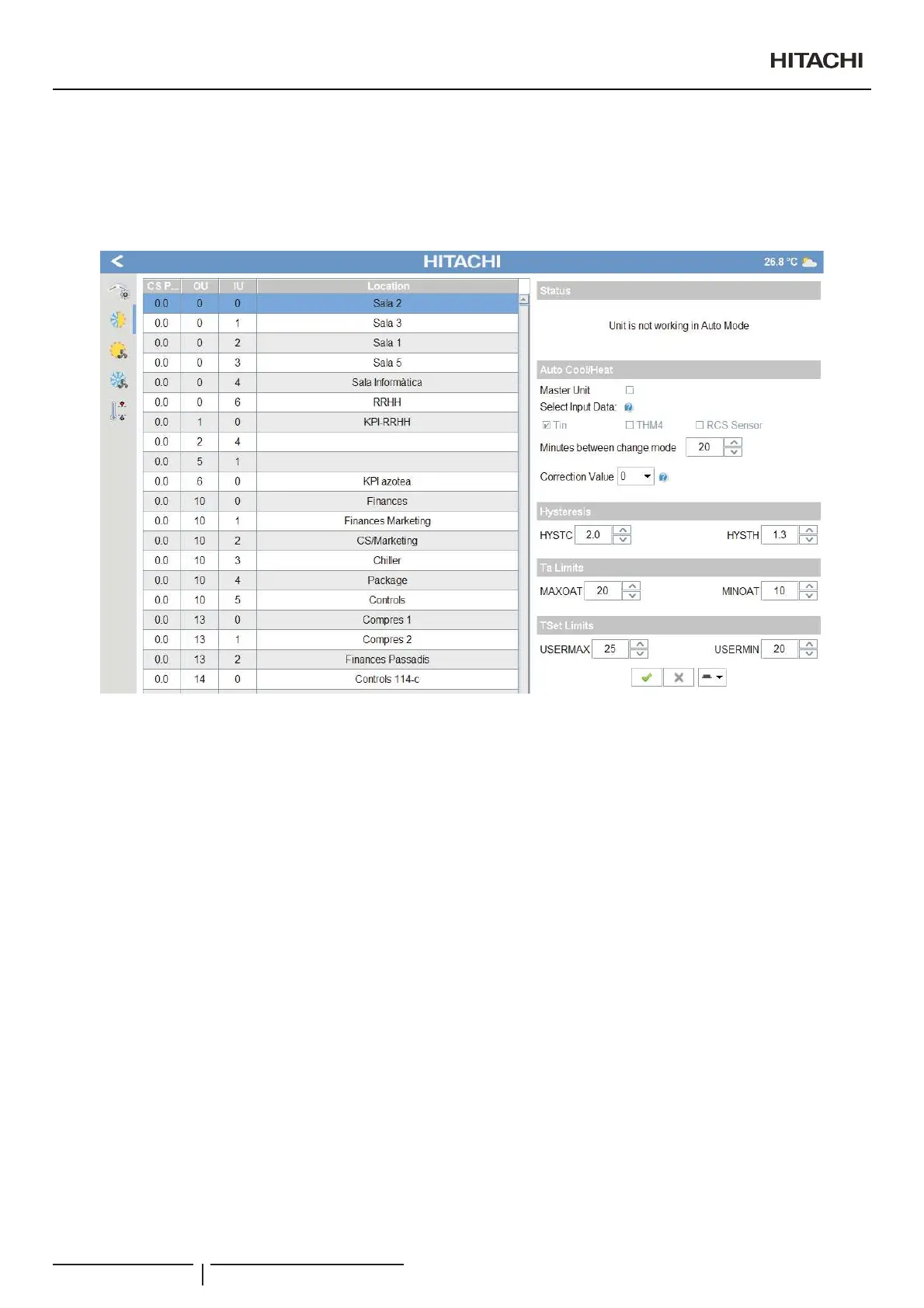
To use this option, you have to set the parameters shown in the Auto Cool/Heat operation panel. After that, if unit is working in Auto
Cool/Heat mode, you can see the status of this operation on the status zone of the panel.
The Auto Cool/Heat panel shown corresponds to the cooling circuit of the indoor unit selected in the table of indoor units, as shown
in the example.
You should adjust the following parameters:
8QLWFRQ¿JXUDWLRQ
- Master unit: Field for selecting the method CSNET will use to calculate the temperature difference.
- ; (Marked): CSNET will only use this unit to calculate the temperature difference and decide the change, not taking
into account the other units connected to the same 2-tube cooling circuit.
- (Not marked): CSNET will use the average temperature difference of all the indoor units connected to the same
2-tube cooling circuit.
C A U T I O N
:KHQWKLVPHWKRGLVXVHGPDUNHGWKHIROORZLQJRXWGRRUXQLWRSWLRQFDQQRWEHXVHG³FRQWURORILQGRRUXQLWIDQVSHHG´GXULQJRSHUDWLRQZLWK
WKHWKHUPRVWDWGHDFWLYDWHGLQKHDWPRGHWKHLQGRRUIDQVWRSVIRUPLQXWHVDQGRSHUDWHVIRUPLQXWHV,ILWLVXVHGWKHGHFLVLRQRIZKHQWR
change will not always be correct (if it is measured during the deactivation cycle of 6 minutes).
- Select input data:¿HOGIRUVHOHFWLQJZKDWLQOHWWHPSHUDWXUH&61(7VKRXOGXVHWRFDOFXODWHWKHWHPSHUDWXUHGLIIHUHQFHLIDQ
optional remote temperature sensor is connected in THM4 of the PCB of the indoor unit or if there is RCS remote sensor.
When there are selected a combination of different sensor it will calculate the average between them. When nothing is
selected, it is forced to use the Tin value.
- Minutes between change mode: The time which must elapse between the last change of operation mode to the next change.
Pre set adjustment: 20 min.
10 min steps.
20 min...60 min margin.
2SHUDWLRQDQGFRQ¿JXUDWLRQRISDFNDJHGXQLWV
PMML0409A rev.1 - 10/201662


 To Next Page
 Loading...