ENGLISH
4.8.1 'LVSOD\LQJKLVWRULFDOGDWD
CSNET Manager allows you to save a history of data from all the machines connected to the H-LINK.
It also displays the information in two different formats:
- Data in the form of a table, which can be exported in text format; and
- Data in graph format, which can be used to generate graphics for display.
7RREWDLQKLVWRULFDOGDWD
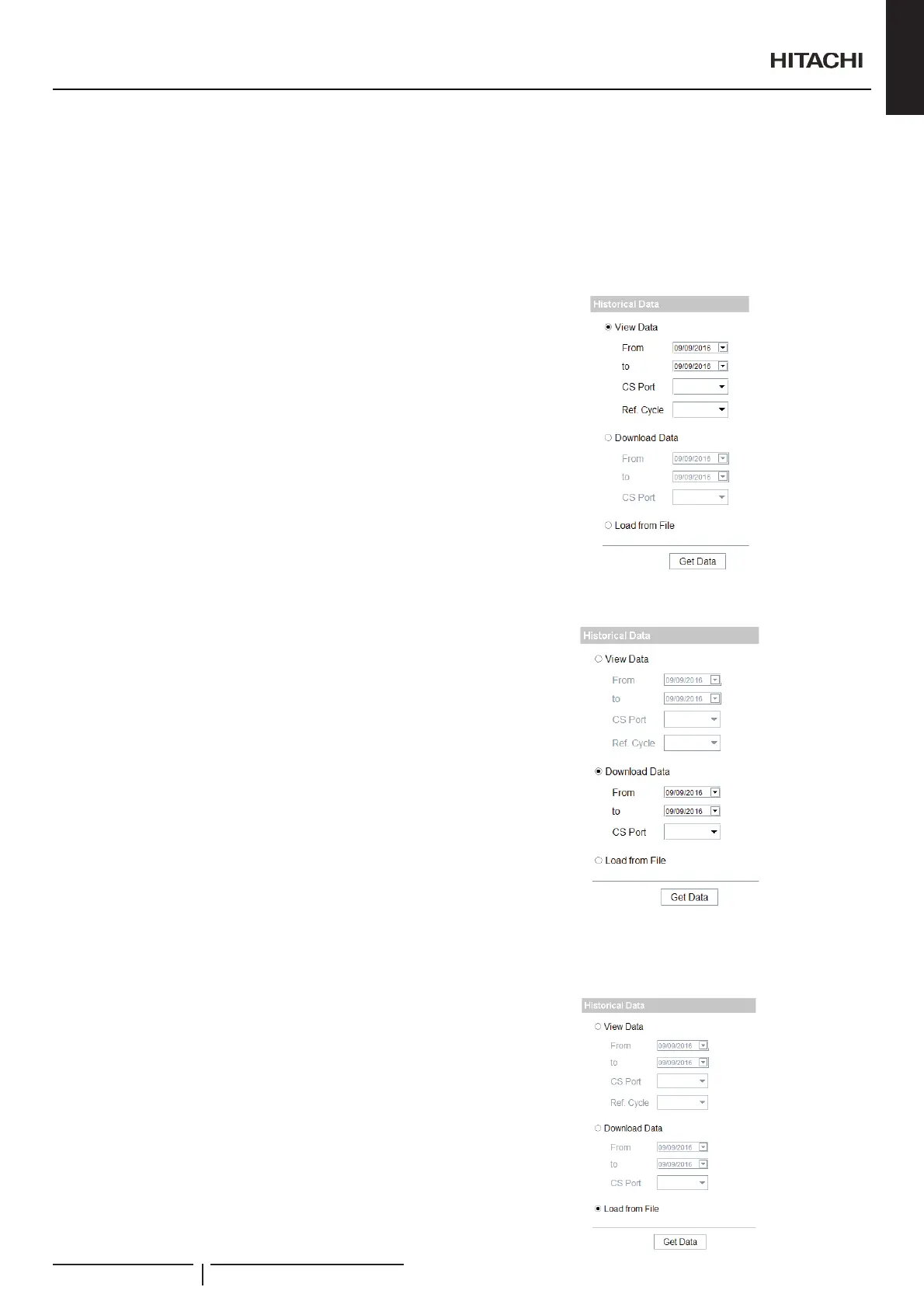
1 Select View data.
2 Select starting date (from).
3 Select end date (to).
4 Select unit to display:
- CS Port and Ref Cycle
5 Press the Get data button.
7RGRZQORDGGDWDWRGLVN
1 Select Download data.
2 Select starting date (from).
3 Select end date (to).
4 Select CS Port.
5 Press the Get data button.
A window will appear letting you select the folder in which to save
WKH¿OHV
File format
:KHQWKHKLVWRULFDOGDWDDUHGRZQORDGHGRQH¿OHLVZULWWHQSHU
RXWGRRUXQLW7KH¿OHQDPHZLOOEHhvv00nn, where:
- vv is the version selected:
02 earlier version (CSNET v8)
03 new version (CSNET Manager/CSNET WEB)
- nn is the number of the outdoor unit.
7RJHWGDWDIURPÀOH
CSNET Manager allows to display data from a previously saved
¿OH/RDGGDWDLVGRQHE\FOLFNLQJGet Data button and selecting
WKHFRUUHVSRQGLQJ¿OH:KHQGDWDORDGLQJLV¿QLVKHGWKLVGDWD
are normally displayed.
1 Select /RDGIURP¿OH
2 Press the Get data button.
3 :LQGRZVVFUHHQZLOORSHQLQRUGHUWRVHOHFWWKHSDWKDQG¿OH
Select open (or cancel) according to your needs.
2SHUDWLRQDQGFRQ¿JXUDWLRQRISDFNDJHGXQLWV
PMML0409A rev.1 - 10/201669


 To Next Page
 Loading...