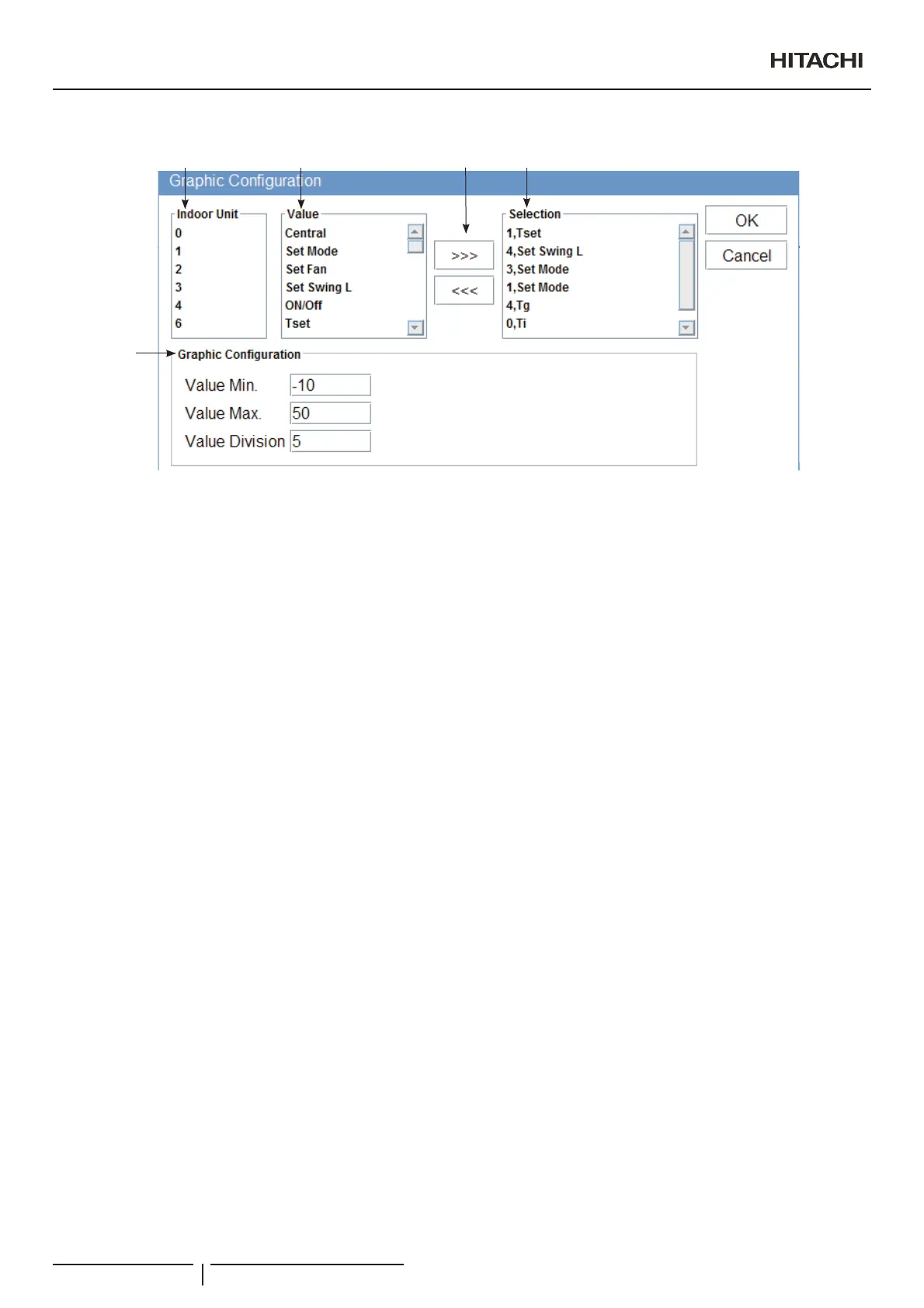
7KHJUDSKFRQ¿JXUDWLRQZLQGRZKDVVHYHUDO¿HOGV
1
2 3
4
5
1 Indoor unit: Select the address of the indoor unit to be displayed.
2 Value: Contains the different values that can be displayed for the unit or cycle. See section on ³9DOXHVWDEOHIRUSDFNDJHG
XQLWV´ for an explanation of each parameter.
3 Selection buttons: Permit the addition or the elimination of a series (unit + value) of the display.
4 Selection: Series to display.
5 *UDSKFRQ¿JXUDWLRQ3HUPLWVWKHFRQ¿JXUDWLRQRIWKHJUDSKGLVSOD\7KH³9DOXHPLQ´¿HOGSHUPLWVWKHVHOHFWLRQRIWKHPLQLPXP
RQWKH<D[LVDQGWKH³9DOXHPD[´¿HOGSHUPLWVWKHVHOHFWLRQRIWKHPD[LPXPRQWKH<D[LV³9DOXHGLYLVLRQ´HVWDEOLVKWKH
intervals between lines.
To generate a graph:
Select the unit (indoor unit or cycle) you wish to add to the series.
Select the value for the unit you wish to add.
3UHVVWKH³!!!´EXWWRQWRDGGWKHVHOHFWLRQWRWKHVHULHVOLVW
Repeat steps 1 to 3 to add the different series required on the list. To delete a selected series, select the series list and press the
³!!!´EXWWRQ
&RQ¿JXUHWKHJUDSKDVUHTXLUHG
3UHVV³2.´WRXSGDWHDQGUHWXUQWR&61(70DQDJHU
Use the lower scroll bar to select the day. Change the day in the Day¿HOG
The ExportEXWWRQSHUPLWVWKHFDSWXUHRIDJUDSKLFLQ-3*IRUPDW7KHPrint button permits the graph to be printed.
2SHUDWLRQDQGFRQ¿JXUDWLRQRISDFNDJHGXQLWV
PMML0409A rev.1 - 10/201674


 To Next Page
 Loading...