English
10
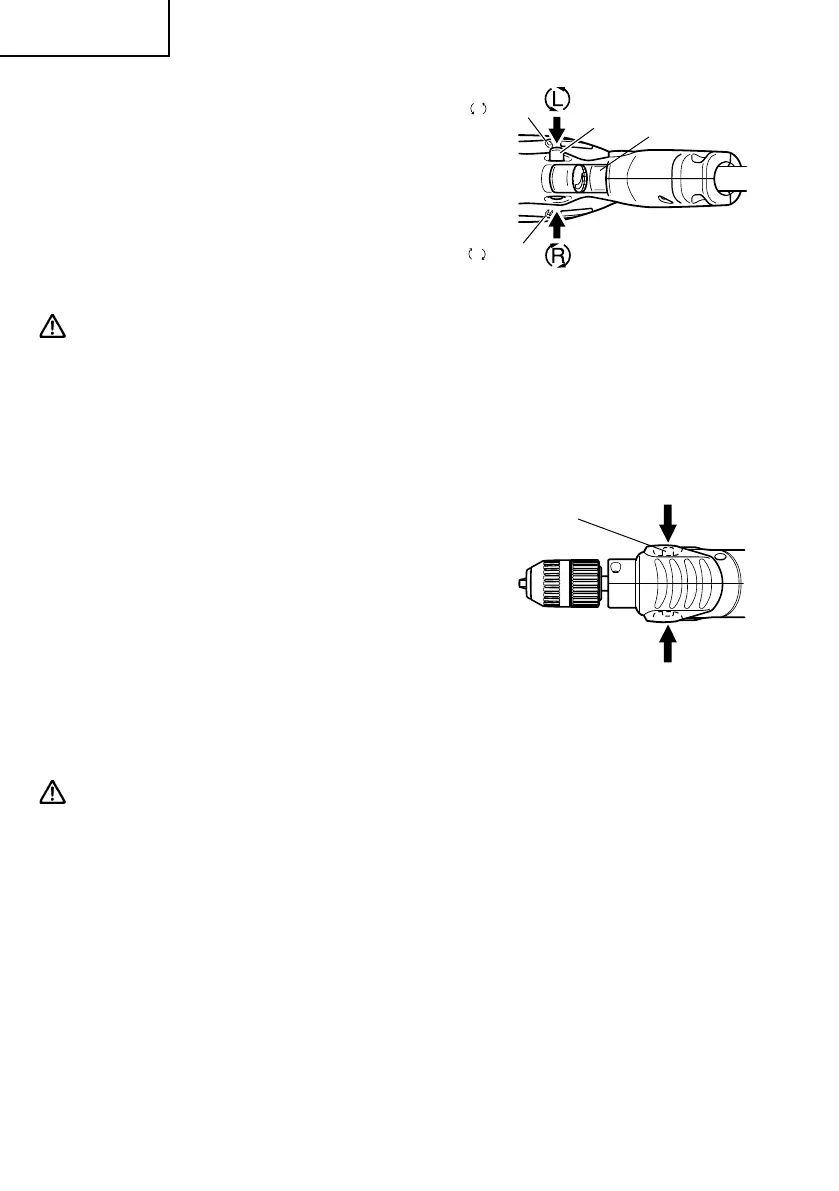
9. Check the rotational direction (Fig. 5)
The bit rotates clockwise (viewed from the
rear side) by pushing the R-side of the push
button.
The L-side of the push button is pushed to
turn the bit counterclockwise.
CAUTION:
䢇 Never change the direction of bit rotation while operating. Turn the power switch OFF
before changing the direction of bit rotation: otherwise, burning of the motor will
result.
䢇 Always use the hammer drill with clockwise rotation, when using it as an hammer
drill.
10. IMPACT to ROTATION changeover (Fig. 6)
The Hammer Drill can be switched from
IMPACT (impact plus rotation) to
ROTATION (rotation only) by rotating the
change lever (Fig. 1). When boring concrete,
stone, tile or similar materials, sliding the
change lever to IMPACT side. The drill head
impacts against the material while continuing
to rotate.
When boring metal, wood or plastic or
tightening, sliding the change lever to
ROTATION side. The drill rotates as an ordinary
electric drill.
CAUTION:
Do not use the Hammer Drill in the IMPACT function if the material can be bored by
rotation only. Such action will not only reduce drill efficiency, but may also damage
the drill tip.
Fig. 6
Change lever
ROTATION
ROTATION+IMPACT
Fig. 5
L
mark
R
mark
Siwtch Trigger
Push Button
01Eng_FDV16VB2_US.p65 5/10/13, 13:1210





 To Next Page