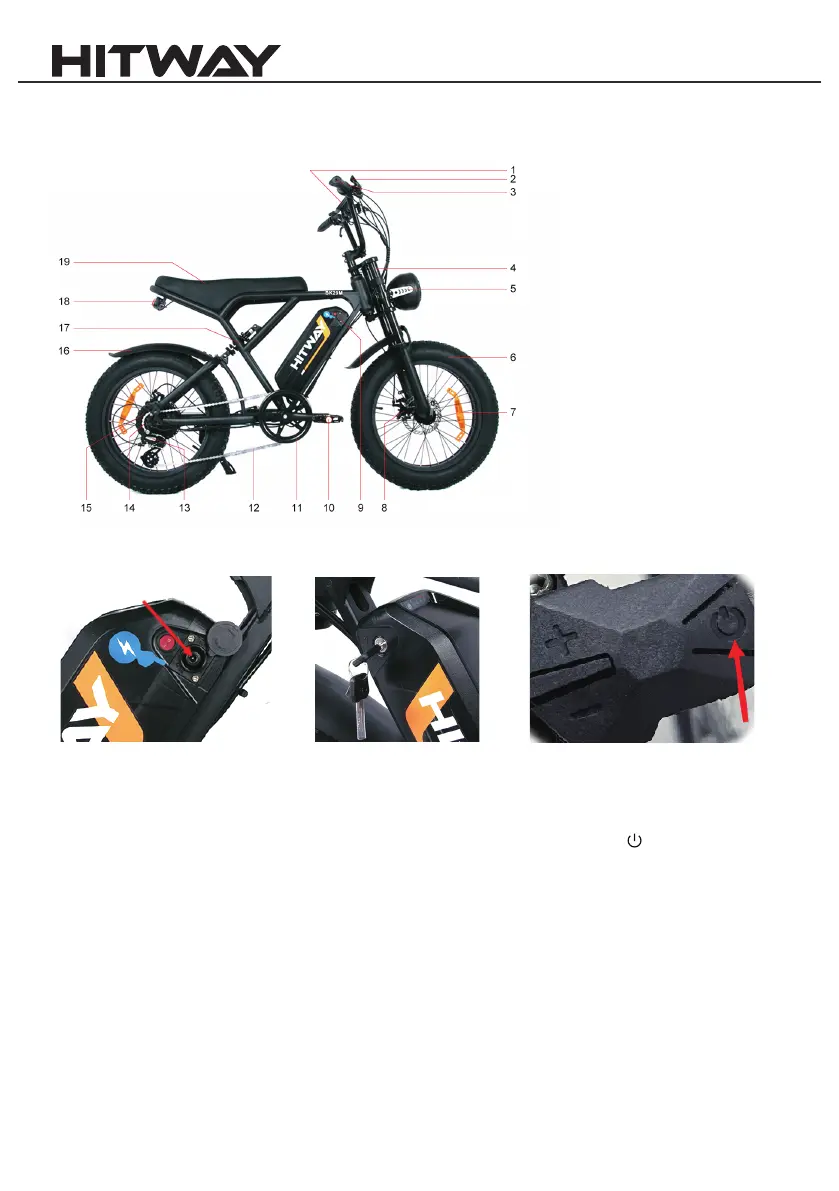
(Model:BK7) Product Function Diagram
1. Display
2. Brake lever
3. Handlebar
4. Front fork
5. Front light
6. Tire
7. Wheel reflector
8. Disc brake
9 Battery
10. Pedal
11. Chainring
12. Chain
13. Rear derailleur
14. Flywheel
15. Motor
16. Fenders
17. Rear shock
18. Tail light
19. Saddle
Function Introduction:
Product Function Diagram
(2)
1. Charging: Unscrew the plastic cover on the battery (Picture 1), connect the charger to start charging, when the battery
is full and the indicator light of the charger changes from red to green, it means it is fully charged.
2.Power on: refer to Picture 2, turn on the battery switch; refer to Picture 3, press and hold button to turn on/off .
3. Power display: After powering on, the dashboard lights up to display the power, and the power is divided into 5 grids,
corresponding to high, medium and low power.
4. Headlights: refer to Picture 3, long press the + button to turn on/off the headlights.
5. Start: power-assisted riding, short press + to adjust to 1st gear after power on, step on the bicycle sprocket, start the
motor to assist. If motor assistance is not required, turn off the power or turn off the battery or set the gear to 0.
(Picture 1) (Picture2) (Picture3)


 To Next Page
 Loading...