EasyManua.ls Logo

HL HL-i Series - User Manual

HL HL-i Series
24 pages
Print Icon
To Next Page IconTo Next Page
Loading...
USE AND
MAINTENANCE
HANDBOOK
HL-i Series
This manual has been prepared in compliance with CE certification and it is an essential part to every HL Cooling unit
HL (Europe) Ltd 92 Craven Park Road, London, NW10 4AG United Kingdom
Tel: 0844 56 11 783 Fax: 0844 56 11 780 www.hl-cooling.com sales@hl-cooling.com
Company registration number: 5285108. Registered office: 270 Sutton Road Southend-on-Sea Essex SS2 5ET UK

Questions and Answers

  • Y
    yfrankAug 14, 2025
    What to do if the HL HL-i Chiller compressor doesn't start because of max pressure switch?
    • S
      sydney53Aug 15, 2025
      If your HL Chiller's compressor isn't starting and the max pressure switch has been activated (HP1 or HP2 alarm), there could be several reasons: * The pressure switch might be faulty and needs checking or replacement. * There might be excessive refrigerant charge, requiring you to recover the excessive gas. * The air condenser could be clogged, needing cleaning with compressed air or a water jet. * The ambient air temperature could be too high. Try reducing the ambient temperature within the design limits, perhaps by increasing local ventilation.
  • D
    Drew RamirezAug 18, 2025
    How to troubleshoot HL HL-i Chiller that doesn't start?
    • J
      James KnappAug 18, 2025
      If your HL Chiller unit doesn't start up, consider the following: * Check the voltage and ensure all contacts are properly closed, as there may be a defective connection or open contacts. * The compressor delay timer might be active; wait for the set delay time to pass. * There may be wrong parameter settings; try resetting the unit.
  • M
    Michael LarsonAug 21, 2025
    What to do if HL HL-i compressor doesn't start due to min pressure switch?
    • G
      Gloria HarrisAug 21, 2025
      If the HL Chiller compressor doesn't start because the min pressure switch has been actuated, it could be due to several reasons: * The pressure switch may be out of order, requiring a check and replacement. * There might be a lack of refrigerant, in which case you should call a qualified refrigeration engineer to check for leaks and replenish refrigerant. * The water outlet sensor probe might be set too low, causing the water to freeze. Raise the set value or change the LP Switch. * The freon filter may be clogged; check and replace it.
  • T
    Tammy LucasAug 25, 2025
    Why does my HL HL-i run constantly and never stop?
    • A
      anthony91Aug 26, 2025
      If the HL Chiller unit works and never stops, consider these potential causes: * There might be a lack of refrigerant, so call a qualified refrigeration engineer to check for leaks and replenish refrigerant. * There could be an excessive thermal load; try reducing it. * The compressor cooling capacity might not be as high as expected; check, replace, or reset the compressor.
  • B
    Brooke BradleyAug 28, 2025
    How to fix HL HL-i compressor that won't start?
    • J
      jonathan89Aug 28, 2025
      If the HL Chiller compressor doesn't start, here are a few things to check: * The compressor might be burned or seized, requiring a replacement. * The compressor remote control switch might be de-energized; check the voltage at the compressor coil's ends and check for coil continuity. * The power circuit could be open; try to find out why the protection is activated and close the compressor's circuit. * The compressor’s thermal overload circuit breaker may have tripped; reset it.
  • B
    Brenda JordanAug 31, 2025
    What causes HL Chiller pump not to start?
    • S
      Sean GallowayAug 31, 2025
      If the HL Chiller pump doesn't start, here's what you can check: * The pump's thermal overload circuit breaker may have tripped; try resetting it. * The pump might be burned; check or replace it. * There might be no water inside the circuit; check the hydraulic system for leaks, if any, and refill.
  • T
    Tony MaySep 3, 2025
    Why HL HL-i fans don't start?
    • M
      Matthew FlemingSep 3, 2025
      If the HL Chiller fans don’t start, here are a few things to consider: * The fans might be burned or seized, requiring replacement. * The pressure sensors could be damaged; replace them. * The fans’ thermal overload circuit breaker may have tripped; reset it.
  • E
    Erika GomezSep 7, 2025
    What to do if HL Chiller compressor starts and stops repeatedly?
    • R
      Robin AdamsSep 7, 2025
      If the HL Chiller compressor starts and stops repeatedly, it might be because the control temperature return difference setting is too small. Try raising the return difference setting (“r02” parameter).
  • C
    churchsherriSep 10, 2025
    What causes no signal from water differential pressure switch in HL HL-i Chiller?
    • M
      michaelcarrSep 12, 2025
      If the signal of the water differential pressure switch is not present in your HL Chiller, consider the following: * The pump might be set for low speed; increase the speed through the variator on the pump. * The water capacity of the system might be limited; check pressure drops in the system. * A shut-off valve of the water circuit might be closed; open the closed valve.

Summary

Safety Information

Safety Marks and Symbols

Explains symbols for general, electrical, and attention warnings.

Risks of Non-Compliance

Details consequences of ignoring safety, including injury and warranty voidance.

Active and Passive Safety Features

Covers microprocessor control and physical enclosures for user protection.

EC Declaration of Conformity

General Unit Information

HL-i Series Overview

Details the range of sizes and cooling capacities for HL-i chillers.

Standard Unit Features

Lists key components like microprocessor, tanks, fins, and fans.

Model Identification Guide

Explains how to identify models and their cooling capacities.

Operating Condition Parameters

Specifies allowed ambient and water temperature ranges for operation.

Understanding General Symbols

Interprets common symbols used for connections, flow, and risks.

Transportation and Installation

Package Inspection and Handling

Guidelines for inspecting packages upon delivery and safe handling.

Unit Positioning and Access

Factors for selecting a suitable installation location and ensuring service access.

Hydraulic Connection Best Practices

Recommendations for connecting hydraulic lines and system components.

Electrical Connections and Working Limits

Electrical Connection Requirements

Specifies power supply checks, cable sizing, and protection measures.

Operational Working Limits

Defines temperature jump limits and flow rate considerations for safe operation.

Cool Water Temperature Guidelines

Recommends temperatures and glycol use for chilled water operation.

External Air Temperature and Maintenance

External Air Temperature Range

Specifies the acceptable external air temperature for optimal cooling performance.

Routine Maintenance Schedule

Outlines monthly checks for electrical, water, and component condition.

Cooling Circuit Maintenance Procedures

Details steps for refrigerant handling, leak testing, and charging.

Cooling Circuit Maintenance Procedures

Circuit Preparation and Testing

Covers tightness tests, draining, drying, and vacuuming the cooling circuit.

Refrigerant Charging and Temperature Checks

Details the correct procedure for adding refrigerant and verifying temperatures.

Unit Dismantling and Oil Disposal

Provides guidance on safely dismantling the unit and disposing of compressor oil.

Emergency Procedures and Components

Flood and Fire Response Actions

Steps to take in case of floods or fires involving the unit.

Structural and Enclosure Components

Information on panels, frames, and protective guards.

Key Operational Components

Overview of compressor, condenser fins, water tank, and axial fans.

CAREL Controller Interface

Controller Display and Information

Explains the 3-digit display, its range, and operating values.

Initial Unit Start-Up Sequence

Step-by-step guide for powering on the unit via the SW0 switch.

CAREL Controller Modes and Operations

Activating Standby Mode

Instructions for putting the unit into standby using the fan button.

Unit Shutdown Procedure

Steps to safely turn off the unit using the SW0 switch.

Adjusting Water Outlet Cooling Set Point

Guide to changing the target water outlet temperature (r01).

CAREL Controller Parameter Settings

Setting Water Outlet Differential Point

Procedure to modify the differential set point (r02) for water outlet.

Setting Antifreeze Alarm Point

Procedure to adjust the antifreeze alarm set point (A01).

Troubleshooting Unit Start-Up and Operation

Unit and Compressor Start Issues

Addresses problems preventing the unit or compressor from starting.

Compressor Cycling and Pressure Alarms

Explains causes for repeated compressor stops or pressure-related shutdowns.

Troubleshooting Component and System Faults

Fan, Pump, and Operation Anomalies

Diagnoses issues with fans, pumps, and continuous unit operation.

Pressure Switch Signal Issues

Addresses problems related to the water differential pressure switch signal.

Alarm and Error Code Reference

Control Panel Error Code Display

Lists error codes shown on the unit's front panel.

Detailed Alarm Table and Key

Provides a comprehensive list of alarms with their causes and actions.

Overview

This document is a Use and Maintenance Handbook for HL-i Series Air Cooled Water Chillers with Axial Fans, manufactured by HL (Europe) Ltd. These units are designed for professional use and are available in cooling capacities ranging from 3KW to 180KW. The manual emphasizes compliance with CE certification and states that it is an essential part of every HL Cooling unit.

Function Description:

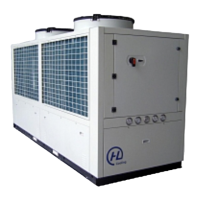
The HL-i Series chillers are air-cooled water chillers designed to provide cooling for various applications. They are equipped with a control microprocessor for managing operations, including fault and malfunction detection, ensuring safety for machinery, personnel, and the environment. The units are enclosed by panels to prevent access to dangerous areas, and fans are fitted with protection grilles. The chillers maintain an optimum water temperature to minimize compressor starts, contributing to a longer compressor life.

Important Technical Specifications:

  • Cooling Capacities: 3KW to 180KW.
  • Ambient Temperature Range: -10°C to 43°C.
  • Water Temperature Range: -5°C to 35°C (LP Switch adjustment required if below 0°C).
  • Minimum Outlet Evaporator Temperature: 5°C (excluding "brine" versions).
  • Maximum Inlet Evaporator Temperature: 30°C.
  • Water Flow Rate: Related to a 5°C temperature jump between input and output. Maximum allowable flow rate entails a 3°C jump; minimum allowable flow rate entails a 7°C jump.
  • Water-Ethyl Glycol Mixture: Recommended for cool water temperatures below 4°C (out of the evaporator). A table is provided for freezing temperatures at various glycol percentages (5% to 40%).
  • External Air Temperature for Cooling: -15°C to 40°C.
  • Components: Control microprocessor, water fill & vent tank, special coated condenser fins, integral stainless steel tank, adjustable LP switch, centrifugal pump (standard 3 bar, optional 5 bar), heavy-duty condenser fan, and reliable compressor.
  • Compressor: Highly reliable with high-efficiency performance, protected by an internal thermal overload.
  • Condenser Fins: Aluminium fins coated with special anti-corrosion material for endurance.
  • Water Tank: High volume integral stainless steel tank.
  • Axial Fans: Directly coupled to an electric 8-6 pole motor with overload protection, electronic balancing, low-sound-level wing contour blades, and special air conveyor and protection grilles.

Usage Features:

  • Installation: Units can be installed both indoors and outdoors. Considerations for positioning include hydraulic line length, power supply origin, free airflow, easy service access, and a strong, even surface.
  • Hydraulic Connections: Inlet and outlet connections are not interchangeable. Suggestions for connecting to the application system include using vibration-damping joints, applying shutoff valves, and a by-pass valve. Thorough draining and air removal from the water circuit are crucial.
  • Electrical Connections: Power supply must match nameplate data. Power supply cable section should not be smaller than indicated in wiring diagrams, and length should be moderate to avoid excessive voltage drops. Upstream cable protection (automatic circuit breaker or three fuses) is required, with breaking power at least equal to the maximum short-circuit current.
  • CAREL Controller: The unit is managed by a CAREL µC²SE controller, which is the same size as a normal thermostat. It controls chillers and heat pumps, including air-air, air-water, water-water, and condensing units. A separate user manual for the controller is provided.
  • Controller Display: Features a 3-digit display, showing decimal points between -99.9 and 99.9. In normal operation, it displays the temperature read by probe B1 (evaporator water inlet temperature or ambient air temperature).
  • Parameter Access: Parameters are divided into 4 types based on user access level (password-protected).
  • Start-up Procedure: Involves turning the main switch SW0 to "ON" and pressing a specific button on the controller for 5 seconds, followed by a 3-minute wait.
  • Standby Procedure: Pressing a specific button on the controller for 5 seconds.
  • Shut Down Procedure: Pressing a specific button on the controller for 5 seconds, then turning the main switch SW0 to "OFF".
  • Changing Set Points: Instructions are provided for changing the water outlet cooling set point (r01), different set point (r02), and antifreeze alarm set point (A01) using the controller's "sel" and "Prg" buttons.

Maintenance Features:

  • General Safety: All operations must be carried out by skilled personnel. Before any internal operation, the main power safety switch and the unit's main switch SW0 must be turned OFF. Operations with power supplied and panels open are only for trained technicians.
  • Periodical Maintenance (Monthly):
    • Check electrical terminals for correct clamping.
    • Check remote control switch contacts for cleanliness and sound conditions (replace if necessary).
    • Check water circuit for uniform filling (no air).
    • Check water differential pressure switch operation.
    • Clean condenser coil fins by blowing compressed air or flushing with water (opposite to airflow).
    • Check defrost procedure performance.
  • Extraordinary Checks: If anomalous noises occur after a few working hours, an extraordinary check is required.
  • Cooling Circuit Maintenance:
    • Refrigerant Exhaustion: During operations requiring cooling circuit exhaustion, gas must be collected into a proper receiver for environmental safety.
    • Tightness Test: Fill the circuit with gaseous R407C to 1 bar, then add nitrogen to 15 bar. Check for leaks with a leak detector. Exhaust the circuit before welding if leaks are found. Emphasizes never using oxygen as a substitute for nitrogen.
    • Draining and Drying: Use a suitable vacuum pump (1.4 mbar absolute pressure, 30 l/min. capacity). A three-fold pumping method is recommended if the circuit remains open for a long time or if moisture is present.
    • Refrigerant Charge: Connect the refrigerant bomb to the 1/4" SAE male intake on the liquid line, blow out gas to exhaust air, then fill 75% of the total charge with liquid refrigerant. Connect to the suction line and fill completely with the bomb upright until the liquid tube temperature before the filter is 7-8°C lower than the R407C pressure gauge reading.
  • Dismantling: When dismantling, drain the cooling circuit and collect gas in a suitable receiver. Compressor oil must be poured into a suitable receiver and sent to a specialized center for disposal. Improper disposal of gas or oil is strictly prohibited.
  • Troubleshooting Guide: A comprehensive table of probable causes and possible cures for various issues, including the unit not starting, compressor not starting, compressor starting and stopping repeatedly, max/min pressure switch actuation, fans not starting, unit working but never stopping, pump not starting, and signal of water differential pressure switch not present.
  • Alarm Error Code: A table listing alarm display codes, alarm types, resetting conditions, affected components (compressor, pump, fan, heater, valve), and descriptions, including warnings and advice. The manual notes that warning relays differ from alarm relays as they only activate for non-operational-affecting signals and do not show the alarm symbol.

HL HL-i Series Specifications

General IconGeneral
BrandHL
ModelHL-i Series
CategoryChiller
LanguageEnglish