OPTIONS
Service +49(0)391 2514666 02/2017 Instruction Manual HMP LFGpro – en
■
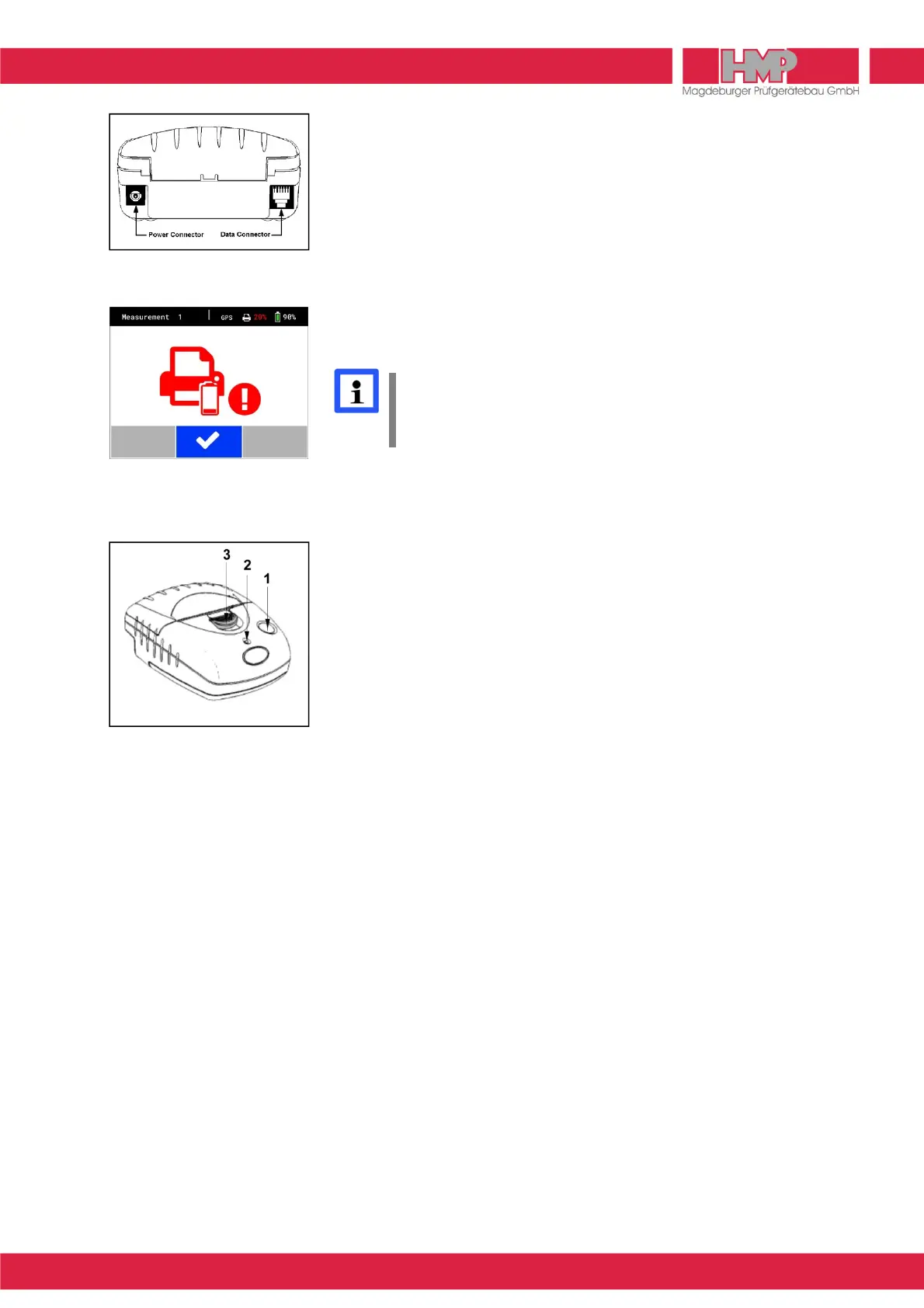
Connect the power pack charger to the »Power Supply« connection of the
printer (Figure 35).
■
Connect the power pack charger to the mains supply.
■
Disconnect the power pack charger from the mains supply when charging
of power pack has been finished (after 15 hours at the latest).
State of Charge of the Printer
The state of charge of the printer is displayed in status line of display after
switching on the electronic settlement measuring instrument.
The battery pack of the printer should be recharged as quickly as
possible, when state of charge is 15% or less or in case the note on
the left (Figure 36) appears on the screen of settlement measuring
instrument.
Front panel of printer
(Figure 37)
1 Paper feed Single-line paper feed:
– Press the key for a short interval, and release.
Multi-line paper feed:
– Hold down this key until the desired length of
paper is reached.
2 LED Signals READY
LED off:
– The printer is in the power-saving mode.
– Power pack is discharged.
Green LED (steady):
– Printer is active.
Green flashing LED:
– Paper out.
Green – orange flashing LED:
– Power pack is charged.
Red – green flashing LED:
– Power pack voltage is too low.
3 Paper compartment opener


 To Next Page