EasyManua.ls Logo

Holzstar ADH Series - User Manual

Holzstar ADH Series
58 pages
Print Icon
To Next Page IconTo Next Page
Loading...
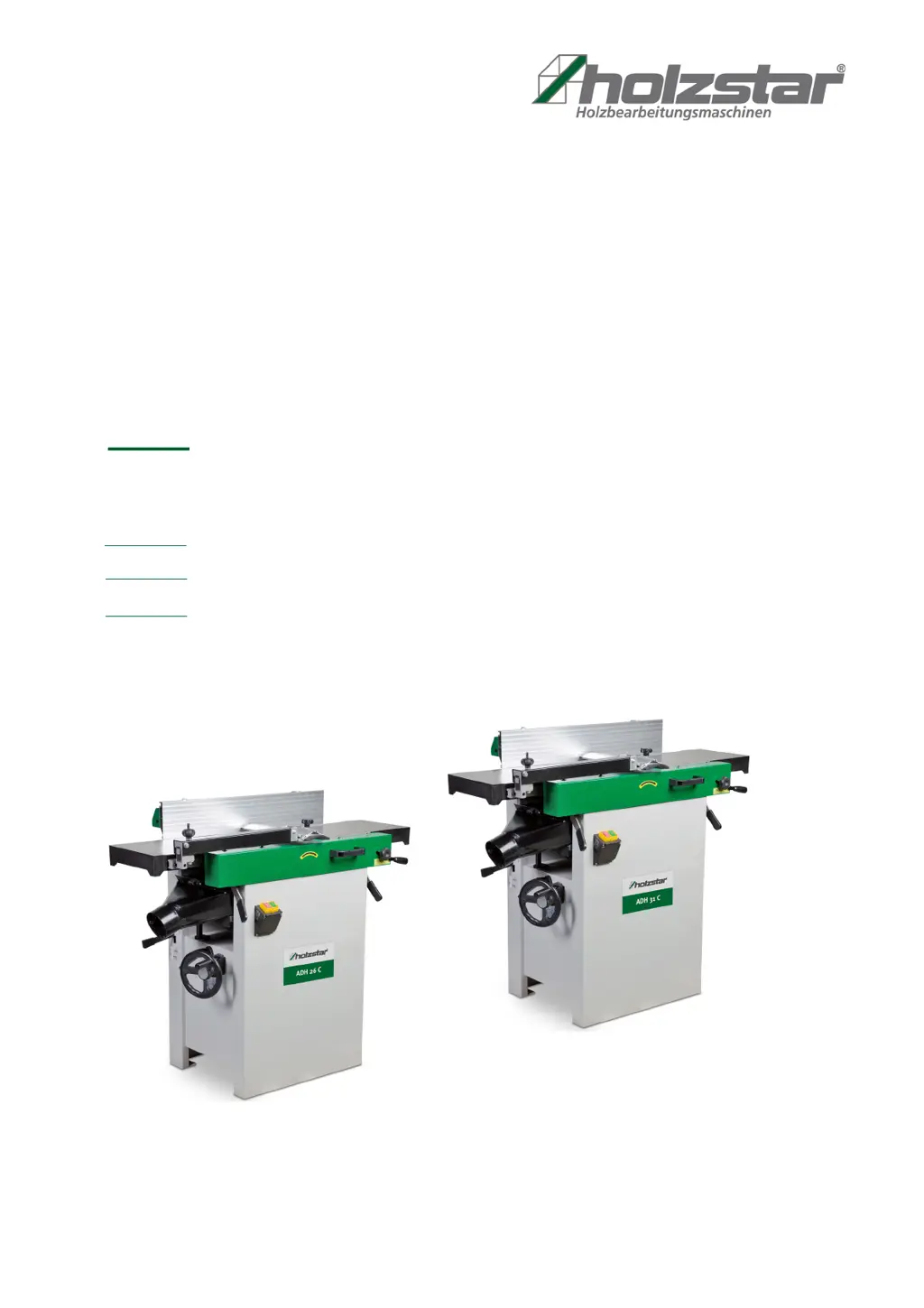
ADH 26 C
Operating Instructions
ADH 26 C 230V, 400V
ADH-SERIES
Planer-Thicknesser
ADH 31 C 230V, 400V
ADH 41 C 400V
ADH 31 C

Questions and Answers

  • I
    ielliottAug 17, 2025
    What to do if my Holzstar ADH Planer is chipping out the wood?
    • D
      debbie28Aug 17, 2025
      If your Holzstar Planer is causing chip-out, several factors could be responsible. First, ensure you're cutting with the grain direction. If the knives are blunt, sharpen or replace them. Reduce the workpiece feed speed and make shallower cuts. Also, inspect the wood for knots or imperfections, and use different stock if necessary.
  • R
    robert87Aug 22, 2025
    What to do if my Holzstar ADH is not starting or restarting?
    • M
      Matthew FranklinAug 22, 2025
      If your Holzstar Planer isn't starting or restarting, first check that it's properly connected to the power supply, the START button is fully pressed, and the STOP button is released. Also, if the overload switch on the circuit breaker in the motor starter is overloaded, allow the machine to cool down sufficiently before restarting. If the problem persists, check the ampere setting on the motor starter in the electrical box.
  • C
    Courtney Smith MDAug 25, 2025
    How to fix uneven knife marks on my Holzstar ADH workpiece?
    • B
      Brenda JonesAug 26, 2025
      If you're seeing uneven knife marks on your Holzstar Planer workpiece, it's likely that the knives are either nicked or incorrectly adjusted. Try adjusting the knives, and if that doesn't solve the problem, replace the nicked knives.
  • K
    Kayla MillerAug 28, 2025
    Why does my Holzstar Planer have chatter marks on the workpiece?
    • B
      boydjeffreyAug 28, 2025
      If you're noticing chatter marks on the workpiece from your Holzstar Planer, it could be due to incorrectly inserted knives. Ensure the knives are correctly inserted and that the knife slots are clean. Another potential cause is feeding the workpiece too fast, so try feeding it slowly and consistently.
  • W
    wkellyAug 30, 2025
    Why is the structure fibrous after using my Holzstar Planer?
    • A
      Alexis MillerAug 31, 2025
      If the structure is fibrous after using your Holzstar Planer, it could be due to the wood having a high moisture content. Allow the wood to dry or use a drying chamber. Another reason may be blunt knives, so try to sharpen or replace the knives/knife inserts.
  • H
    Heather HowardSep 2, 2025
    What causes poor feeding of lumber in my Holzstar Planer?
    • C
      Cody DavisSep 2, 2025
      Poor feeding of lumber in your Holzstar Planer can stem from several issues. Check for uneven feed roller pressure and adjust the feed roller tension. A rough or dirty planer bed can also cause problems, so clean the incline and remove any residue. If the transmission V-belt is slipping, tighten it. Lastly, ensure the surface of the feed rollers isn't clogged; clean the pitch and remove any residue from the teeth.
  • A
    Andrea LongSep 5, 2025
    Why does my Holzstar Planer cutter head slow down during operation?
    • C
      Christopher PhillipsSep 5, 2025
      If the cutter head of your Holzstar Planer slows down during operation, it's likely because the workpiece is being conveyed too quickly or too much pressure is being exerted on it. Try feeding the workpiece more slowly or applying less pressure.
  • H
    Holly WrightSep 8, 2025
    What causes a concave end on a Holzstar ADH Planer workpiece?
    • M
      Miranda SmithSep 8, 2025
      If the finished workpiece is concave at the end after machining with your Holzstar Planer, the knife is probably set higher than the discharge table. Adjust the cutting head knives and the output table to each other.
  • K
    Kristina BrownSep 12, 2025
    What causes a concave beginning on a Holzstar Planer workpiece?
    • J
      Jonathan JohnsonSep 12, 2025
      If your Holzstar Planer leaves the finished workpiece concave at the beginning, the outfeed table is likely higher than the knife. Adjust the cutter head knife with the outfeed table.
  • D
    Daniel ScottSep 13, 2025
    What causes snipe on a Holzstar Planer workpiece?
    • H
      hcolonSep 13, 2025
      Snipe on a Holzstar Planer workpiece is often caused by the knife being set higher than the output table. Align the cutting head knives and the output table.

Summary

1 Introduction

1.1 Copyright

Details copyright protection and intellectual property rights for the manual.

1.2 Customer service

Provides contact information for support and technical inquiries regarding the machine.

1.3 Disclaimer

Outlines manufacturer liability and product variations from the documentation.

2 Safety

2.1 Legend of symbols

Explains warning symbols and their meanings for hazard communication.

2.2 Operator responsibility

Defines operator duties regarding safety, training, and machine condition.

2.3 Operating staff qualification

Specifies necessary skills and qualifications for personnel operating the machine.

2.4 Personal protective equipment

Lists and describes essential personal protective equipment (PPE) for safe operation.

2.5 Safety labels on the Planer-Thicknesser

Identifies and explains safety labels attached to the machine for hazard awareness.

2.6 For your own safety

Provides critical safety instructions and warnings for safe machine operation.

2.7 Safety equipment

Details safety features like undervoltage release, overload protection, and microswitches.

2.8 General safety instructions

Comprehensive safety guidelines for machine operation and work environment.

3 Intended Use

4 Technical Data

4.1 Operating conditions

Specifies environmental and operational parameters for the machine.

4.2 Type plate

Explains information found on the machine's identification plate.

4.3 Table

Presents detailed technical specifications and dimensions for different models.

5 Transport, packaging, storage

5.1 Delivery and transport

Covers procedures for receiving, unpacking, and safely transporting the machine.

5.2 Packaging

Describes the recyclable packaging materials used for the machine.

5.3 Storage

Provides guidelines for safely storing the planer-thicknesser when not in use.

6 Description of device

7 Setting up and connection

7.1 Requirements for the place of operation

Details necessary conditions for the installation site, including surface, space, and lighting.

7.2 Setting up of the Planer-Thicknesser

Guides the user through the physical assembly and setup of the machine.

7.3 Electrical connection

Explains how to safely connect the machine to the electrical power supply.

8 Operation

8.1 Operating elements

Identifies and explains the function of the machine's controls and operational elements.

8.1.1 Conversion from planer to thickness function

Step-by-step guide to switch the machine's mode from planer to thicknesser.

8.1.2 Conversion from thickness to planer function

Step-by-step guide to switch the machine's mode from thicknesser to planer.

8.1.3 Controls and Adjustments of the planer

Details the controls and adjustment procedures for the planer function.

8.1.4 Controls and Adjustments of the thicknesser

Details the controls and adjustment procedures for the thicknesser function.

8.2 Adjustments

Provides instructions for various machine adjustments for optimal performance.

8.2.1 Table and knife adjustments

Guides on aligning tables and setting cutter head knives for precise cuts.

8.2.2 Setting cutter head knives

Detailed steps for correctly setting and aligning the cutting knives in the cutter head.

8.2.3 Replacement of cutting knives

Instructions for safely removing, replacing, and installing cutting knives.

8.2.4 Thicknesser table lock handle adjustment

Procedures for adjusting the thicknesser table lock handle for proper function.

8.2.5 Adjustment of the planer table

Steps to adjust the planer table for parallelism with the cutter head.

8.3 Initial start up

Essential checks and procedures before the first operation of the machine.

8.4 Changing mode of operation

Explains the procedure for switching between planer and thicknesser modes safely.

8.5 Thicknesser operations

Outlines the correct procedures and safety precautions for thicknessing operations.

8.6 Thicknessing

Details the process of thicknessing for creating a finished, flat edge or surface.

8.7 Beveling

Describes the process of beveling edges using the machine, similar to thicknessing.

8.8 Planer operations

General instructions and depth of cut guidelines for planer operations.

8.9 Planing

Step-by-step guide for performing planing operations on workpieces.

9 Care, maintenance and repair

Avoiding snipe

Explains how to prevent and minimize depressions at the ends of boards during planing.

9.1 Blade care

Instructions for cleaning and maintaining the sharpness and condition of the blades.

9.2 Sharpening the knives

Detailed steps for sharpening the machine's knives to ensure precise cuts.

9.3 Care after work

Procedures for cleaning and maintaining the machine after completing work.

9.3.1 Functional testing

Outlines a functional test to be performed before each use of the machine.

9.3.2 Suction

Instructions for checking and maintaining the functionality of the dust extraction system.

9.3.3 Lubrication

Guidance on lubricating the machine's moving parts and bearings.

9.4 Maintenance and repair

General guidelines for maintenance and repair work, emphasizing qualified personnel.

10 Troubleshooting tables

10.1 Troubleshooting table - Thicknesser

Lists common problems encountered during thicknessing and their potential causes and solutions.

10.2 Troubleshooting table - Planer

Lists common problems encountered during planing and their potential causes and solutions.

10.3 Mechanical Troubleshooting - Planer-Thicknesser

Addresses mechanical issues like chain jumping and machine starting problems with solutions.

11 Disposal, recycling of used devices

11.1 Decommissioning

Steps for safely decommissioning the machine before disposal.

11.2 Disposal of electrical equipment

Guidelines for the proper disposal of electrical components.

11.3 Disposal of lubricants

Information regarding the disposal of lubricants used in the machine.

12 Spare parts

12.1 Ordering spare parts

Provides information on how to order spare parts, including necessary details.

12.2 Spare parts drawings ADH 26 C

Illustrated breakdown of spare parts for the ADH 26 C model.

12.3 Spare parts drawings ADH 31 C

Illustrated breakdown of spare parts for the ADH 31 C model.

12.4 Spare parts drawings ADH 41 C

Illustrated breakdown of spare parts for the ADH 41 C model.

13 Electrical circuit diagrams

14 EC Declaration of Conformity

15 Notes

Holzstar ADH Series Specifications

General IconGeneral
Number of blades2
Max. chip removal thickness3 mm
Extraction port diameter100 mm
Voltage230 V
Frequency50 Hz

Related product manuals