MAN0597 ISSUE 08 - 02/04
2302M5030
4. OPERATION
37
4.3.4 Resetting an Alarm
If an alarm condition occurs it is possible to cancel the alarm
by pressing any of the buttons, once the gas measurements
have returned to a safe level. Otherwise, the instrument will
remain in the alarm condition, but the audible alarm will be
muted. Any subsequent alarms that occur 1 second after the
previous alarm has been reset will reactivate the audible
alarm.
4.4 FAULT AND WARNING CONDITION
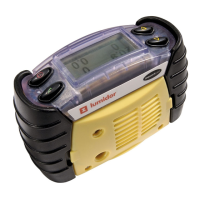
In addition to the gas alarms, the Impact includes a number of
auxiliary alarms to safeguard proper use of the instrument. At
switch on the Impact performs an electronic self-test that
assures the user of proper performance. When the Impact
detects that an electronic fault or failure condition has
occurred, the audible and visual alarms are activated and an
explanatory message will be displayed.
CAUTION
As the Impact is designed to protect from potentially life-
threatening atmospheric conditions, any alarm conditions
must be taken seriously.
4.4.1 Warning
The instrument displays a warning
message for situations where a fault
or error has occurred but may be
resolved by the user.
The 'Code - 0' shown here is an
example only. A full list of codes is
given in Appendix A.
WARNING
Code - 0
See manual



 To Next Page
 Loading...