MAN0597 ISSUE 08 - 02/04
2302M5030
4. OPERATION
39
feature (where fitted) be used on either instrument. It will be
found that while the pump is running the Safelink option on the
instrument menu system has been removed. Furthermore, if
an attempt to start the pump is made (on either the attendant
or entrant instrument) during Safelink operation an alarm
condition is generated and Safelink Mode has to be exited.
Safelink mode cannot be entered when the batteries are low
(i.e. there is less than 1 bar on the battery indication meter).
In some instances a Fault or Warning will not be displayed on
the Entrant instrument. In this case it is important to note that
gas alarms on the Entrant instrument are still indicated on the
Entrant and the Attendant instruments.
4.5.2 Using Safelink
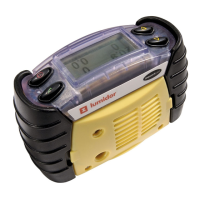
Connect the Safelink cable between two instruments. Turn on
each instrument and from the user menu on each instrument
select the Safelink mode.
On one instrument select Attendant.
When selecting the Attendant on one
instrument the instrument will display
‘locating’ while it attempts to connect
with the other instrument. Once
established each instrument will
briefly display ‘Configuring’. The instrument will then show the
readings – ensure that the Safelink symbols appear on the
display. To check the integrity of the communications it is
recommended that a message be sent from the Attendant to
the Entrant. Whenever a message must be responded, the
instrument will flash its green LEDs and sound its audible
alarm at a rate of once per second.
Until the Safelink cable is disconnected both instruments will
remain in Safelink mode.
Safelink Mode
Entrant
Attendant



 To Next Page
 Loading...