Getting Started
• Be careful not to scratch your device or hurt
yourself when using the eject pin.
• Store the eject pin out of the reach of children to
prevent accidental swallowing or injury.
• Do not use cut or modied SIM cards with your
device as these may not be recognised and could
damage the card tray (slot).
• If your SIM card does not match your device,
please contact your carrier.
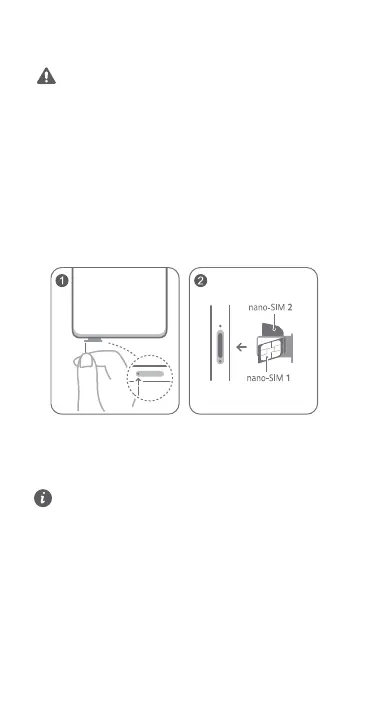
Follow the instructions in the following gures to set up
your device. Please use the eject pin included.
Ensure that the card is correctly aligned and its notch is
rst inserted into the card tray.
SIM Card Management
Select the default mobile data card and calling card as
needed. For details, check out the pre-installed Tips app.
• 4G service depends on the support of your
network carrier and its deployment of relevant
services. Please contact your carrier to activate 4G
service.
• 4G service may be unavailable in certain areas due
to network interference.
• If this guide is inconsistent with the description on
the ocial website, the latter prevails.
For More Information
If you encounter any problems while using your device,
you can obtain help from the following resources:
2















 To Next Page