OPERATION
6
Charging the battery
CAUTION: Do not use the vacuum cleaner when the machine is plugged in and charging.
CAUTION: For best performance the terminals on the battery and vacuum cleaner must be clean
and free from dust and dirt. The life expectancy of the battery will vary depending on the usage
of the vacuum cleaner.
The On/Off and charging light will illuminate continuously whilst
the charger is connected.
Red light – The battery is charging.
Green light – The battery is charged (after 5 hours).
If charging for the first time the initial
charge time is 8 hours.
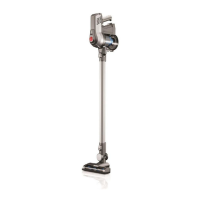
Using as a pole vacuum cleaner
Squeeze the trigger
located underneath the
handle, the machine will
switch ‘On’. The On/
Off and charging light
will illuminate green
indicating the power is
on and the machine is
charged. Release the
trigger to switch the
machine ‘Off’.
Squeeze the trigger and
push the ‘Continuous
power latch’ towards
the trigger. This will lock
it into the ‘On’ position
and will continue to
power the machine
without having to hold
in the trigger. Push the
latch away from the
trigger to unlock and
release the trigger.
Press the brushbar’s On/Off button
to activate. Repeat this process to
de-activate the brushbar. The brushbar
should be switched ON for carpets
and OFF for hard floors.
CAUTION: This vacuum cleaner has a constantly rotating brushbar when the brushbar ‘ON’
is selected. Never leave the vacuum cleaner in one spot for an extended period of time as this
may damage the floor surface. The brushbar should be ON for carpets and OFF for hard floors.
When the vacuum cleaner is in use the On/Off and charging
light will illuminate and flash red when the battery is running low.
When the red light flashes the machine will turn off in 20 seconds.
The user should recharge the machine.



 To Next Page
 Loading...