Hoover
®
Dashboard and FloorSense
™
Technology
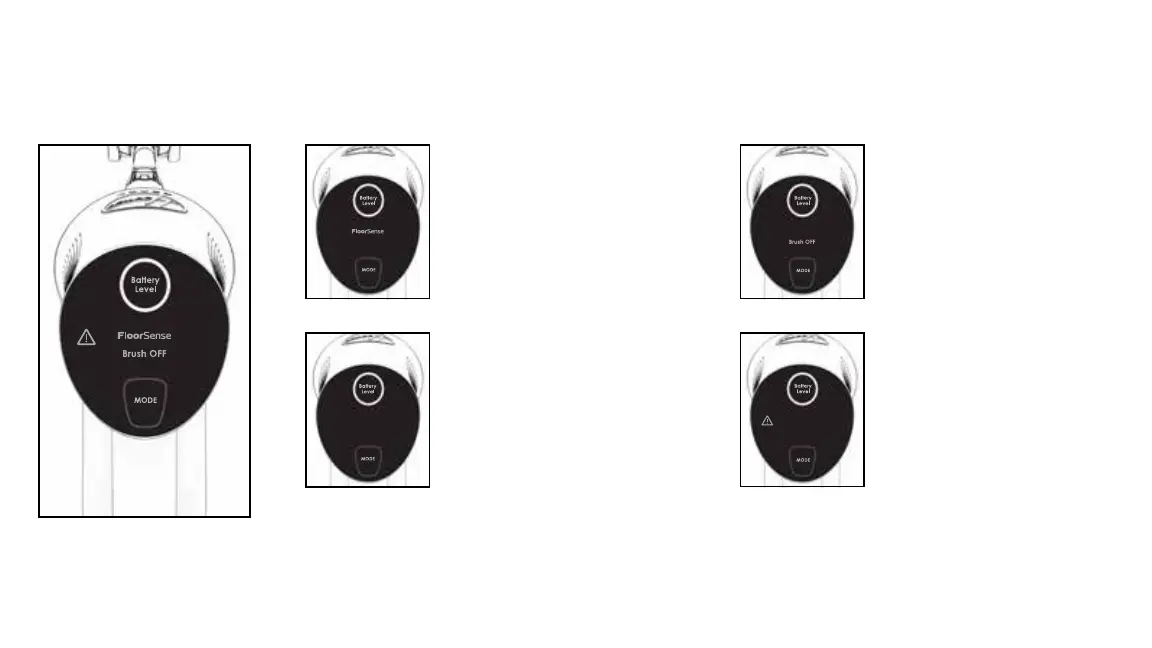
TIP: To allow FloorSense™ to determine oor type and optimize brush roll speed automatically, ensure FloorSense™ is illuminated on the Hoover
®
Dashboard.
12
1
3
2
4
The Hoover
®
Dashboard will indicate
“FloorSense”. In FloorSense
™
mode,
brush roll speed automatically adjusts
for the best results on any oor type.
When the mode button has been
pressed and no words illuminate on the
Hoover
®
Dashboard, the brush roll is
ON and perfect for lifting and removing
deep-down dirt on carpet.
The Hoover
®
Dashboard will light up,
if there is a system error. Refer to
the Maintenance section for further
information.
The Hoover
®
Dashboard will indicate
“Brush Off”. In “Brush Off” mode, brush
roll turns OFF to prevent scattering of
dirt and debris across hard oors and
area rugs.



 To Next Page