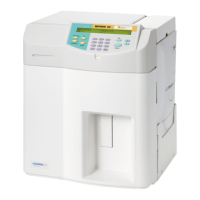
Need help?
Do you have a question about the HORIBA ABX ABX Pentra 60C+ and is the answer not in the manual?
Details on how long your toner cartridge lasts based on print density and average page yield.
Indicators for when to replace the toner cartridge, including LED status and print output.
Step-by-step guide for replacing the toner cartridge, including cleaning the LED array.
Information on image drum lifespan, factors affecting it, and expected page count.
Indicators for replacing the image drum when print quality deteriorates.
Steps for replacing the image drum, handling precautions, and LED array cleaning.
Instructions to reset the drum counter after replacing the image drum unit.
The provided document is an update to an instrument user manual, specifically addressing procedures for the OKI B4200 printer, which is used with various ABX Pentra diagnostic instruments (60C+, 80, XL 80, 400, and ABC Vet). This update focuses on the replacement of the toner cartridge and the drum kit, offering detailed instructions and important considerations for users.
The OKI B4200 printer serves as an output device for the ABX Pentra diagnostic instruments, enabling the printing of results, reports, and other relevant information generated by these medical analysis systems. Its primary function is to convert digital data into physical printouts, which are crucial for record-keeping, patient diagnosis, and laboratory operations. The printer utilizes a toner-based printing process, which involves a toner cartridge and an image drum to create text and graphics on paper.
The OKI B4200 printer is designed for straightforward operation, with features that assist users in monitoring its status and performing routine maintenance.
Monitoring Toner and Drum Life: The printer provides indicators to help users monitor the life of both the toner cartridge and the image drum.
Print Density and Page Yield: The lifespan of a toner cartridge is directly influenced by print density, which is the percentage of a page covered in black. A typical letter, with 3% to 5% print density, will yield more pages than graphics-heavy prints. A standard toner cartridge is expected to print an average of 2500 pages at 5% density, though actual results may vary. The initial toner cartridge installed in a new printer will yield fewer pages (approximately 1,000) because some toner is used to fill the image drum reservoir and saturate the developing roller.
The manual update provides detailed instructions for replacing the toner cartridge and the image drum, emphasizing safety and proper handling to ensure optimal printer performance and longevity.
Toner Cartridge Replacement:
Image Drum Replacement:
Resetting the Drum Counter: After replacing the image drum, it is crucial to reset the drum counter to maintain an accurate count of printed pages.
Toner Handling and Spills: The toner used in the printer is a very fine, dry powder. If toner powder is spilled, users should lightly brush it off. If residue remains, a cool, damp cloth can be used. Hot water and solvents should never be used, as they can make stains permanent.
Health and Safety Warnings:
The image drum's life is approximately 25,000 pages of continuous printing, but this number can vary based on factors like temperature, humidity, paper type, and the number of pages per job. This comprehensive guide ensures that users can effectively maintain their OKI B4200 printer, contributing to the reliable operation of their ABX Pentra diagnostic systems.
 General
| Type | Hematology Analyzer |
|---|---|
| Throughput | 60 samples per hour |
| Sample Type | Whole blood |
| Display | LCD color touch screen |
| Power Requirements | 100-240V AC, 50/60 Hz |
| Operating Temperature | 15°C to 30°C |
| Humidity | 30-85% non-condensing |
| Parameters | WBC, RBC, HGB, HCT, MCV, MCH, MCHC, PLT |

 To Next Page