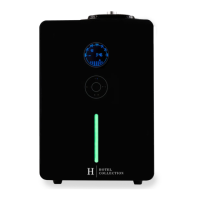
Penthouse Scent Diffuser Instructions
Setting the Current Time
If your screen is unresponsive, press and hold [SET] for 20 seconds and try again after you hear it beep.
1. To set the current time, press [SET].
2. The Hour will now be flashing. Using [UP/DOWN], adjust the Hour and press [SET] to
confirm your choice.
3. The Minutes will now be flashing. Using [UP/DOWN], adjust the Minutes and press [SET] to
confirm.
4. An arrow will now be flashing below the Day of the Week. Using [UP/DOWN], adjust the
Day and press [SET] to confirm your choice.
5. Using [UP/DOWN], adjust the VOLUME to 120 (the size of your oil bottle in mL) and press
[SET] to confirm.
6. Using [UP/DOWN], adjust your LEVEL to 120 (the amount of oil in your bottle in mL) and
press [SET] to confirm.
7. Using [UP/DOWN], adjust your MILLILITERS to 1.0mL/hr and press [SET] to confirm.
Setting the Operating Hours
The Penthouse Scent Diffuser allows up to 5 individual Operating Events so you can scent at various
times on different days of the week.
Set the Start Time
1. Press [MODE]. EVENT 1 ON will appear. This represents the On Time for the first operating
event.
2. Press [SET] and the Hour will flash. Press [UP/DOWN] to adjust.
3. Then press [SET] again for the Minutes to flash. Press [UP/DOWN] to adjust.
Note: Operating events are displayed following the 24-hour clock.
Example) 12:00 = 12:00 PM
24:00 = 12:00 AM

 Need help?
 General

 To Next Page