28
Electronic Clock & Automatic Cooking Feature
SETTING THE MINUTE MINDER:
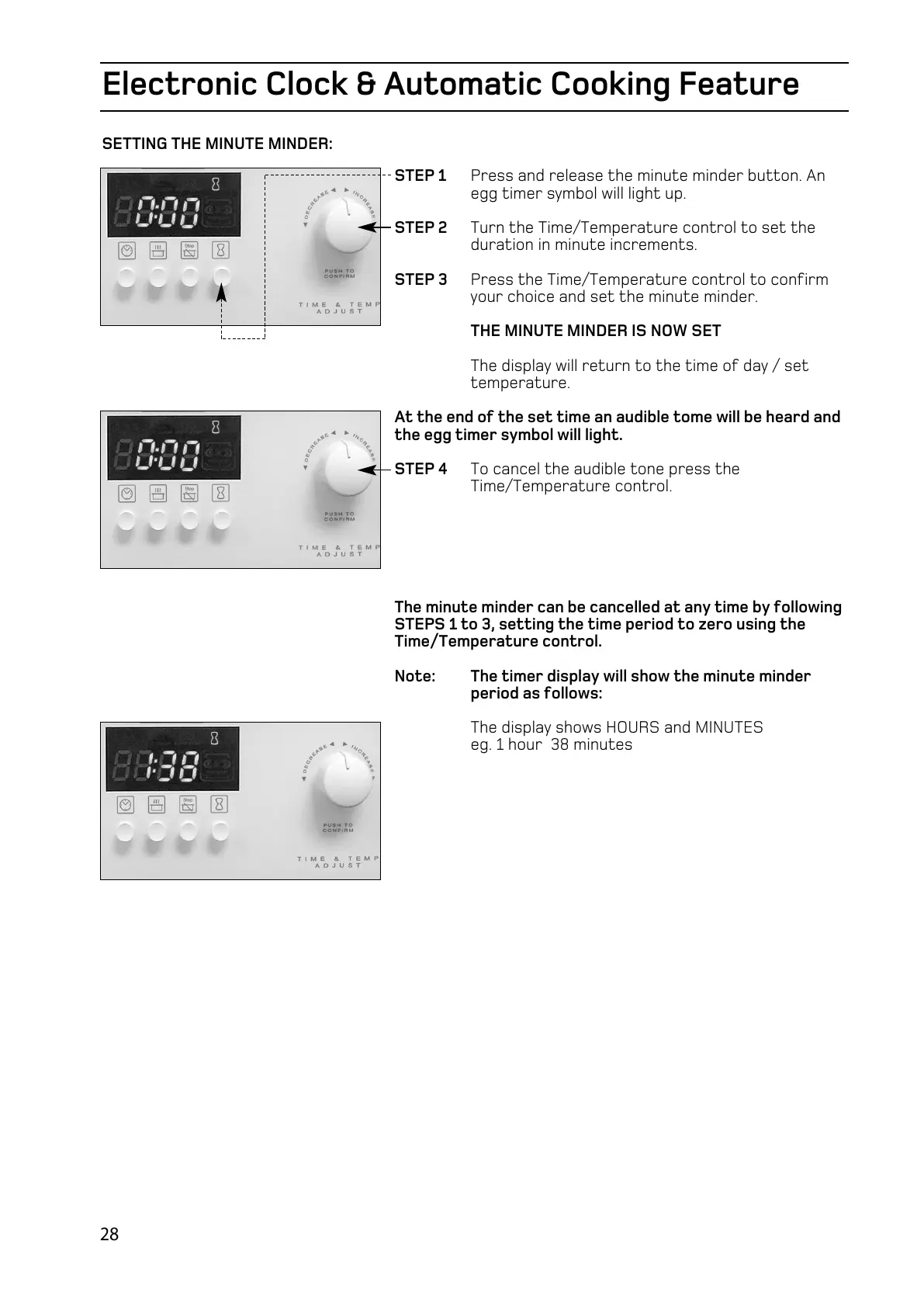
STEP 1 Press and release the minute minder button. An
egg timer symbol will light up.
STEP 2 Turn the Time/Temperature control to set the
duration in minute increments.
STEP 3 Press the Time/Temperature control to confirm
your choice and set the minute minder.
THE MINUTE MINDER IS NOW SET
The display will return to the time of day / set
temperature.
At the end of the set time an audible tome will be heard and
the egg timer symbol will light.
STEP 4 To cancel the audible tone press the
Time/Temperature control.
The minute minder can be cancelled at any time by following
STEPS 1 to 3, setting the time period to zero using the
Time/Temperature control.
Note: The timer display will show the minute minder
period as follows:
The display shows HOURS and MINUTES
eg. 1 hour 38 minutes



 To Next Page