23. Press
NNNNNNNNNNNNNNNNNNNNNNNNNNNNN
MEAS LOAD
. The HP 4284A will p erform a LOAD
correction measurement, and display the LOAD correction data
on the system message line.
24. Move the cursor to the
LOAD
eld.
25. Press
NNNNNNNN
ON
to enable the LOAD correction calculations for
subsequent measurements at the specied frequency p oints.
Note
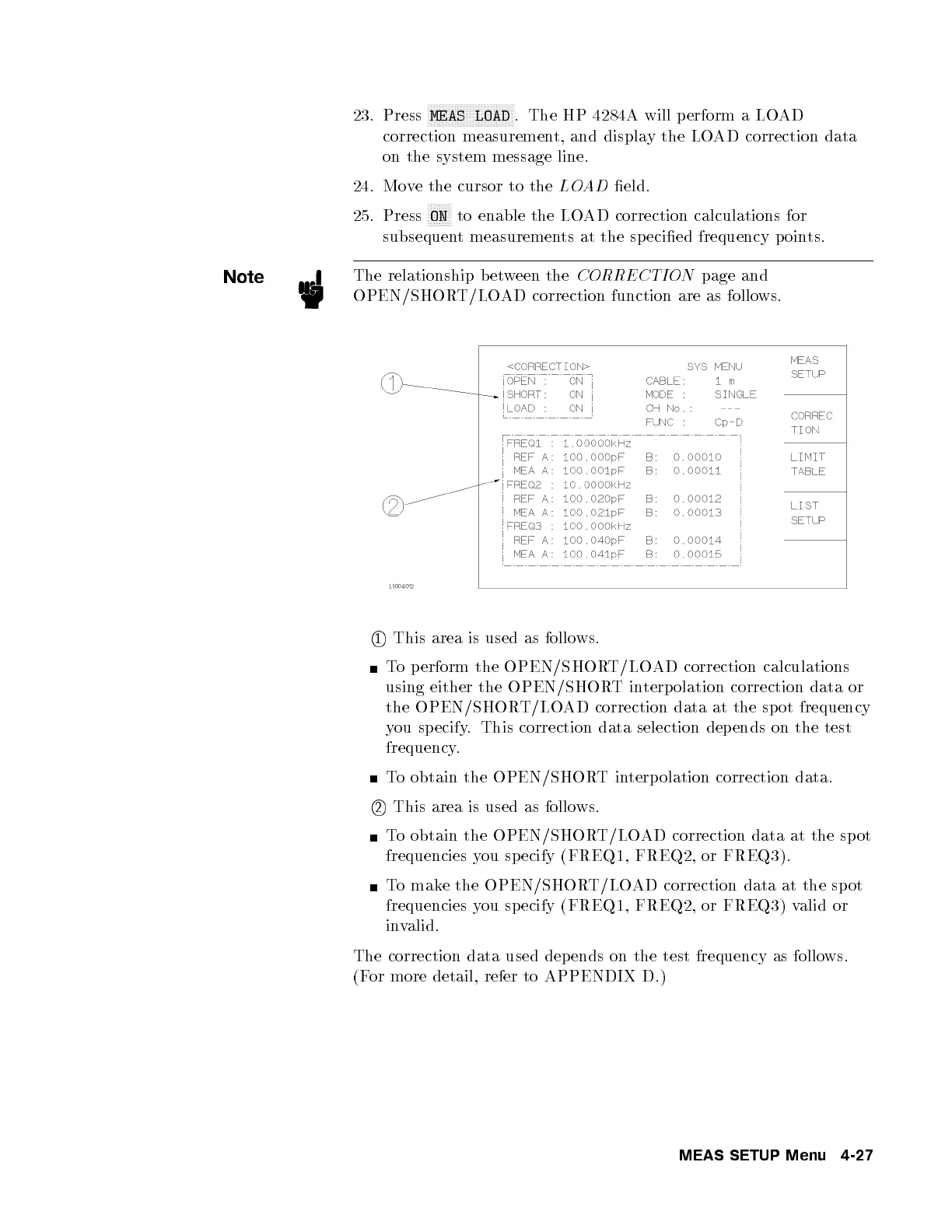
The relationship b etween the
CORRECTION
page and
OPEN/SHORT/LOAD correction function are as follows.
1
This area is used as follows.
To perform the OPEN/SHORT/LOAD correction calculations
using either the OPEN/SHORTinterp olation correction data or
the OPEN/SHORT/LOAD correction data at the sp ot frequency
you specify. This correction data selection depends on the test
frequency.
To obtain the OPEN/SHORTinterp olation correction data.
2
This area is used as follows.
To obtain the OPEN/SHORT/LOAD correction data at the spot
frequencies you sp ecify (FREQ1, FREQ2, or FREQ3).
To make the OPEN/SHORT/LOAD correction data at the sp ot
frequencies you sp ecify (FREQ1, FREQ2, or FREQ3) valid or
invalid.
The correction data used depends on the test frequency as follows.
(For more detail, refer to APPENDIX D.)
MEAS SETUP Menu 4-27



 To Next Page