Operation
Model 8642A/B
SETTING MODIFICATIONS
:r^'"°r^n "r-7 5^: -i—Cl)
©
I
SHIFT
I
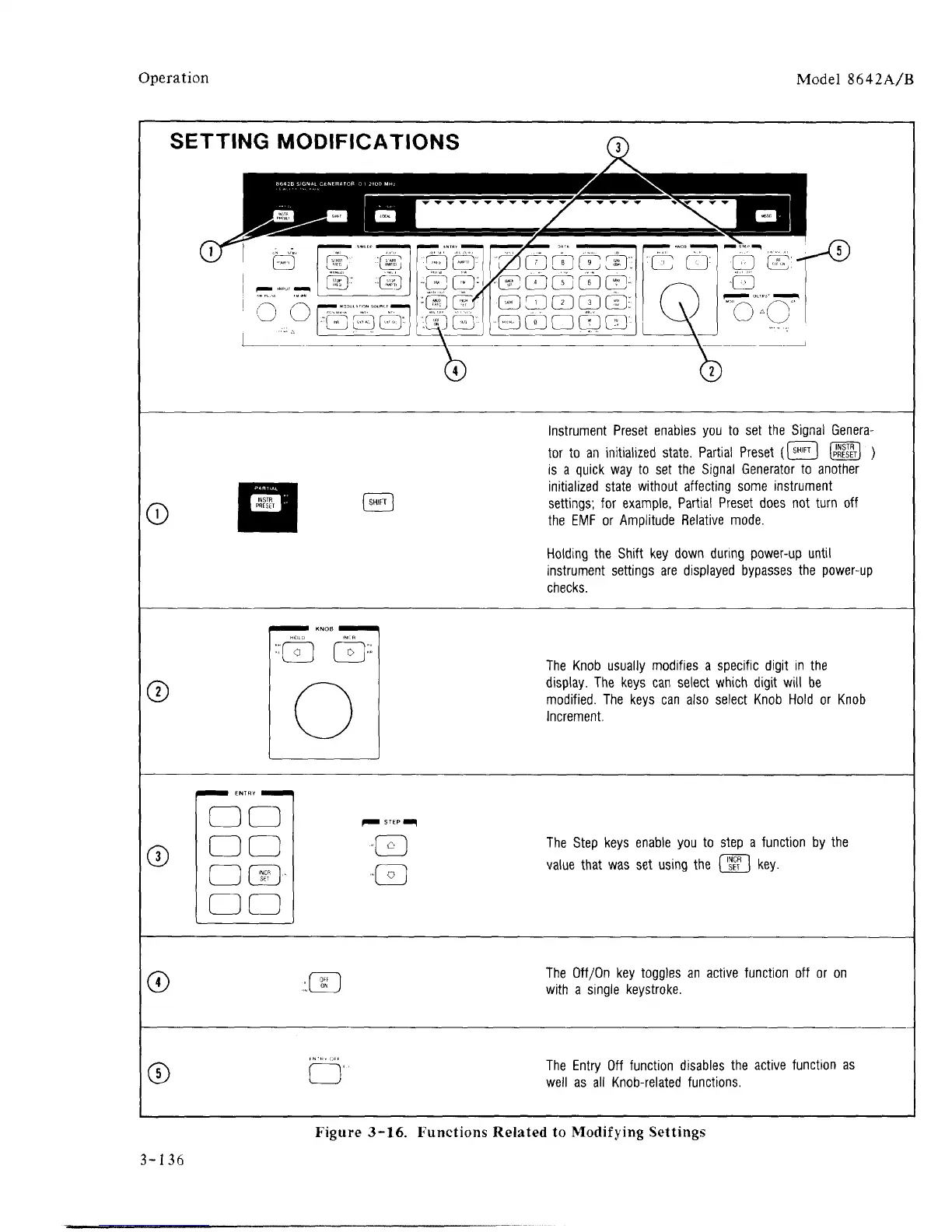
Instrument Preset enables you to set the Signal Genera-
tor to an initialized state. Partial Preset (f^l (S] )
is a quick way to set the Signal Generator to another
initialized state without affecting some instrument
settings; for example, Partial Preset does not turn off
the EMF or Amplitude Relative mode.
Holding the Shift key down during power-up until
instrument settings are displayed bypasses the power-up
checks.
©
::
'E E?
^■■M
ENTRY H^M
□ □
□ □
□
d?>
□ □
f^m
STEP
■
Q
-Q
The Knob usually modifies a specific digit in the
display. The keys can select which digit will be
modified.
The keys can also select Knob Hold or Knob
Increment.
®
The Step keys enable you to step a function by the
value that was set using the [
SFF
] key.
©
■W
The Off/On key toggles an active function off or on
with a single keystroke.
©
The Entry Off function disables the active function as
well as all Knob-related functions.
Figure 3-16. Functions Related to Modifying Settings
3-136



 To Next Page