Model 8642A/B
Appendix B
Appendix B: WRITING MESSAGES TO THE DISPLAY
You can write messages to the Signal Generator's display using service special functions and
ASCII character codes. Two, separate, 49-character message strings can be easily displayed on
the front panel or read via HP-IB. Messages such as these could be useful, for example, when
keeping track of calibration times, or the owner of the instrument, or special calibration
information. Also, when testing instruments, a message could be used as a system prompt. These
messages are battery-backed up and can be stored through power off, to be read any time.
Service Special Functions 653 through 659 manipulate message 1; Special Functions 663 through
669 manipulate message 2. Note that accessing service special functions is different than
accessing the user special functions discussed previously in this manual.
To select user special functions, you key in SPCL ( I SHIFT I [ - ] ) and then the special function
number. (For HP-IB, use the example on page 3-202.) To select service special functions locally,
you need to follow two steps:
1) First select user Special Function 3, Service Mode, with keystrokes SPCL ( 1 SHIFT ) [ - ] )
[ 3 I. Once you enter the service mode you can access the actual service special functions.
However, you can only key in numbers and terminators; selecting any other key will cause
the instrument to exit this special mode and display current instrument settings.
2) After you enter the service mode, you can select the service special function number.
However, the instrument only knows that you have selected a special function when you
key in the [ HZ U\7~1 terminator. For example, to clear the current message in message 1,
you would key in CO CD CD I HZ UV 1.
Table 3-30 on page 3-203 lists the special functions that apply to both message 1 and message 2.
Table 3-31 on page 3-203 provides a list of valid ASCII character codes. Page 3-204 lists
messages that might appear when manipulating the user-defined messages.
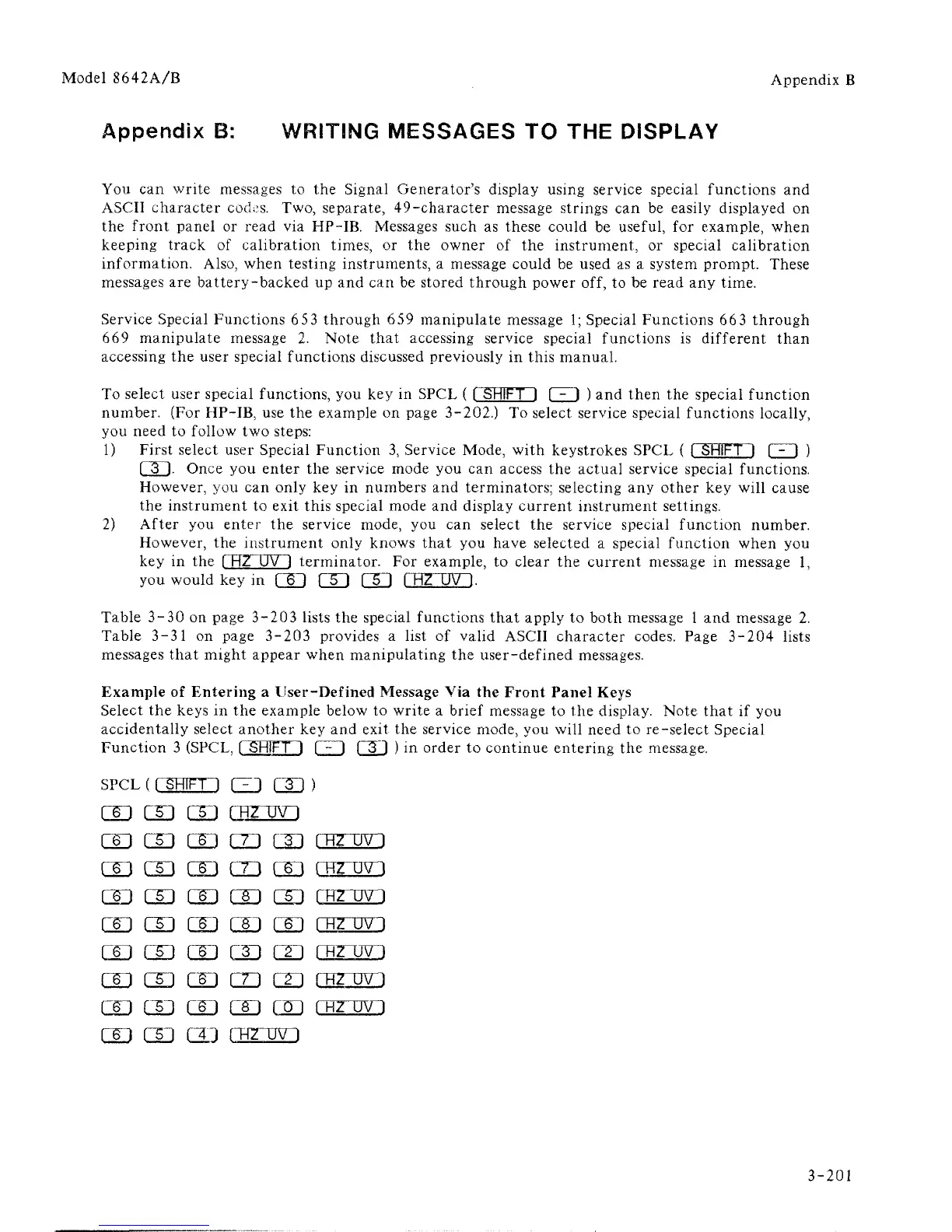
Example of Entering a User-Defined Message Via the Front Panel Keys
Select the keys in the example below to write a brief message to the display. Note that if you
accidentally select another key and exit the service mode, you will need to re-select Special
Function 3 (SPCL, [ SHIFT I F-~~l f~3~1 ) in order to continue entering the message.
SPCL ( I SHIFT I m GD )
CD CD CD CEOVJ
CD CD CD CO CD rmrwi
CB CO UJ CO CS mrwi
CD CD CO CD CO fHZTAn
CO CO CO CO CO Cffrwi
CO CO CO CO CO rrnzrwi
CO CO CO CO CD ( HZ uv ]
CO CO CO CO CO rRTWi
CO CO QD Qfrwj
3-201


 To Next Page
 Loading...












