Model 8642A/B
Appendix C
Appendix C: AMPLITUDE UNITS CONVERSION
You can use this information to convert the output amplitude to practically any desired units.
This information might be useful, for example, to convert between dBm and volts or EMF mV
and dBm or dB EMF uV to EMF uV.
Observe the following three considerations sequentially when converting amplitude units:
1.
When you desire non-EMF units and the EMF mode is currently selected, turn off the EMF
mode by selecting EMF (
1
SHIFT 1 f INCR SET I ) I OFF ON I (HP-IB code: EMOF). If you
desire EMF units, then do nothing at this point.
2.
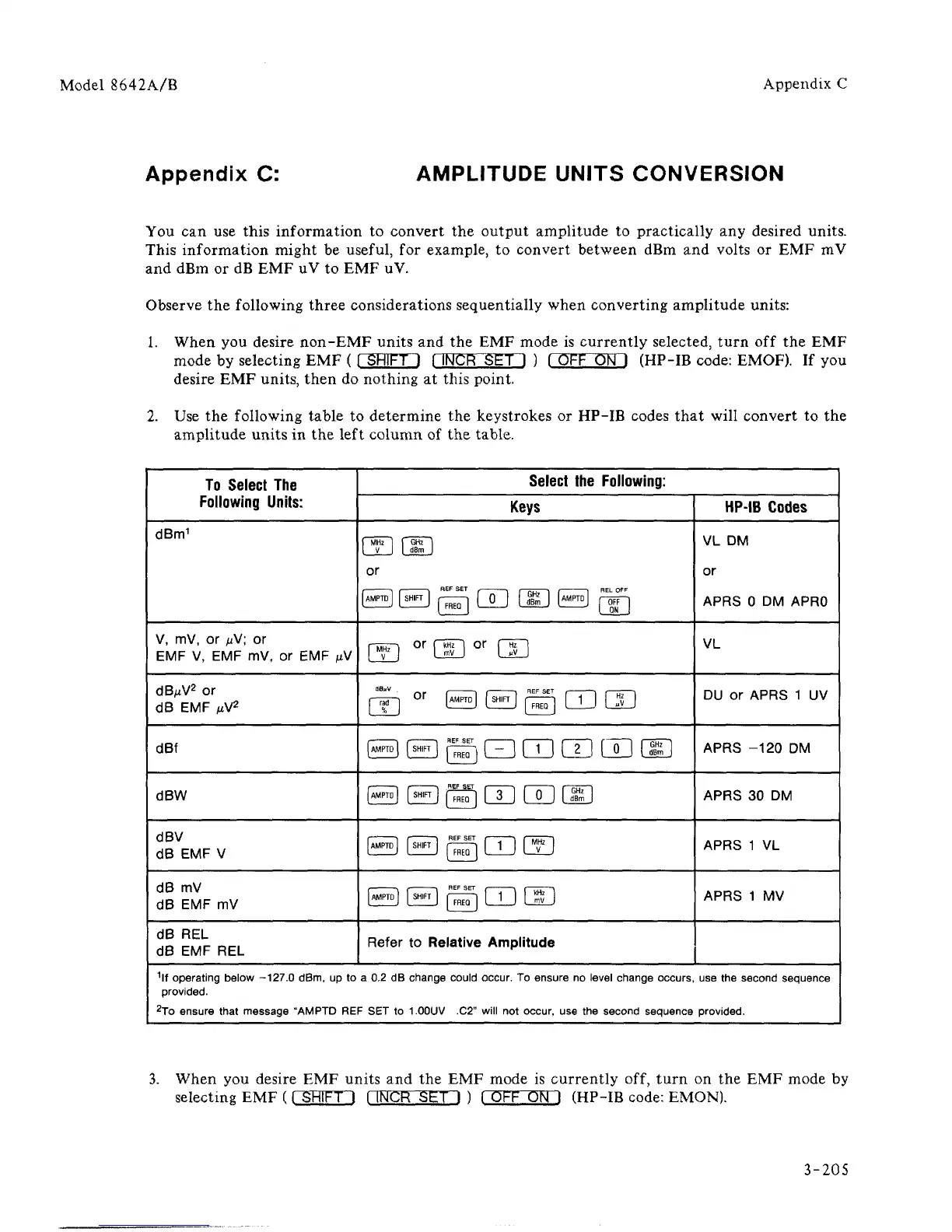
Use the following table to determine the keystrokes or HP-IB codes that will convert to the
amplitude units in the left column of the table.
To Select
The
Following Units:
dBm
1
V, mV, or ^V; or
EMF V, EMF mV, or EMF ^V
dB/A/
2
or
dB EMF
fiV
2
dBf
dBW
dBV
dB EMF V
dB mV
dB EMF mV
dB REL
dB EMF REL
Select
the
Following:
Keys
f
MHz I f GHz 1
[
V 1 |
dBm
J
or
(AMPTD]
1
SH.FT
j p^ [ 0 ) |S ] [«H ( OFF ]
m
or
dD
or
m
g
or
s s g m m
eagQEmai]
(AMPTD] (SHIFT) |
FREQ
]
1 3 1 ( 0 1 (S 1
e@@m@
t
\ r 1
REF SET
i \
f—m—i
SB [w]QDCID
Refer to Relative Amplitude
HP-IB Codes
VL DM
or
APRS 0 DM APRO
VL
DU or APRS 1 UV
APRS -120 DM
APRS 30 DM
APRS 1 VL
APRS 1 MV
1
lf operating below -127.0 dBm, up to a 0.2 dB change could
occur.
To ensure no level change occurs, use the second sequence
provided.
2
To ensure that message "AMPTD REF SET to
1.00UV
.C2" will not
occur,
use the second sequence provided.
3.
When you desire EMF units and the EMF mode is currently off, turn on the EMF mode by
selecting EMF ( rSHIFTl f INCR SET I ) f OFF ON I (HP-IB code: EMON).
3-205



 To Next Page