Model 8642A/B
Performance Tests
PERFORMANCE TESTS
3.
Incidental PM
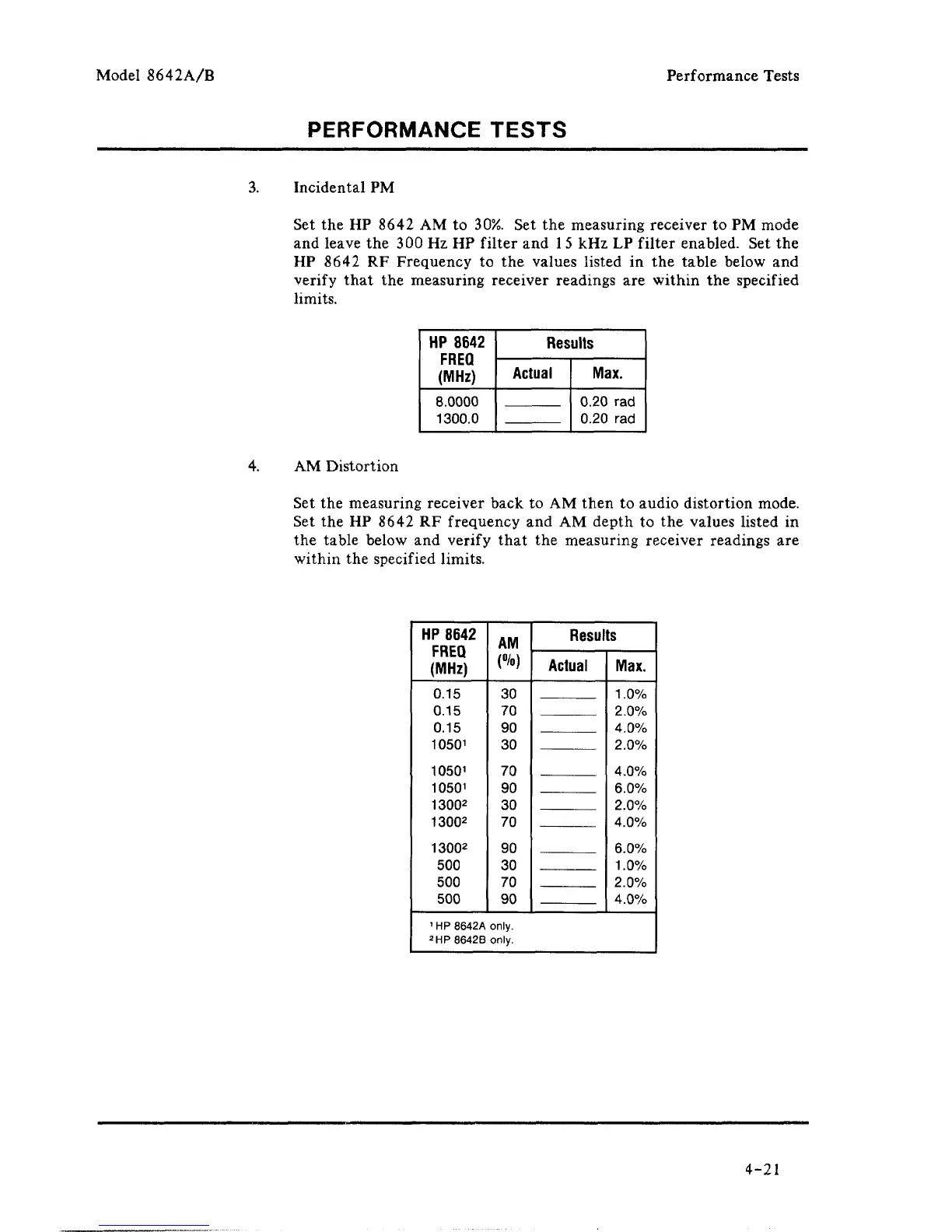
Set the HP 8642 AM to 30%. Set the measuring receiver to PM mode
and leave the 300 Hz HP filter and
1
5
kHz LP filter enabled. Set the
HP 8642 RF Frequency to the values listed in the table below and
verify that the measuring receiver readings are within the specified
limits.
HP
8642
FREQ
(MHz)
8.0000
1300.0
Results
Actual
Max.
0.20 rad
0.20 rad
4.
AM Distortion
Set the measuring receiver back to AM then to audio distortion mode.
Set the HP 8642 RF frequency and AM depth to the values listed in
the table below and verify that the measuring receiver readings are
within the specified limits.
HP
8642
FREQ
(MHz)
0.15
0.15
0.15
1050
1
1050
1
1050
1
1300
2
1300
2
13002
500
500
500
AM
(%)
30
70
90
30
70
90
30
70
90
30
70
90
Results
Actual
Max.
1.0%
2.0%
4.0%
2.0%
4.0%
6.0%
2.0%
4.0%
6.0%
1.0%
2.0%
4.0%
1
HP 8642A only.
2HP8642Bonly.
4-21



 To Next Page