Model 8642A/B
Performance Tests
PERFORMANCE TESTS
7.
FM Indicated Accuracy
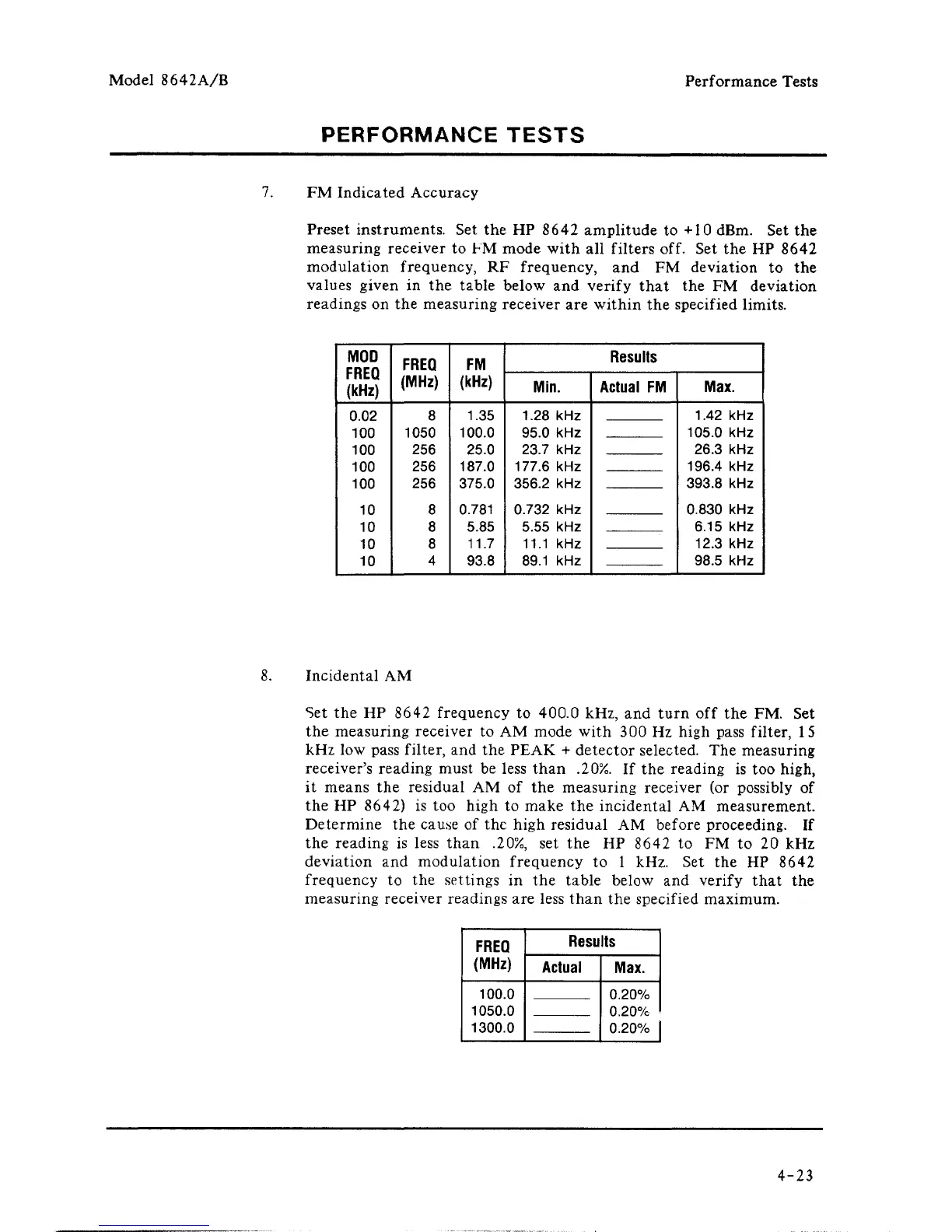
Preset instruments. Set the HP 8642 amplitude to +10 dBm. Set the
measuring receiver to FM mode with all filters off. Set the HP 8642
modulation frequency, RF frequency, and FM deviation to the
values given in the table below and verify that the FM deviation
readings on the measuring receiver are within the specified limits.
MOD
FREQ
(kHz)
0.02
100
100
100
100
10
10
10
10
FREQ
(MHz)
8
1050
256
256
256
8
8
8
4
FM
(kHz)
1.35
100.0
25.0
187.0
375.0
0.781
5.85
11.7
93.8
Results
Min.
1.28 kHz
95.0 kHz
23.7 kHz
177.6 kHz
356.2 kHz
0.732 kHz
5.55 kHz
11.1 kHz
89.1 kHz
Actual
FM
Max.
1.42 kHz
105.0 kHz
26.3 kHz
196.4 kHz
393.8 kHz
0.830 kHz
6.15 kHz
12.3 kHz
98.5 kHz
8. Incidental AM
Set the HP 8642 frequency to 400.0 kHz, and turn off the FM. Set
the measuring receiver to AM mode with 300 Hz high pass filter, 15
kHz low pass filter, and the PEAK + detector selected. The measuring
receiver's reading must be less than .20%. If the reading is too high,
it means the residual AM of the measuring receiver (or possibly of
the HP 8642) is too high to make the incidental AM measurement.
Determine the cause of the high residual AM before proceeding. If
the reading is less than .20%, set the HP 8642 to FM to 20 kHz
deviation and modulation frequency to 1 kHz. Set the HP 8642
frequency to the settings in the table below and verify that the
measuring receiver readings are less than the specified maximum.
FREQ
(MHz)
100.0
1050.0
1300.0
Results
Actual
Max.
0.20%
0.20%
0.20%
4-23



 To Next Page