Model 8642A/B
Performance Tests
PERFORMANCE TESTS
4.
Distortion
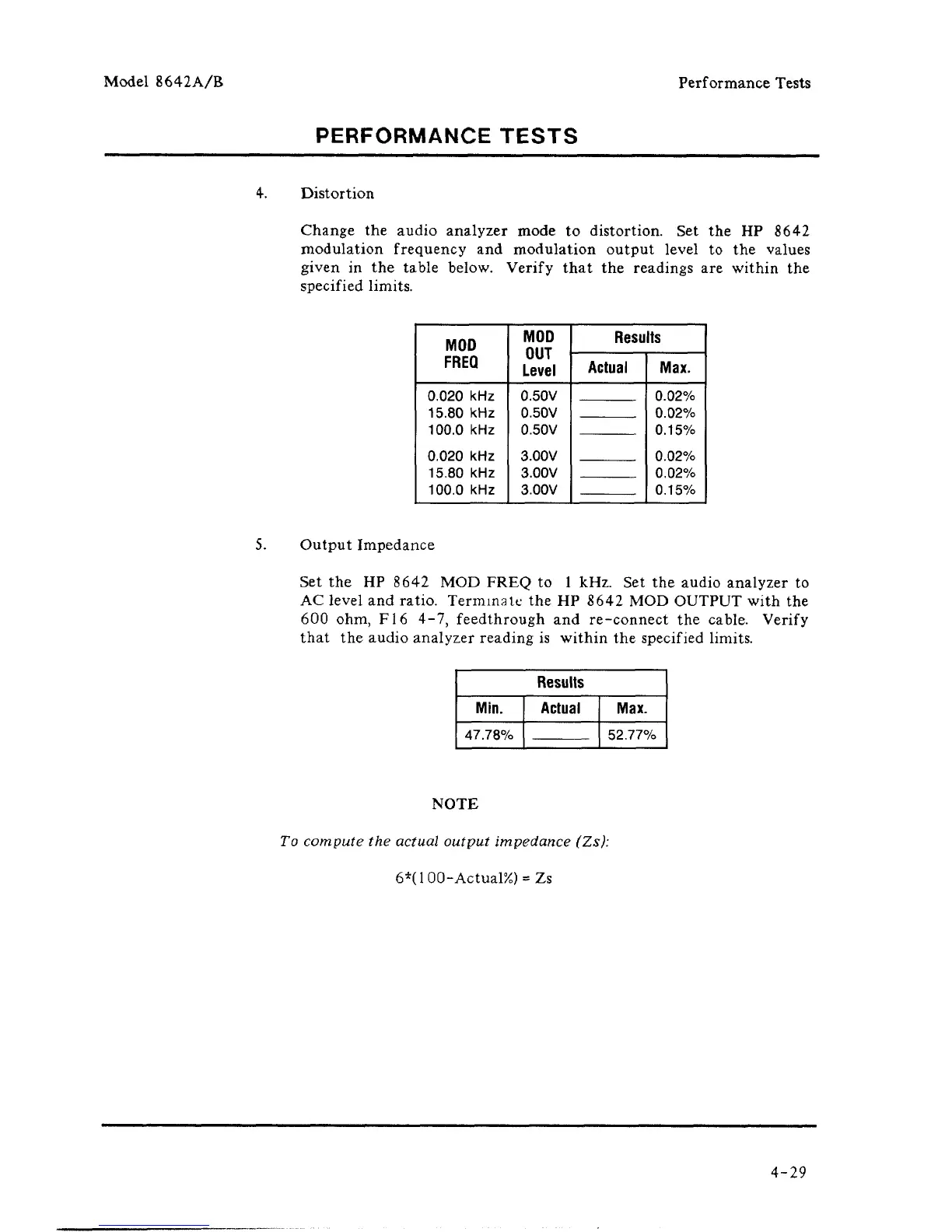
Change the audio analyzer mode to distortion. Set the HP 8642
modulation frequency and modulation output level to the values
given in the table below. Verify that the readings are within the
specified limits.
MOD
FREQ
0.020 kHz
15.80 kHz
100.0 kHz
0.020 kHz
15.80 kHz
100.0 kHz
MOD
OUT
Level
0.50V
0.50V
0.50V
3.00V
3.00V
3.00V
Results
Actual
Max.
0.02%
0.02%
0.15%
0.02%
0.02%
0.15%
5.
Output Impedance
Set the HP 8642 MOD FREQ to 1 kHz. Set the audio analyzer to
AC level and ratio. Terminate the HP 8642 MOD OUTPUT with the
600 ohm, F16 4-7, feedthrough and re-connect the cable. Verify
that the audio analyzer reading is within the specified limits.
Results
Min.
47.78%
Actual
Max.
52.77%
NOTE
To compute the actual output impedance (Zs):
6*(100-Actual%) = Zs
4-29



 To Next Page