Model 8642A/B
Adjustments
How All Auto-Adjust Procedures Begin
At the beginning of each Auto-Adjust routine you are requested to enter data. The Module Tabs
in Section 8 contain the Auto-Adjust Procedures, but for the first, time user, the beginning of the
Auto-Adjust routines is given below with some added explanation.
1.
Connect the required equipment to the HP 8642 via HP-IB.
2.
Verify or change the HP-IB addresses of the external equipment as previously shown in Auto-
Adjust Routines.
3.
On the HP 8902 (or HP 8901B) insure that: the HP 11722 Cal Factors have been loaded into
memory, and the RF Power mode has been Zeroed and Calibrated.
4.
Key in: jJNST PRESET] on the HP 8642.
5.
Key in: |SHIFT| |SPCL| \3\ to enter Service Mode.
6. Key in:
[8]
[8
Hz
to make the HP 8642 a system controller.
7.
Key in:
[81
[0 Hz to initiate the Auto-Adjust mode.
"A BIG HOWDY FROM HP .GO" and "WELCOME TO SELF-CAL .G1" will appear on the
display momentarily. (From now on the Back Space key, when used during a data entry prompt,
will abort the Auto-Adjust Routine.)
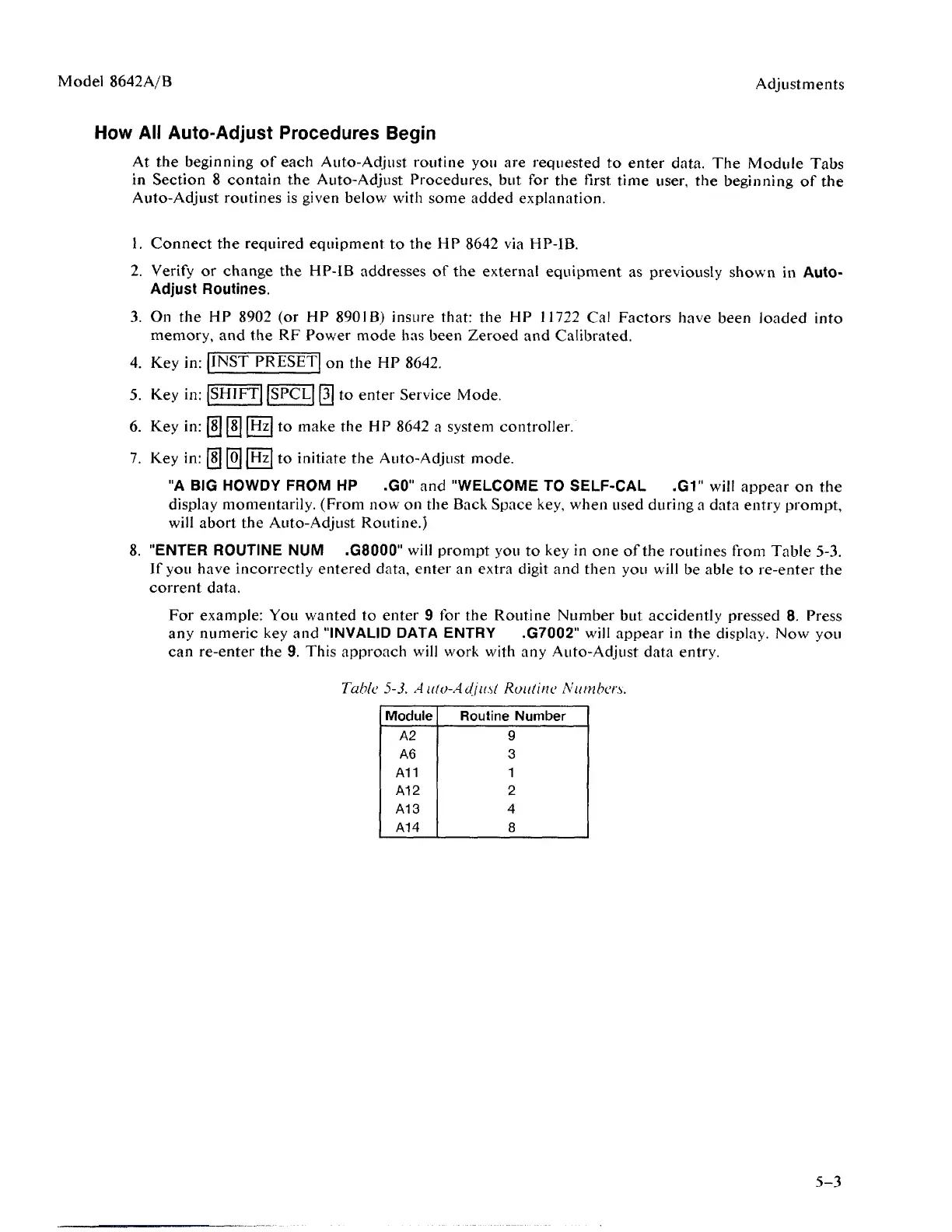
8. "ENTER ROUTINE NUM .G8000" will prompt you to key in one of the routines from Table 5-3.
If you have incorrectly entered data, enter an extra digit and then you will be able to re-enter the
corrent data.
For example: You wanted to enter 9 for the Routine Number but accidently pressed 8. Press
any numeric key and "INVALID DATA ENTRY .G7002" will appear in the display. Now you
can re-enter the 9. This approach will work with any Auto-Adjust data entry.
Table 5-3. Aulo-Adjusl Routine Numbers.
Module
A2
A6
A11
A12
A13
A14
Routine Number
9
3
1
2
4
8
5-3



 To Next Page