Model 8642A/3
Operation
®
,„[ STOP
]
FREQ
j' ' !
AMPID
j
^^^^m ENTRY B^^^H
" FHfQ AMPTD .-.
-O 0
::
:
® 0
□ □
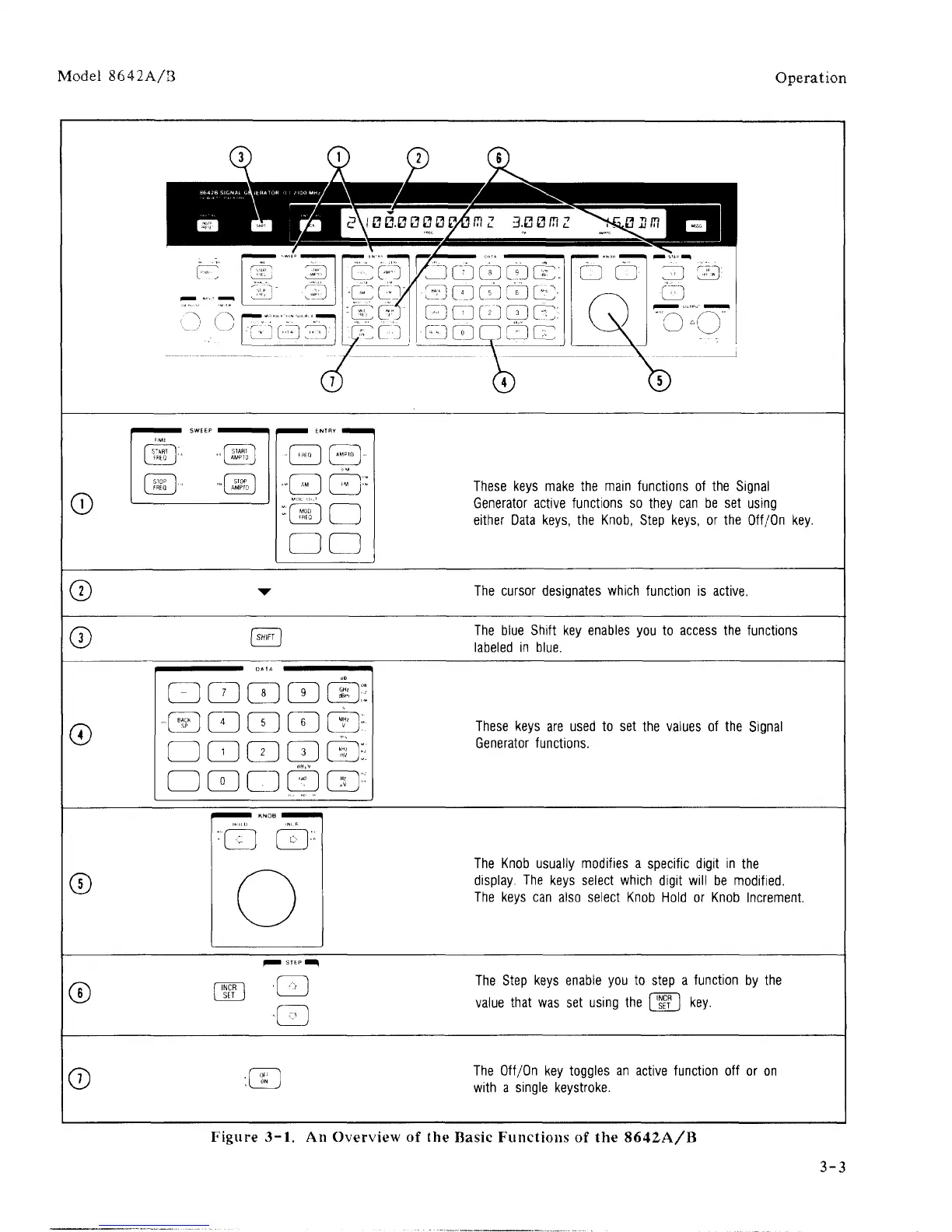
These keys make the main functions of the Signal
Generator active functions so they can be set using
either Data keys, the Knob, Step keys, or the Off/On key.
©
The cursor designates which function is active.
©
The blue Shift key enables you to access the functions
labeled in blue.
©
ED 0 0 0 0E
"® 000 0:
□ 0 0 0 0:
0 0 0 0 0
::;
These keys are used to set the values of the Signal
Generator functions.
©
'0 0
::
The Knob usually modifies a specific digit in the
display. The keys select which digit will be modified.
The keys can also select Knob Hold or Knob Increment.
©
0
0
The Step keys enable you to step a function by the
value that was set using the [
SET
] key.
©
"X
«
J
The Off/On key toggles an active function off or on
with a single keystroke.
Figure 3-1. An Overview of the Basic Functions of the 8642A/B
3-3



 To Next Page