Model 8642A/B
Operation
RF Frequency Sweep (cont'd)
Example for Calculation #4 (cont'd)
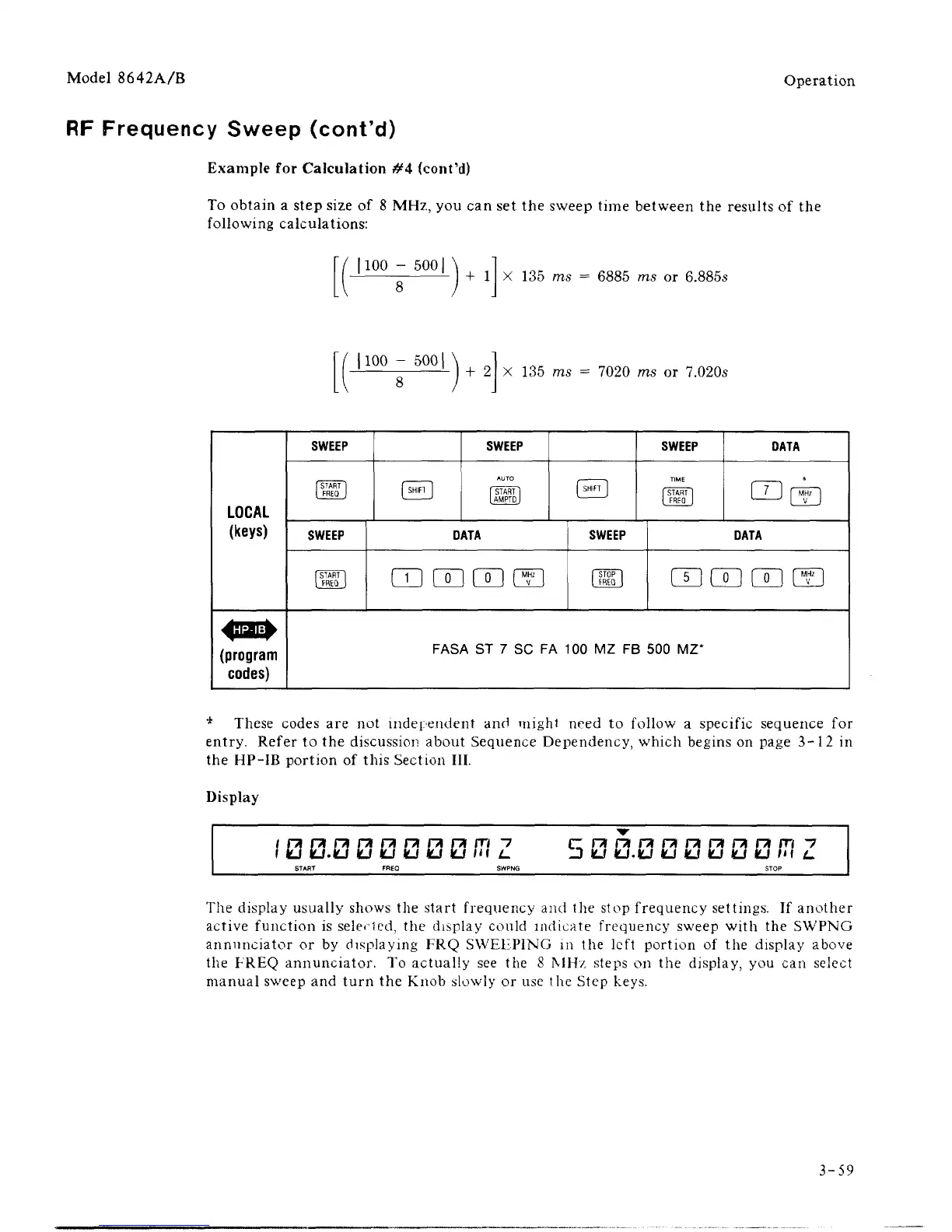
To obtain a step size of 8 MHz, you can set the sweep time between the results of the
following calculations:
|100 - 500|
+ 1 X 135 ms = 6885 ms or 6.885s
1100 - 5001
+
2
X 135 ms = 7020 ms or 7.020s
LOCAL
(keys)
SWEEP
SWEEP
SWEEP
DATA
ID CD 00 CD
SWEEP
SWEEP
DATA
CD [™g
DATA
CD CD CD SD
(program
codes)
FASA ST 7 SC FA 100 MZ FB 500 MZ*
* These codes are not independent and mighl need to follow a specific sequence for
entry. Refer to the discussion about Sequence Dependency, which begins on page 3-12 in
the HP-IB portion of this Section III.
Display
fcj.fcj
kj
kj kj kj
kls
in
5
kj.kJ kj IU kj u iu
in
The display usually shows the start frequency and the stop frequency settings. If another
active function is seleHed, the display could indicate frequency sweep with the SWPNG
annunciator or by displaying FRQ SWEEPING in the left portion of the display above
the FREQ annunciator. To actually see the 8 MHz steps on the display, you can select
manual sweep and turn the Knob slowly or use the Step keys.
3-59



 To Next Page