Model 8642A/B
Operation
RF Frequency Sweep (cont'd)
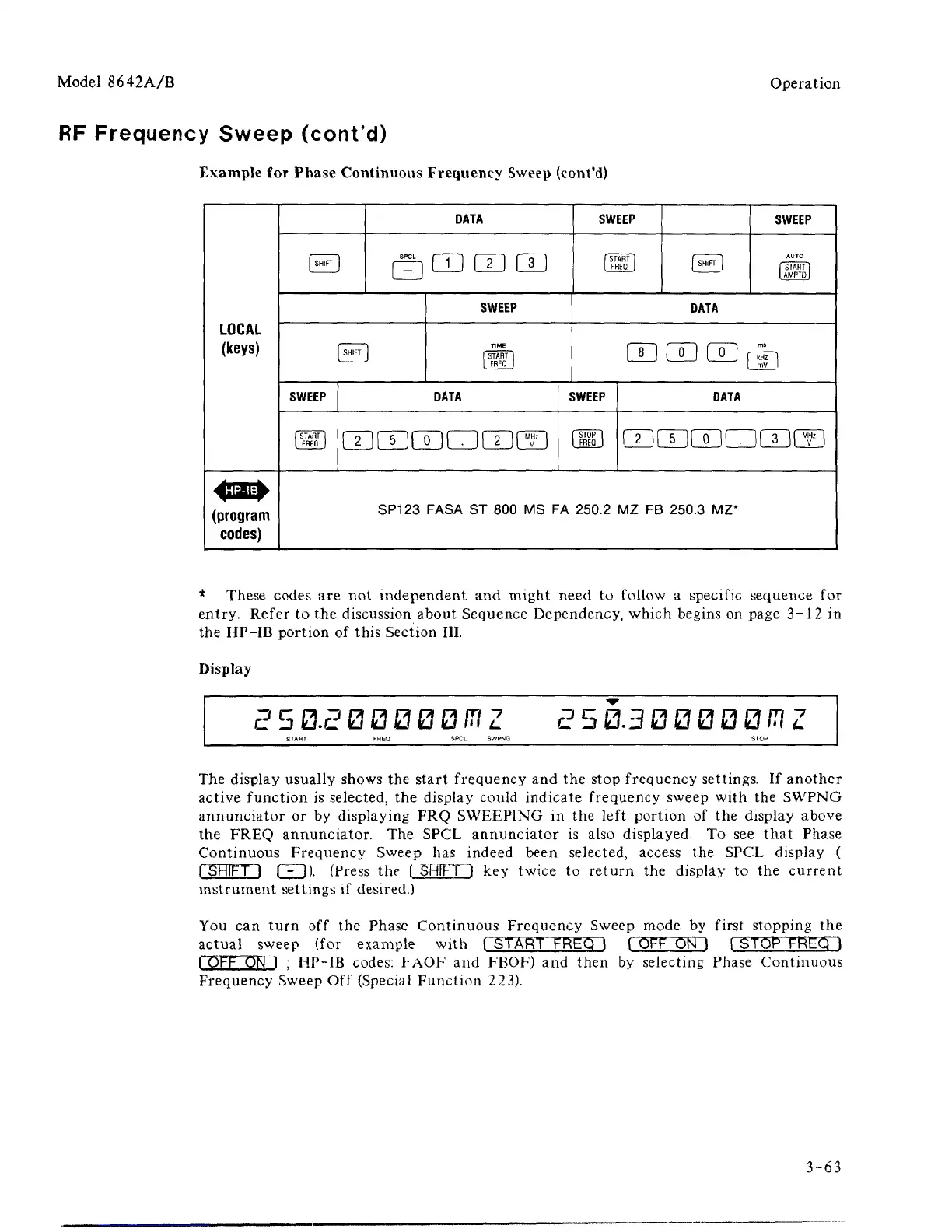
Example for Phase Continuous Frequency Sweep (cont'd)
LOCAL
(keys)
(program
codes)
1
SHIFT
1
DATA
□ 0 (X) LX)
1
SHIFT
1
SWEEP
/
START
)
I
FRED
1
SWEEP
TIME
I START
I
|
FREQ
|
DATA
msmatum
SWEEP
[ START
I
I FREQ
|
f SHIFT
]
SWEEP
AUTO
I START
I
|
AMPTD|
DATA
mmm^
SWEEP
fSTOP
I
|
FREQ
]
DATA
mc
uar
imcf]
SP123 FASA
ST 800 MS FA
250.2
MZ FB
250.3
MZ*
* These codes are not independent and might need to follow a specific sequence for
entry. Refer to the discussion about Sequence Dependency, which begins on page 3-12 in
the HP-IB portion of this Section III.
Display
E 503
13
0 0 0 0
/T?
Z
2 5 03 0 0 0 0 0
CT
Z
The display usually shows the start frequency and the stop frequency settings. If another
active function is selected, the display could indicate frequency sweep with the SWPNG
annunciator or by displaying FRQ SWEEPING in the left portion of the display above
the FREQ annunciator. The SPCL annunciator is also displayed. To see that Phase
Continuous Frequency Sweep has indeed been selected, access the SPCL display (
fSHIFT ] FH). (Press the [ SHIFTl key twice to return the display to the current
instrument settings if desired.)
You can turn off the Phase Continuous Frequency Sweep mode by first stopping the
actual sweep (for example with r^TA~RT FREQ I FOFF OI^H ("STOP FREQ"!
fOFF ON ] ; HP-IB codes: FAOF and FBOF) and then by selecting Phase Continuous
Frequency Sweep Off (Special Function 223).
3-63



 To Next Page