EasyManua.ls Logo

HP HP-65 - Page 60

HP HP-65
112 pages
Print Icon
To Next Page IconTo Next Page
To Previous Page IconTo Previous Page
Loading...
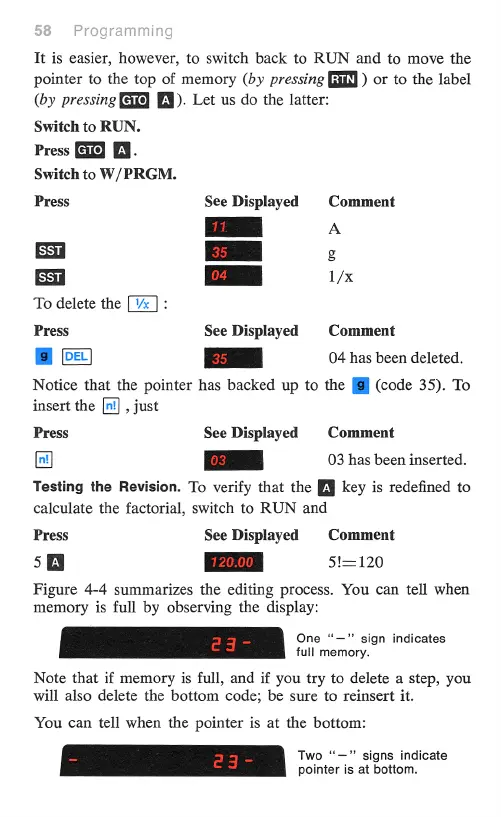
It
is
easier,
however,
to
switch
back
to
RUN
and
to
move
the
pointer
to
the
top
of
memory
(by
pressing
[fI
)
or
to
the
label
(by
pressing
G189
E¥).
Let
us
do
the
latter:
Switch
to
RUN.
Press
B.
Switch
to
W/PRGM.
Press
See
Displayed
Comment
B
A
-
-
5
-
1/x
To
delete
the
:
Press
See
Displayed
Comment
g
-
04
has
been
deleted.
Notice
that
the
pointer
has
backed
up
to
the
[@
(code
35).
To
insert
the
[n]
,
just
Press
See
Displayed
Comment
[n]]
e
03
has
been
inserted.
Testing
the
Revision.
To
verify
that
the
[[§
key
is
redefined
to
calculate
the
factorial,
switch
to
RUN
and
Press
See Displayed
Comment
50
[
720.00
|
51—120
Figure
4-4
summarizes
the
editing
process.
You
can
tell
when
memory
is
full
by
observing
the
display:
One
“—"
sign
indicates
full
memory.
Note
that
if
memory
is
full,
and
if
you
try
to
delete
a
step,
you
will
also
delete
the
bottom
code;
be
sure
to
reinsert
it.
You
can
tell
when
the
pointer
is
at
the
bottom:
Two
“—"
signs
indicate
pointer
is
at
bottom.

Other manuals for HP HP-65

Related product manuals