EasyManua.ls Logo

HP HP-65 - Page 75

HP HP-65
112 pages
Print Icon
To Next Page IconTo Next Page
To Previous Page IconTo Previous Page
Loading...
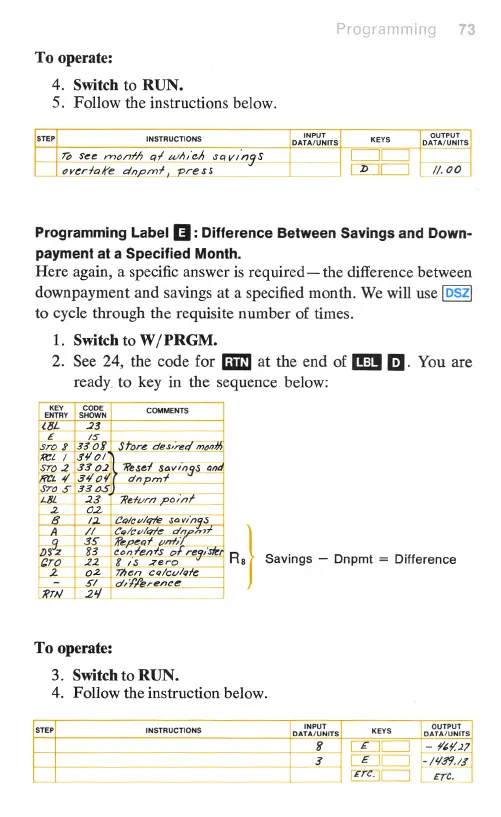
To
operate:
4.
Switch
to
RUN.
5.
Follow
the
instructions
below.
STEP INSTRUCTIONS
DATATONITS
KEYS
oIS
7o
See
month
af
whieh
savings
L]
overtake
dpnpm?,
press
[
7200
Programming
Label
[J
:
Difference
Between
Savings
and
Down-
payment
at
a
Specified
Month.
Here
again,
a
specific
answer
is
required
the
difference
between
downpayment
and
savings
at
a
specified
month.
We
will
use
to
cycle
through
the
requisite
number
of
times.
1.
Switch
to
W/PRGM.
2.
See
24,
the
code
for
at
the
end
of
B}
You
are
ready
to
key
in
the
sequence
below:
KEY
CODE
ENTRY
SHOWN
COMMENTS
Rs/
Savings
Dnpmt
=
Difference
To
operate:
3.
Switch
to
RUN.
4.
Follow
the
instruction
below.
INSTRUCTIONS
KEYS
OYUYPUT
-
%
LI
/
Ere]—

Other manuals for HP HP-65

Related product manuals