HP Photosmart C4600 All-in-One series • 7
11 - Mac
BA
HP Photosmart C4600 All-in-One series /
ﺯﺎﻬﺟ ﻦﻣ ﻲﻔﻠﺨﻟﺍ ءﺰﺠﻟﺍ ﻰﻠﻋ ﺩﻮﺟﻮﻤﻟﺍ ﺬﻔﻨﻤﻟﺎﺑ USB ﻞﺑﺎﻛ ﻞﻴﺻﻮﺘﺑ ﻢﻗ
ﺯﺎﻬﺟ ﻰﻠﻋ USB ﺬﻔﻨﻣ ﻱﺄﺑ ﻪﻠﻴﺻﻮﺘﺑ ﻢﻗ ﻢﺛ ،HP All-in-One
.ﺮﺗﻮﻴﺒﻤﻜﻟﺍ
. ﻕﺭﺯﻷﺍ ﻁﻮﻐﻀﻤﻟﺍ ﺹﺮﻘﻟﺍ ﻞﺧﺩﺃ
ﻁﻮﻐﻀﻤﻟﺍ ﺹﺮﻘﻟﺍ ﺰﻣﺭ ﻕﻮﻓ ﺎًﺟﻭﺩﺰﻣ ﺍًﺮﻘﻧ ﺮﻘﻧﺍ
.ﺐﺘﻜﻤﻟﺍ ﺢﻄﺳ ﻰﻠﻋ ﺩﻮﺟﻮﻤﻟﺍ HP Photosmart
ﺕﺍﺩﺎﺷﺭﻹﺍ ﻊﺒﺗﺍ . HP Installer ﺰﻣﺭ ﻕﻮﻓ ﺎًﺟﻭﺩﺰﻣ ﺍًﺮﻘﻧ ﺮﻘﻧﺍ
.ﺔﺷﺎﺸﻟﺍ
ﻰﻠﻋ ﺮﻬﻈﺗ ﻲﺘﻟﺍ
. (ﺩﺍﺪﻋﻹﺍ ﺪﻋﺎﺴﻣ) Setup Assistant ﺔﺷﺎﺷ ﻝﺎﻤﻜﺘﺳﺎﺑ ﻢﻗ
.a
.b
.c
.d
Conecte o cabo USB à porta na parte posterior
do HP All-in-One e a qualquer porta USB no
computador.
Insira o CD azul .
Clique duas vezes no ícone do CD do HP
Photosmart na área de trabalho.
Clique duas vezes no ícone do HP Installer .
Siga as instruções exibidas na tela.
Conclua as etapas exibidas na tela do
Assistente de Instalação .
a.
b.
c.
d.
Connectez le câble USB au port situé à l’arrière du
périphérique HP Tout-en-un, puis à n’importe quel
port USB de l’ordinateur.
Insérez le CD de couleur bleue .
Double-cliquez sur l’icône du CD
HP Photosmart située sur le bureau.
Double-cliquez sur l’icône Programme
d’installation HP . Suivez les instructions
affichées à l’écran.
Renseignez l’écran de l’ Assistant de
configuration .
a.
b.
c.
d.
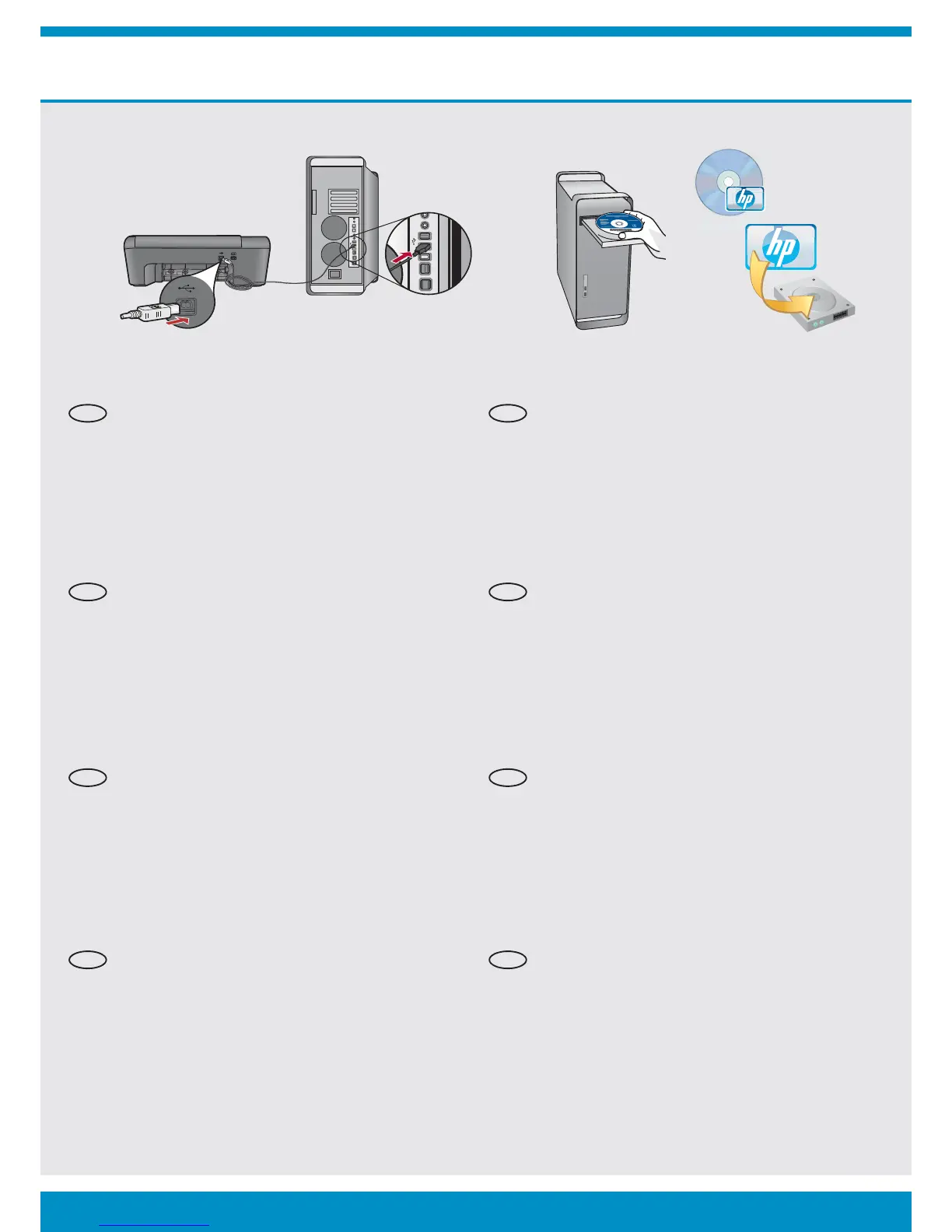
Connect the USB cable to the port on the back of
the HP All-in-One, and then to any USB port on the
computer.
Insert the blue CD.
Double-click the HP Photosmart CD icon on the
desktop.
Double-click the HP Installer icon. Follow the
onscreen instructions.
Complete the Setup Assistant screen.
a.
b.
c.
d.
AR AR
PT
EN
FR
PT
EN
FR



 To Next Page
 Loading...