HP Digital Projector vp6210 and vp6220
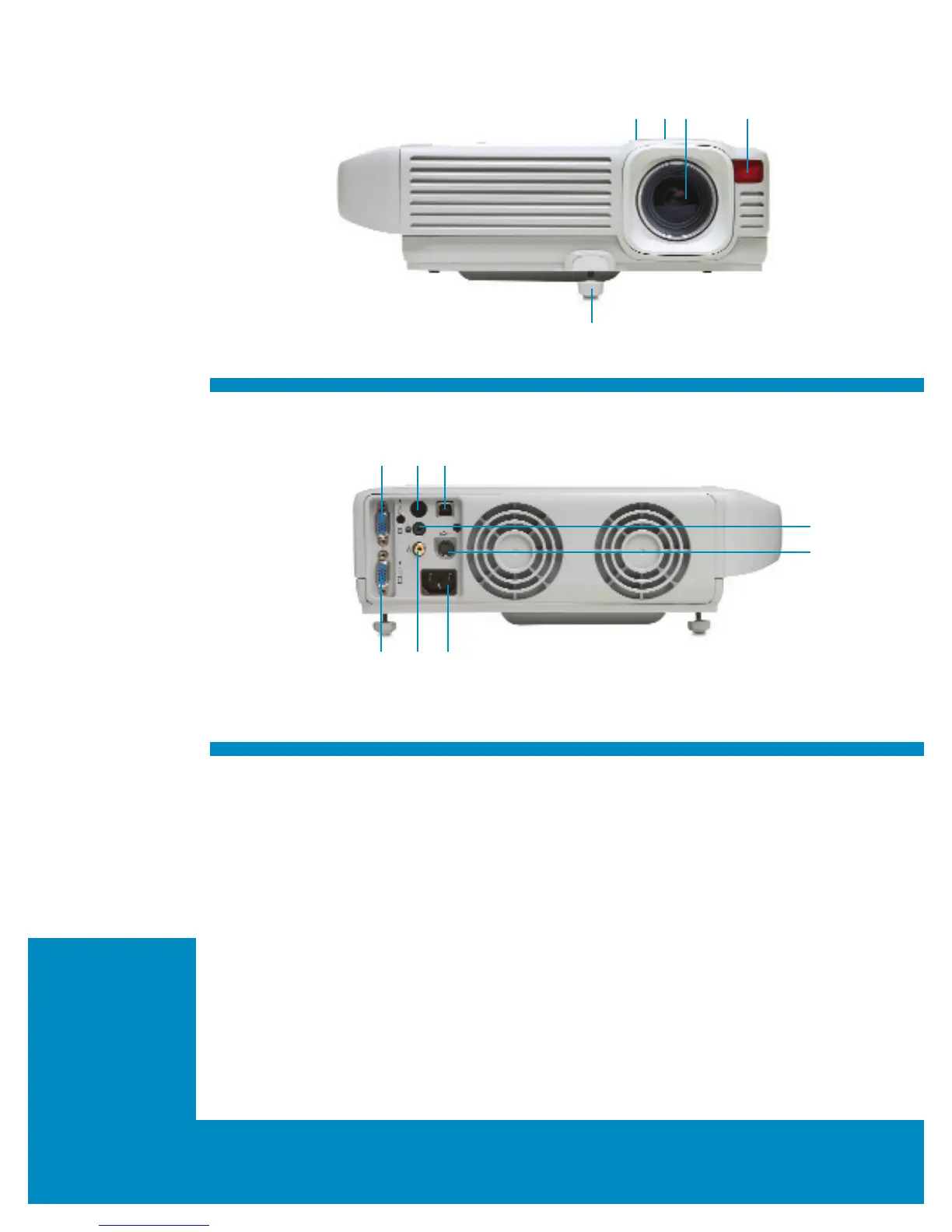
Front view
1. Zoom-adjusted focus ring
2. Control panel
3. Lens
4. Infrared remote sensor
5. Front adjuster foot
Back view
1. 15-pin VGA output connector
2. Infrared remote sensor
3. USB port for connecting remote
4. Audio RCA jack
(3.5 mm mini jack)
5. S-video connector
(mini-DIN 4-pin connector)
6. 15-pin VGA input connector
7. Composite-video input
(RCA jack)
8. AC power
TI DLP
™
quality and life-long
image reliability
Infrared (IR) receiver windows—
front and rear of projector
Kensington lock slot
1-watt speaker
Ceiling mount, tabletop mount
and rear mount ready
Dual mode output for
optimized colors
HP Digital Projector vp6210 front shown
HP Digital Projector vp6210 back shown
Product highlights
• Presentation and video mode—With super bright
PowerPoint slides and deep video colors in a single
projector, you no longer need to agonize over color
and brightness tradeoffs when selecting a projector.
• Image sharpness—Keep your audience engaged
and entertained with clear, crisp, accurate images
and text. The 2000:1 contrast ratio means no more
eyestrain to read what is being projected.
• Light weight, compact size and convenient carrying
handle make it easy to move from room to room,
wherever it is needed.
• Signal detection—Don’t waste time trying to get the
projector to recognize the source. These projectors
automatically detect the source and scale the
resolution accordingly.
• Monitor pass through—View your presentation
on a strategically placed external laptop or PC
monitor, giving you the confidence and power to
communicate effectively.
• Home and business use—Enjoy the projector’s
amazing versatility while watching DVDs in the
comfort of your home or while presenting critical
fiscal information to colleagues and managers.
1
5
2 3 4
1 2 3
6 7 8
4
5


 To Next Page
 Loading...






