4
Range Sensitivity
Setting Up
The Detector can be adjusted to react to different levels of movement and at different distances.
At its most sensitive setting it may detect a small child or animal at a full distance. At the least sensitive setting
it may require a large person at a close distance to detect movement.
The Detector may detect movement under certain conditions that could be interpreted as false operation. Ensure you
place the detector carefully, taking into consideration surrounding objects that may be detected by the sensor, such as
passing cars, waves in the swimming pool, tree branches moving in the wind or any other movement of warm objects
or warm air.
These conditions may cause unwanted operation of the Detector, while the Detector itself is still working
correctly. The user has to be aware of these conditions and should take measures to minimize the possibility of
their occurrence.
Note: The range of movement detection depends on external conditions such as the ambient temperature,
body temperature, clothing, speed of movement, etc.
Before the Detector is commissioned for operation it should be tested by a “Walk test”:
1. Set Sensitivity and Lux adjustment knobs, see figure 1, to fully clockwise position and Time knob to fully
anti-clockwise position.
2. Turn the power on and allow 2 minutes for the sensor to warm up before proceeding.
3. Adjust the head position as required.
4. Walk across the Detector’s view range to ensure the light turns on and off.
To setup the Detector for day-to-day operation adjust the knobs so that their settings reflect the desired
mode of operation. Note: Adjusting for the correct light level is dependent on the ambient light and it could
take several days until the right light level setting is found.
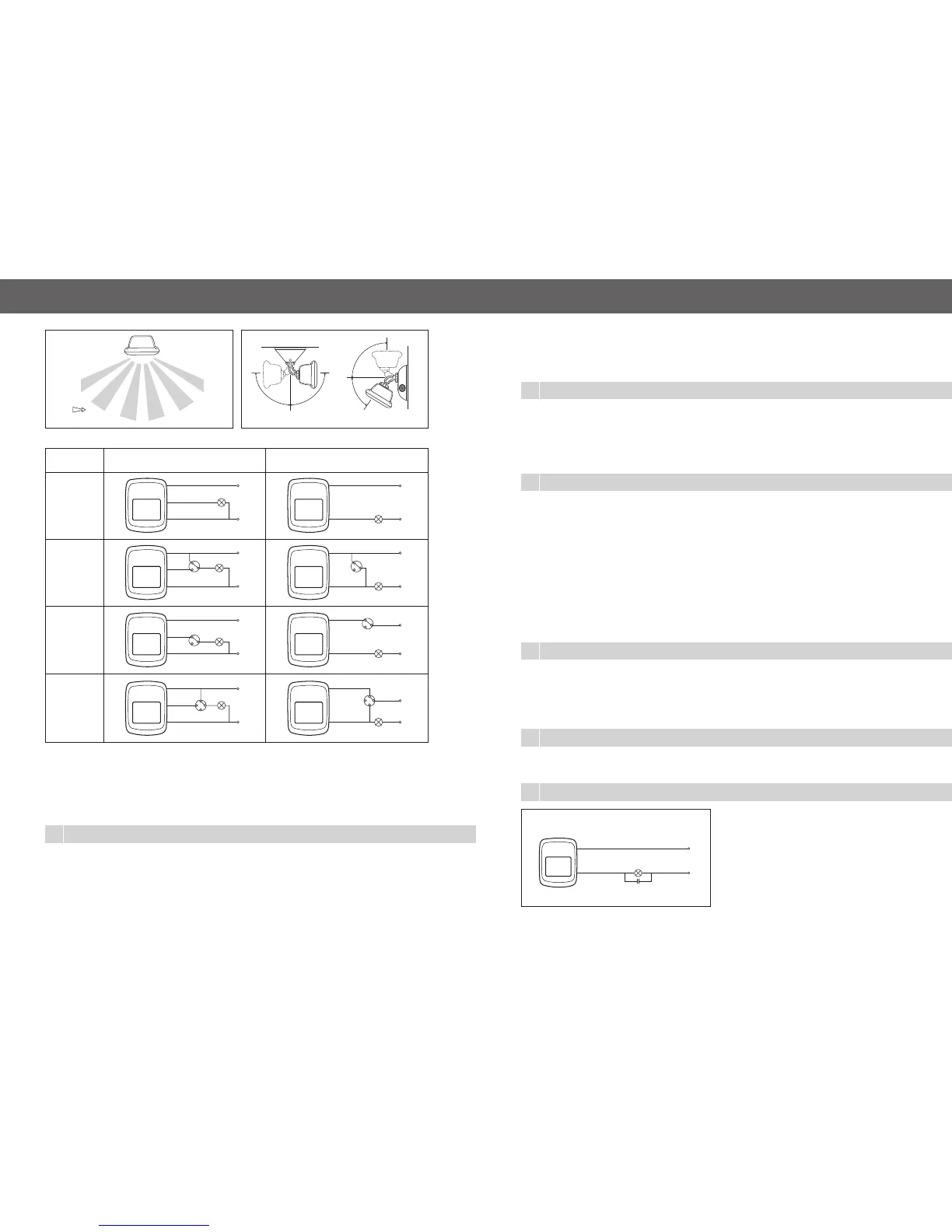
Two conduit entries on the mounting base can be used for PAR38 light fittings. These light fittings are
connected to the detector through the supplied terminals. Alternatively, remote loads can be connected
up to the maximum rating. Refer to Figure 4 for electrical connection options.
Note: Different connection and configuration options are possible, e.g. for remote control of Detector’s
operation. All wiring for such circuits must be done by a qualified electrician.
Figure 4
L
Brown
White
N
Blue
Auto
3 wire
Auto
&
ON
override
Auto
&
OFF
override
Auto
&
ON
&
OFF
switch
L
ON
AUTO
Brown
White
N
Blue
Switch: CAT 770RSDM
Switch: CAT 770M
Switch: CAT 770M
ON
L
OFF
AUTO
Brown
White
N
Blue
L
OFF
AUTO
Brown
White
N
Blue
2 wire
L
Brown
N
Blue
L
Brown
N
Blue
N
Blue
Switch: CAT 770M
Switch: CAT 770RSDM
Switch: CAT 770M
Brown
N
Blue
L
Brown
L
ON
AUTO
OFF
AUTO
ON
OFF
AUTO
Figure 2
Figure 3
Normal Traffic
TOP VIEW 630/9
Ceiling
Wall
SIDE VIEW
TOP VIEW
90º90º
90º
65º
5
Operation
The detector will turn the load on if a warm body moves in its viewing range. The Range Sensitivity adjustment knob determines the range.
The Movement Detector can be setup so that it only turns the load on when it is dark. The setting of the Lux adjustment knob
determines the light level at which the Detector starts operating the load.
The load stays turned on for a predetermined amount of time. The time that the load stays turned on depends on the setting
of the Timer adjustment knob.
Light Sensitivity
The Movement Detector can be setup to operate during different light conditions, such as night only or day and night.
At the minimum ‘Lux’ control setting the sensor will detect movement only when it is dark. At the maximum setting the
sensor will operate during day and night. In that way users can adjust the operating conditions to suit their needs and
save energy.
Note: A small plastic screwdriver is supplied as an adjustment tool.
Timer
The time that the load stays turned on can be varied from 15 secs to 7 mins. Rotating the ‘Time’ knob anti-clockwise
reduces load ‘ON’ duration. This feature allows the user to balance energy savings and convenience.
6
Two-wire devices draw their power through the load.
Some loads might not provide enough power for the
Detector to operate or are sensitive to high off-state
leakage currents e.g. relays. In such cases a mains
voltage rated capacitor of 2-10uF should be connected
in parallel with the load. Refer to Figure 5 for information
on how to connect the capacitor.
For some inductive loads this capacitor could cause
resonance, seen as a high off-state voltage across the load.
In such case the value of the capacitor should be changed.
2-Wire (630/9-2W) Option
2 wire option
L
Brown
Blue
N
Figure 5


 To Previous Page
 Loading...