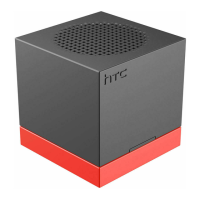
The HTC BoomBass (ST A100) is a portable speaker designed to enhance the audio experience of HTC phones, specifically those running Android 4.3 or later with BoomSound technology. Its primary function is to amplify and deepen the bass frequencies that smartphone speakers typically struggle to reproduce, providing a richer and more immersive sound for music and videos.
Function Description
The HTC BoomBass serves as an external subwoofer, wirelessly connecting to compatible HTC smartphones to augment their built-in audio capabilities. It is engineered to deliver powerful bass, transforming the sound output from a smartphone into a more robust and dynamic audio experience. The device is compact and designed for portability, allowing users to easily carry it and enjoy enhanced audio wherever they go. Its wireless connectivity, primarily through NFC and Bluetooth, ensures a seamless and cable-free user experience. The integrated phone stand further adds to its utility, allowing users to prop up their phone in landscape mode while enjoying the improved sound.
Usage Features
The HTC BoomBass offers straightforward usage with multiple features designed for convenience and ease of connection:
- Power On/Off: The device can be turned on or off by pressing and holding the multifunction button until an audible tone is heard. Alternatively, connecting a phone via NFC will automatically power on the speaker.
- NFC Pairing: For quick and effortless pairing, the HTC BoomBass supports Near Field Communication (NFC). To pair, users need to ensure NFC is enabled on their HTC phone (and the Read/Write P2P option if available), unlock the lock screen, and then place the back of their phone (where the NFC antenna is located) on the speaker's NFC zone. A prompt will appear on the phone, requiring the user to tap "Yes" to confirm the connection. Once connected, a specific icon will appear in the phone's status bar. For future reconnections, simply repeating the NFC placement will establish the link.
- Bluetooth Pairing: The device also supports Bluetooth pairing for broader compatibility and connection flexibility. To pair via Bluetooth, users must first turn on the HTC BoomBass. If no previously paired devices are detected, the BoomBass will enter a discoverable mode for a few minutes. On the HTC phone, users need to navigate to "Settings," turn on Bluetooth, and then tap "Bluetooth" to view a list of available devices. From this list, they can select "HTC BoomBass" to initiate pairing. A successful pairing will be indicated by an icon in the phone's status bar. Reconnecting in the future simply requires turning on Bluetooth on the phone and powering on the HTC BoomBass.
- Disconnecting: Disconnecting from the HTC BoomBass is equally simple. If connected via NFC, placing the phone on the speaker again will disconnect it. For Bluetooth connections, turning off Bluetooth on the phone will sever the link. The HTC BoomBass is designed to automatically power off after 2 minutes of inactivity or disconnection.
- Charging: The device is powered by a rechargeable battery. To charge, users connect the small end of the provided micro USB cable into the HTC BoomBass's micro USB connector. The other end of the cable can then be plugged into a phone's power adapter or a USB connector on a computer.
- LED Status Indicator: A multi-color LED provides visual feedback on the device's status:
- 3 second light: Indicates power on/off.
- Slow single flashing: Means the speaker is on and available for connection.
- Slow double flashing: Shows that the speaker is on and successfully connected.
- Quick flashing: Denotes that the device is in pairing mode.
- Solid light: Indicates that the device is charging (when the speaker is off).
- Faster flashing: When the battery power is low, all LED status indicators will flash faster than usual, alerting the user to recharge.
- Phone Stand: An integrated phone stand is a practical feature, allowing users to slide out a bottom portion of the speaker to prop up their HTC phone. This stand is specifically designed to support the phone in landscape mode, ideal for watching videos or viewing content while enjoying the enhanced audio.
- Volume Control: Once connected to an HTC phone, the volume of the HTC BoomBass is controlled directly through the volume buttons on the connected phone, providing a unified control experience.
Maintenance Features
The HTC BoomBass is designed for minimal maintenance, focusing on user convenience and durability.
- Battery Charging: Regular charging is the primary maintenance task. The device uses a standard micro USB port, making it compatible with common charging accessories. The LED indicator provides clear feedback on charging status and low battery warnings, guiding users on when to recharge.
- Automatic Power Off: The automatic power-off feature after 2 minutes of disconnection helps conserve battery life, reducing the need for manual power management and contributing to the longevity of the battery.
- Cleaning: As a portable electronic device, occasional cleaning of the exterior surfaces with a soft, dry cloth is recommended to remove dust and smudges, maintaining its appearance and ensuring optimal performance of buttons and connectors. Care should be taken to avoid liquids near the speaker grille or ports.
- Software/Firmware: While not explicitly detailed in the provided excerpt, like many modern electronic devices, it is plausible that the HTC BoomBass may benefit from occasional software or firmware updates to improve performance, add features, or address potential issues. Users would typically be notified of such updates through their connected HTC phone or HTC's support channels.
- Storage: When not in use, storing the HTC BoomBass in a clean, dry environment away from extreme temperatures will help preserve its components and battery life.
In summary, the HTC BoomBass is a user-friendly, portable bass speaker designed to seamlessly integrate with compatible HTC smartphones, offering a significantly improved audio experience with minimal setup and maintenance. Its intuitive pairing options, clear status indicators, and integrated phone stand make it a practical accessory for multimedia consumption.

 Need help?
 General

 To Next Page