Switching to Read mode
Want to read an article or blog without distractions? Read mode removes menus,
banners, and backgrounds from a webpage.
While viewing a webpage, tap (when it's available) to switch to Read mode.
To turn Read mode off, tap
Viewing the full version of a website
While viewing a webpage, tap > View desktop site.
Opening or switching between browser tabs
Open multiple browser tabs to make it easier for you to switch from one website to
another.
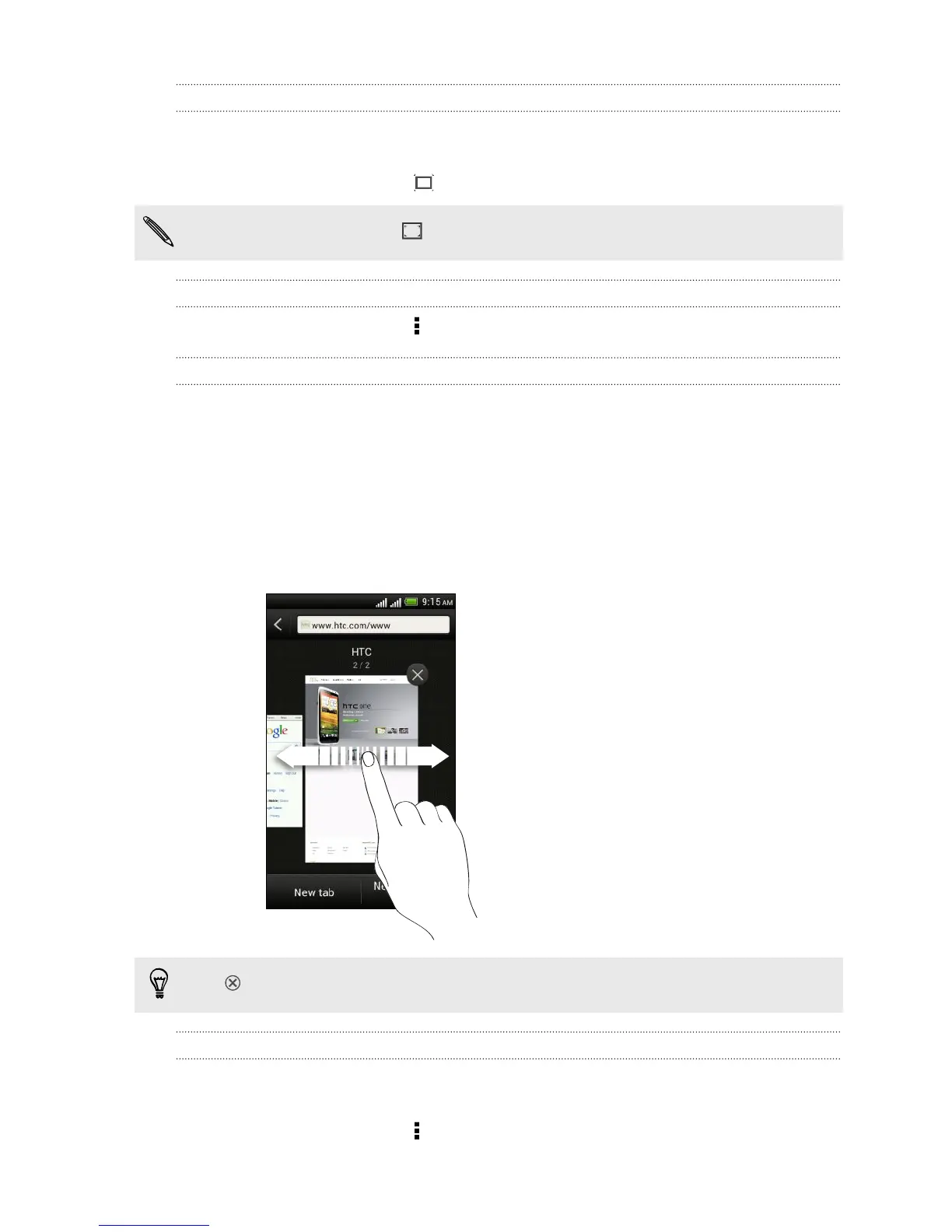
1. While viewing a webpage, tap Tabs.
2. Do one of the following:
§ To open a new tab, tap New tab.
§ To switch to another browser tab, slide your finger until the webpage you
want to view appears. Tap a webpage to display it in full screen.
Tap
to close a webpage.
Viewing previously visited pages
You can go back to the pages you've previously visited without opening another tab
or going through your history.
While viewing a webpage, tap > Back or Forward.
63 Search and Web browser



 To Next Page