3
Item Port Description
LAN GE1/0/6 IP Address: 10.0.0.1
Subnet Mask: 255.255.255.0
The LAN IP address range
shall be pre-determined.
DHCP server IP address range: 10.0.0.1 to 10.0.0.254
1. Set the IP address to 192.168.0.2 (or any other in the range of 192.168.0.2 to 192.168.0.254) and subnet mask to
255.255.255.0 of the corresponding network interface on the administration PC.
2. Open a web browser and navigate to https://192.168.0.1:8443.
3. Enter the user name (admin) and password (Admin@123) in the login dialog box, and then click Login. You need to
change the user password as instructed after the first login.
4. In the Startup Wizard page that is displayed, click Next to access the Basic Configuration page. Change the device
name and click Next.
Ifthe
Startup Wizard
pageisnotdisplayed,clickthe
System
tabandchoose
Wizard > Startup Wiz-
ard
inthenavigationtree.
5. In the Time Settings step, configure the system clock of the device according to your local time zone, and click Next.
6. In the WAN Mode step, select a WAN mode and click Next. The
USG6390E/6620/6630 do not support accessing the
Internet in 4G mode.
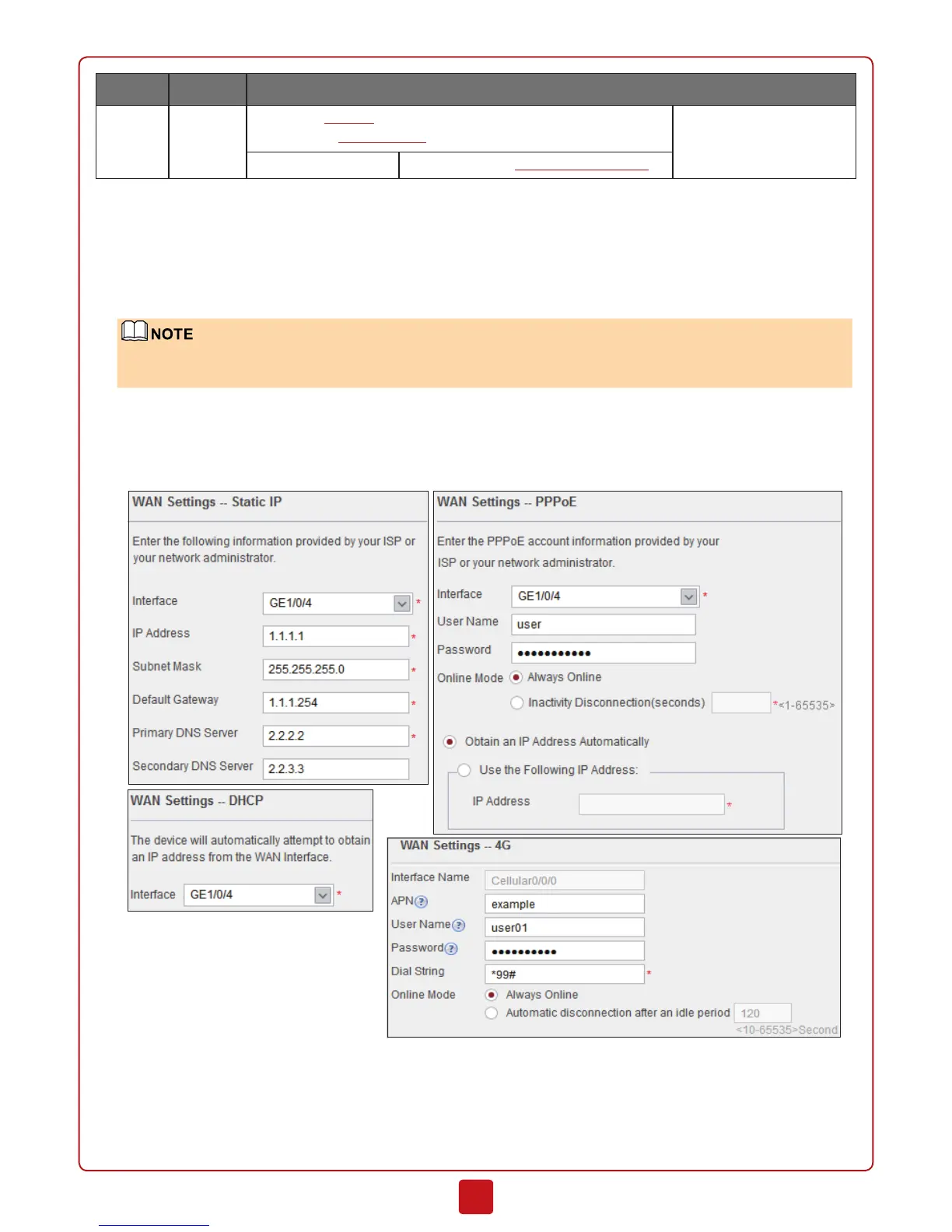
7. In the WAN Settings step, set the parameters and click Next.
8. In the LAN Settings step, set the parameters and click Next.



 To Next Page