This document describes the Hunter Pacific International ceiling fan system, focusing on its remote control handset and the associated control module. The system is designed for user-friendly operation and offers various features for controlling fan speed, direction, and timing.
Function Description
The Hunter Pacific International fan system consists of a ceiling fan, a control module, and a remote control handset. The handset allows users to wirelessly control the fan's operations, including turning it on/off, adjusting its speed, changing its direction, and setting a timer for automatic shutdown. The control module acts as the receiver for the handset's signals and manages the fan's electrical functions.
Important Technical Specifications
The manual does not explicitly list detailed technical specifications such as voltage, power consumption, or specific motor types. However, it provides crucial operational guidelines:
- Control Type: The system uses a wireless remote control handset to communicate with a control module.
- Power Supply: The control module requires mains power, which must be switched on/off via an external switch, not the buttons on the handset, for programming and certain operations.
- Battery Type (Handset): The handset uses batteries, which need to be unwrapped and inserted with correct polarity. The specific battery type (e.g., AAA, AA) is not mentioned, but the process of installation/replacement is detailed.
- Programming Mode: The control module enters program mode after a specific sequence of toggling mains power (ON for 2 seconds, OFF for 2 seconds, repeated several times, ending with ON for 4 beeps). This sequence is critical for adding new handsets or erasing existing ones.
- Wireless Range: For programming, the new handset must be within 2 meters of the receiver.
- Compatibility: The system is designed for use with Hunter Pacific International fans and their dedicated control modules.
- Incompatibilities:
- Direct Wiring: Any modification or attempt to directly wire the fan without a control module will void the warranty unless authorized.
- Speed Controllers: Electronic or dimmer-type speed controllers are explicitly forbidden for use with this system.
- Wall Switch: The wall switch connected to the fan must be ON for the remote control to function.
Usage Features
The remote control handset offers a range of features for convenient fan operation:
- Fan On/Off: A dedicated "Fan On/Off" button turns the fan on or off. When turned on, the fan will resume the speed it was last used at.
- Fan Speed Control: The handset features six LED lights that indicate the fan's current speed. The 1st LED on the left signifies low speed, while the 6th LED indicates high speed. The manual implies a button or set of buttons for adjusting speed, although the specific button is not explicitly labeled in the text, it is visually represented by the "1-6" buttons on the remote diagram.
- Forward/Reverse Direction: A "FWD/REV" button allows users to change the fan's direction. The manual notes that it may take some time for the fan to stop and change direction, depending on its current speed.
- Fan Timer Function: The "Fan Timer" function allows users to set the fan to turn off automatically after a preset time (options include 1h, 2h, 3h, 6h). To cancel the timer, the user simply turns the fan off.
- Learning Button: A "LEARN" button on the handset is used during the programming process to add a new handset to the control module's memory. Pressing the "OFF" button during programming can erase all handsets from the control module's memory.
- Multi-Fan Programming: For installations with multiple fans connected to the same final circuit or power switch, it is recommended to program each control module by plugging it into a GPO/power point before installation to avoid interference.
Maintenance Features
The manual provides instructions for basic maintenance related to the remote control handset:
The document also includes important warnings regarding warranty and proper usage:
- Any unauthorized modification or direct wiring of the fan without a control module will void the warranty.
- The warranty may be voided, and a service fee charged, if the product is damaged by power surges, lightning, weather, misuse, abuse, or similar situations.
- All installation instructions must be followed.

 Need help?
 General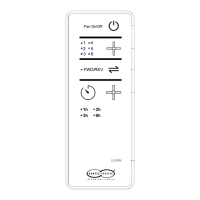

 To Next Page