A. MAKING CALLS
3
A.06 Dial By Name
The Name function is for extensions, trunks and system speed dials. Dial by Name provides the
Directory dial feature for system speed dials and extensions.
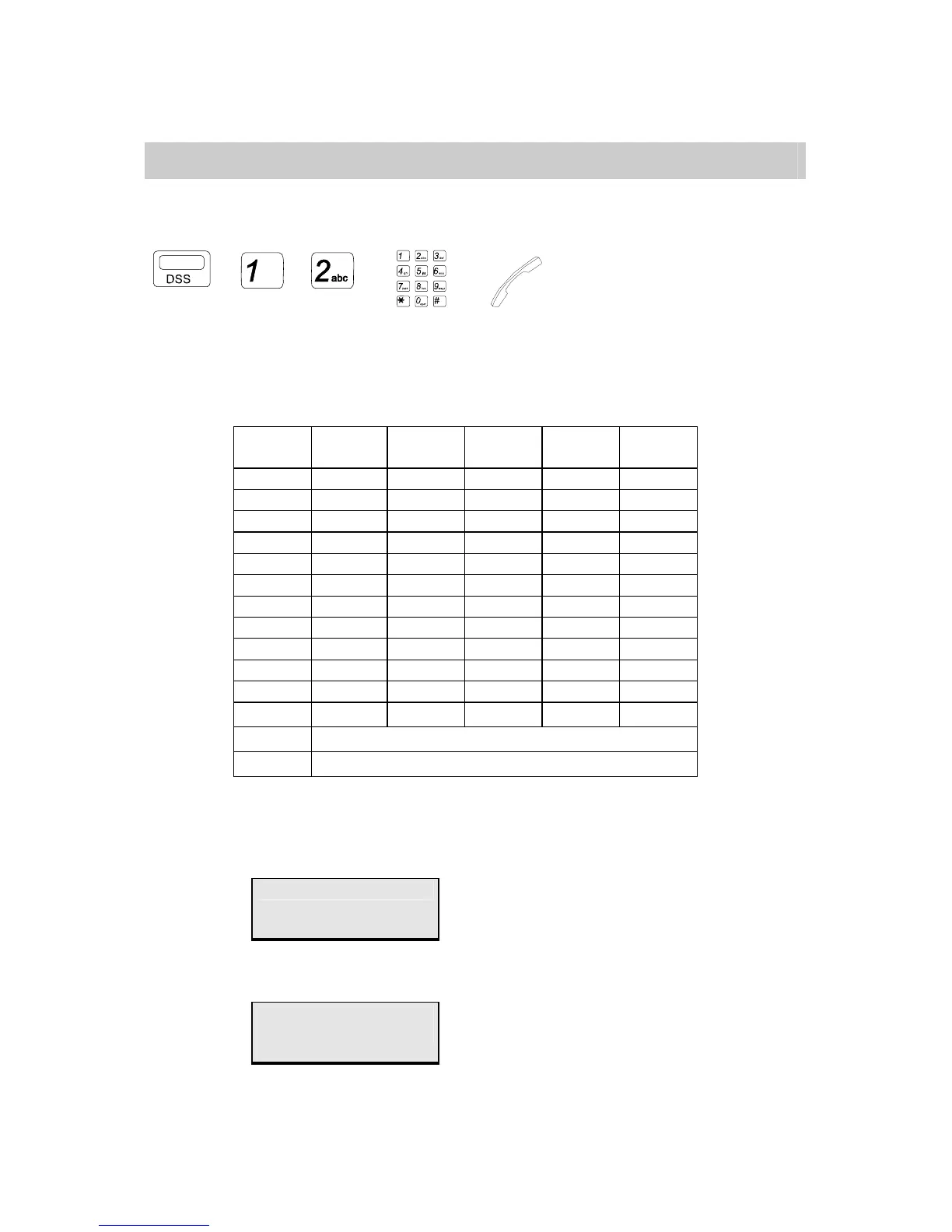
→ / → →
. Press [Directory] Key. (Assign code 62 on DSS from system programming 07.)
. Press [1] or [2] to select the Intercom dial or Speed dial (optional).
. Use the following function keys to enter the first letter of the name and depress
[Vol ▲] or [Vol ▼] to find the desired name forward or backward:
Key Pad Depress
1 time
Depress
2 times
Depress
3 times
Depress
4 Times
Depress
5 Times
1 , . : 1 Space
2 A B C 2 ;
3 D E F 3 /
4 G H I 4 _
5 J K L 5 -
6 M N O 6 '
7 P Q R S 7
8 T U V 8 +
9 W X Y Z 9
0 ä Ü ñ ö 0
* % ^ & * (
# $ ! @ # )
Vol ▲
Find the next name
Vol ▼
Fine the previous name
. Lift Handset / press [SPK] key to make the connection.
If the system finds a match, the LCD displays as the following example:
Mike Chou
If the system cannot find a match for the first character of name, the LCD displays:
No Entries
Try Again
Then, the user can enter another letter and try again.


 To Next Page
 Loading...