G. STATION PROGRAMMING
30
G.09 Switching of Day / Night Service Mode (For Console only)
Normal system operation is set in day time mode. Night service provides Outward Dialing
restriction, Night-Time Incoming Ringing Assignment, etc. The Switching of Day / Night
Service Mode is programmed by the Attendant Console, executed by either an Extension
user (Manual / User Select) or the system itself (Auto / System Select).
By Auto / System, set a Day-time duration (e.g., 08:30 to 17:00, in 24-hour format).
This means that after 17:00, the system switches automatically to Night Service.
By Manual / User, User can also activate the Night Service at any time .
To prevent unauthorized people from accessing programming functions, the Attendant
Extension can be locked by a Security Code. (See G.05 Lock / Unlock Extensions By
Security Code.)
*** For programming of the Day-Time duration, please refer to
Day-Time Duration Setup of System Programming manual ***
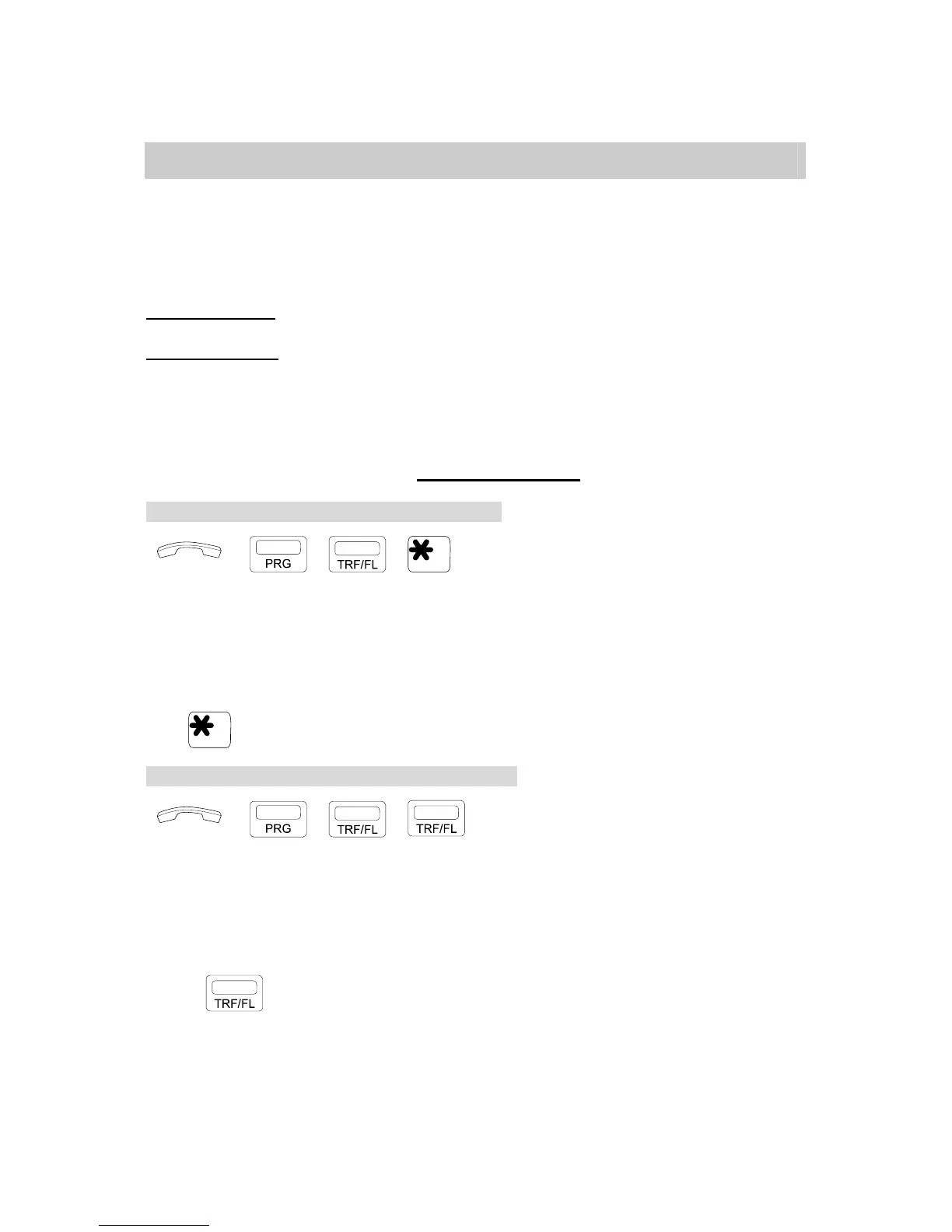
Setting for Manual / User or Auto / System Select:
→ , , . Handset on hook / [SPK] key off.
. Press [PRG], [TRF/FL], then [*] key.
* LED Indication
[SPK] key LED Lamp flashes slowly : Manual / User Select status.
[SPK] key LED Lamp blinks fast : Auto / System Select status.
* To change selection from Auto / System Select to Manual / User Select or vice versa:
. Press [*] key.
Under Manual / User Mode, set Day / Night Service:
→ , , . Handset on hook / [SPK] key off.
. Press [PRG], [TRF/FL], [TRF/FL].
* LED Indication
[DND/CN] key blinks fast: Night Time.
[DND/CN] key off: Day Time.
* To change selection
. Press [TRF/FL] key to change Selection
from Night to Day or Day to Night.


 To Next Page
 Loading...