HOW TO WEAR
•
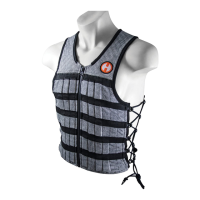
Loosen side laces before putting on Vest"
•
Zip up Vest & tighten laces as needed "
•
Vest should fit snugly around chest & midsection"
•
Tuck loose ends of laces into Vest or cut to ideal length
Hyper Vest® PRO
User Guide
ADJUSTING WEIGHTS
•
Vest comes pre-loaded with 10 lbs of steel weights (7 bars per 1 lb)"
•
Weights can be easily removed, added or adjusted to different pockets "
•
Remove weights by pulling back black webbing on top of pocket & pushing weight up
from the bottom"
•
To insert, simply slide weight into pocket and ensure black webbing is closed over top"
•
Check out http://bit.ly/1mVAxrK for an instructional video"
•
Extra weights can be purchased in 5 lb Booster packs"
•
Each weight pocket holds up to two weights "
•
We recommend training with 3% up to a max of 15% of your bodyweight
CONTACT
EMAIL: customerservice@hyperwear.com"
CALL : 1-888-460-0628
RESOURCES
•
Instructional Videos : https://www.youtube.com/hyperwear"
•
Workouts & Articles: https://www.hyperwear.com/blog/"
•
Sizing Chart : https://www.hyperwear.com/sizing"
•
Additional Products : https://www.hyperwear.com/shop.html"
© 2016 Hyper Wear Inc. All Rights Reserved. Hyperwear® and Hyper Vest®, are registered trademarks of Hyper Wear Inc.


 To Previous Page
 Loading...