06 | Kitchen U10
DAB Radio
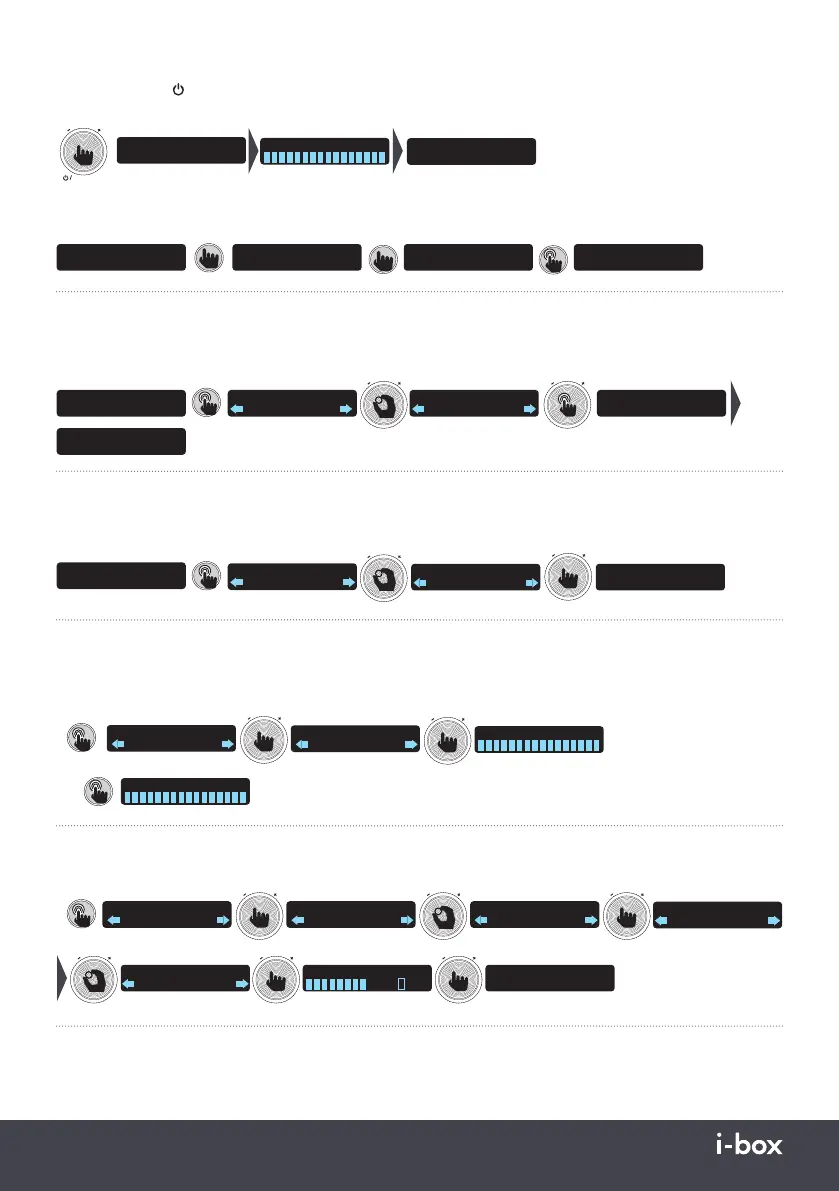
Press the Volume / / Function (1) repeatedly until DAB appears. If there is no Station List available (e.g. when switching
on the first time) the radio will autoscan for DAB stations automatically otherwise it will tune to the last station played.
FUNCTION
V
O
L
U
M
E
DAB
Scanning 64
Absolute 80s
Playing
Autoscan saves all available stations to a Station List, press Preset/Search- & Preset/Search+ buttons to go to the
previous or next station, press and hold buttons to fast scroll through the list.
- SEARCH
- PRESET
SEARCH +
PRESET +
Absolute 80s
Now Playing
Absolute 90s
Now Playing
Absolute 80s
Now Playing
SEARCH +
PRESET +
Virgin Chilled
Now Playing
Storing Stations to Presets
To store the station playing to a preset, long press the Memory button to access the Preset Store, turn the Timer / Enter
dial to scroll through the 30 available Presets (P1 - P30), long press the Timer / Enter dial to store the station to the
selected preset.
MEMORY
LIGHT ON/OFF
BBC Radio 4
Playing
BBC Radio 4
2: (empty)
T
I
M
E
R
Preset 4
stored
BBC Radio 4 P4
The Archers
BBC Radio 4
4: (empty)
T
I
M
E
R
Preset Recall
To recall and play a stored station preset, long press the Memory button to access the Preset Store, turn the Timer /
Enter dial to scroll through the 30 available Presets, short press the Timer / Enter dial to play the selected station preset.
MEMORY
LIGHT ON/OFF
BBC Radio 4
4: BBC Radio 4
T
I
M
E
R
Radio X P10
Now playing on Rad
T
I
M
E
R
BBC Radio 4 P4
The Archers
BBC Radio 4 P4
10: Radio X
Scanning for DAB Stations - Full Scan / Automatic Scan
New stations are frequently being launched and frequencies sometimes change, so it‘s a good idea to rescan from time
to time to make sure you don’t miss out on the latest additions. Also it‘s a good idea to rescan if you have relocated
your radio.
AMS
Timer 1/2
or
Scanning 64
MENU/ALARM
INFO
DAB
Station scan
ENTER/PAIR
T
I
M
E
R
Scanning 64
DAB
Full scan
T
I
M
E
R
Manual Scan
If the Full scan doesn’t find a station and you know the frequency you can tune to it manually and save it.
ENTER/PAIR
T
I
M
E
R
MENU/ALARM
INFO
DAB
Station scan
ENTER/PAIR
T
I
M
E
R
DAB
Full scan
DAB
Manual scan
ENTER/PAIR
T
I
M
E
R
Manual tune
5A
174.928MHz
ENTER/PAIR
T
I
M
E
R
Manual tune
12B
225.648MHz
648MHz BBC Nation
ENTER/PAIR
T
I
M
E
R
ENTER/PAIR
T
I
M
E
R
BBC Radio 1 P1
Radio 1s Party Anth
DAB Info
Short press the Info / Menu button to display: Programme or Track Information / Programme Type / Multiplex / Time
and Date / Frequency / Audio signal format / Signal strength / Signal error.



 To Next Page