®
Document No.
12 / 16
抜去手順 Ⅱ / Un-mating method Ⅱ
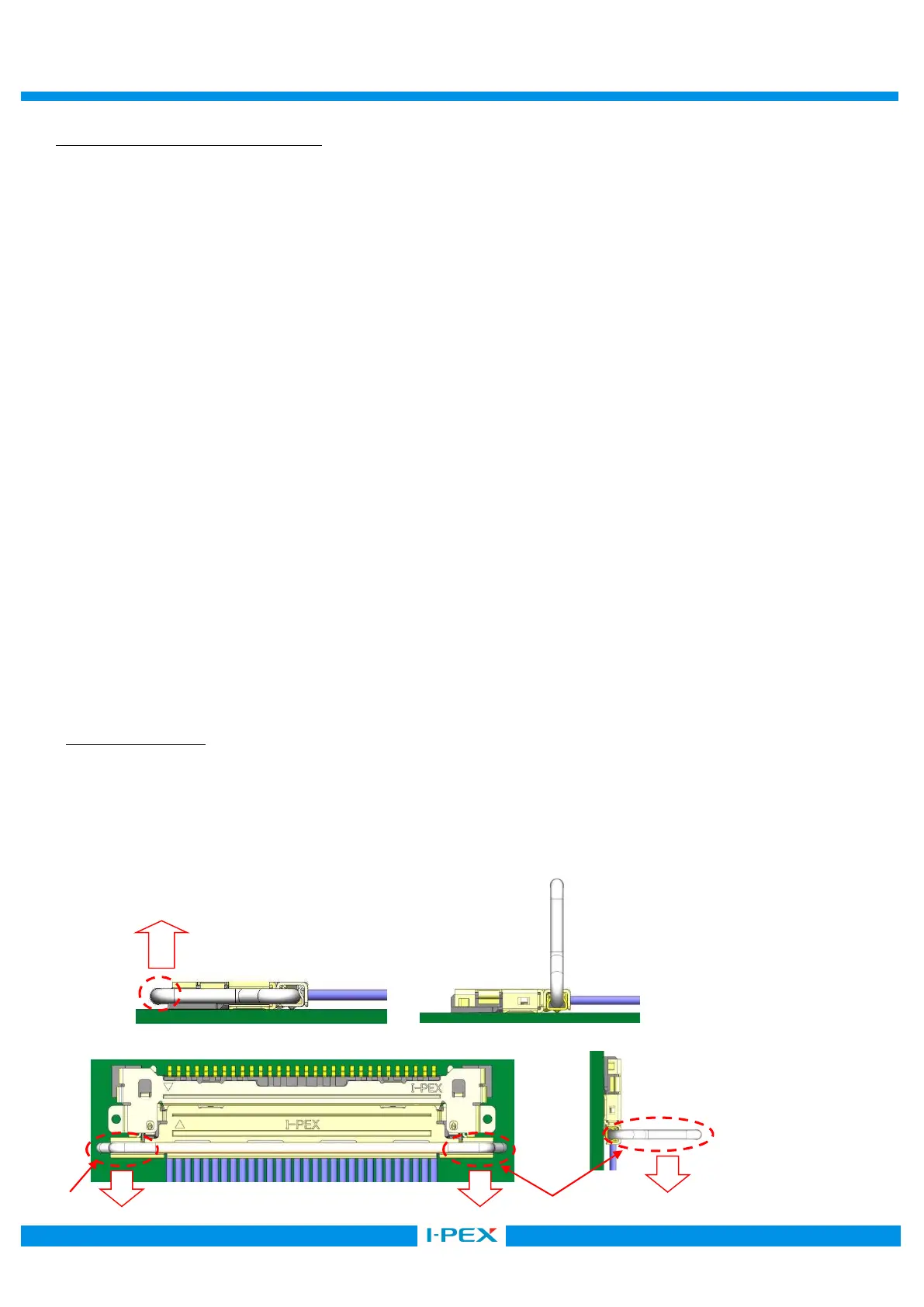
図 10 の①の箇所のどちらか一方を、②の方向に PULL BAR を上げ、基板側コネクタとのロックを解除後、
図 11 のように垂直になるように PULL BAR を回転させ、図 12 のように③の垂直なっている箇所を
矢印方向に基板と水平方向になるように抜去してください。
注意: ①以外で PULL-BAR を②方向に上げようとすると、PULL BAR が変形したり、コネクタが
破損する恐れがあります。
また、INSULATION PULL BAR の絶縁コート部を抜去に使用すると、PULL BAR が変形する
可能性がありますので、抜去には使用しないでください。
なお、絶縁コート部に金属や硬いものを当てると、コートが剥がれてしまう恐れがありますので、
当てないようにご注意願います。
As Fig 10, ①, pull the one of ① points of PULL BAR up towards ② direction to release the lock
from the PCB side connector and turn PULL BAR up to horizontal as Fig 11. As Fig 12,
please make un-mating by pulling the horizontal part ③ in parallel to PCB.
Caution: Except for ① part, if you pull up the PULL-BAR towards direction ②, PULL BAR would have
deformation or the connector would have damage. Also, if you use Insulated part of INSULATION
PULL BAR for Un-mating, PULL BAR may deform. Please do not use it for Un-mating. Moreover,
if you hit the metal or hard material onto the insulating part, the coating have possibility to peel off
so that please understand to handle it carefully.
使用绝缘镀层的拉环的情况
连接器拔出方法 Ⅱ
如图 10 所示,将①部位中的其中一侧沿着②的方向把 PULL BAR 抬起,接触与基板上的连接器的锁扣。然后,将 PULL BAR
旋转到如图 11 所示的垂直位置,之后沿着箭头方向水平的将 Plug 拔出。
注意:如果抬起 Pull Bar 时,使用①部位以外的其他部位,那么可能会引起 Pull Bar 变形,连接器破损等不良现象。
其次,如果使用金属等比较坚硬的东西去触碰 Pull Bar 的绝缘镀层部位,会造成绝缘层脱落,所以要避免这类现
象发生。
図 11(Fig.11)
図 12(Fig.12)
②
③
③


 To Next Page