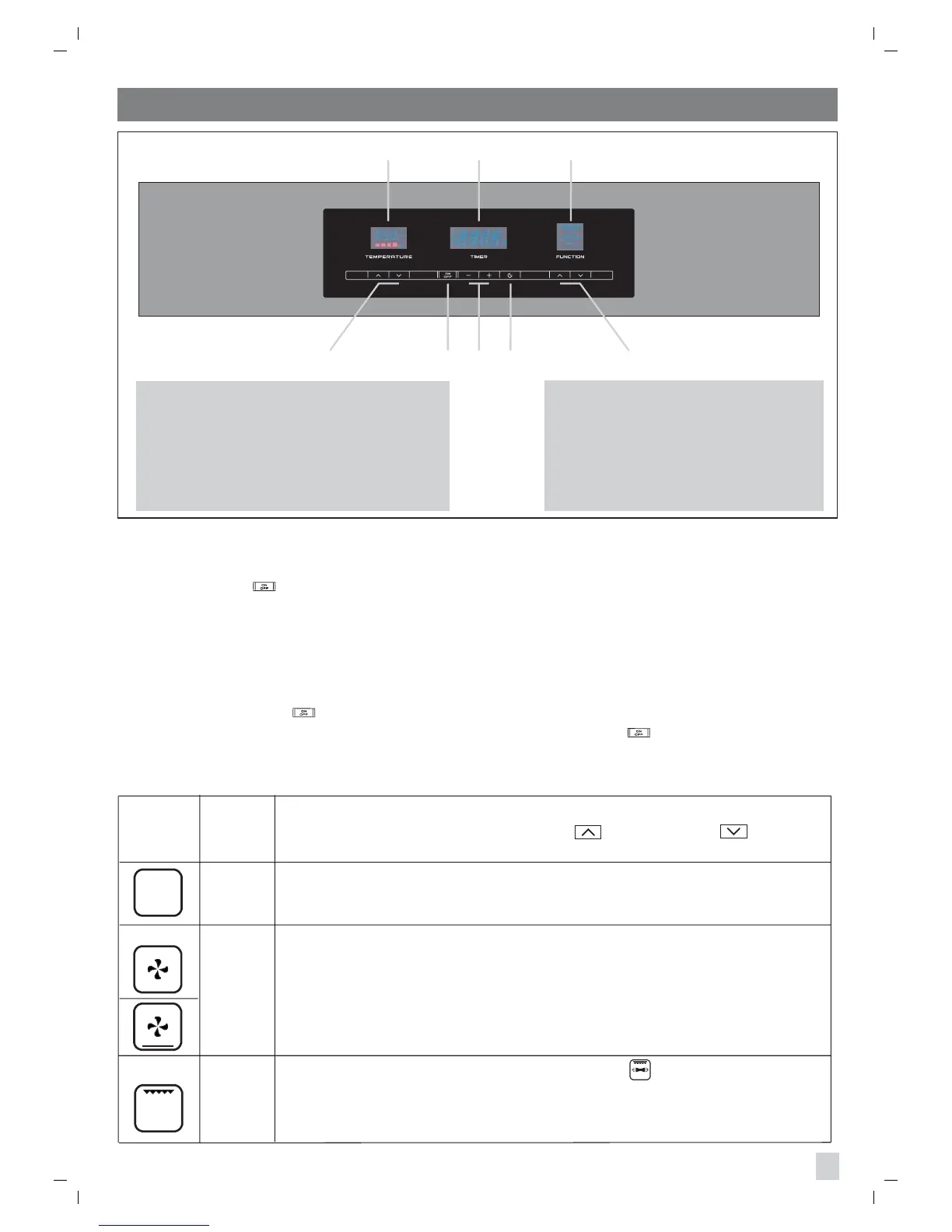
Note: the functions selected and the oven temperature will appear on the display (see fig. 5).
Warning : the oven must be used with the door closed.
Note: gently press the keys (sensors) to increase or decrease
the oven temperature.
Cooking
indicators
Temp. °C
min 40
max 260
Defrosting with fan
Ambient temperature air is distributed inside the oven to defrost food more quickly
without protein adulteration.
Oven light
The ovens internal light comes on automatically when the oven is turned on and
remains on during other functions too.
dEF
NOTE: It is possible to turn on the ovenfs bottom heating element by varying the
temperature between 40 and 60 °C if you want to speed up the defrosting process.
40 ÷ 60
Turning the oven on and off
Press the button .
On will appear on the display and the ovens internal light will come after two seconds.
If no cooking function is set within the following minute, the oven sets itself to OFF automatically.
Controls lock.
Every time the oven is turned off, the controls lock is automatically activated (child safety).
When the lock is active the lock symbol appears on the temperature display. Deactivate the lock
by pressing the button for a few seconds to use the oven.
The lock can be activated even while the oven is in use by pressing the button for a few seconds.
The following cooking functions can be set by using the programmer (Fig. 5):
Pr 01
Medium grill (turnspit according to the model ).
Selecting this function switches on the central upper heating element for direct
radiation of heat over food. This function must be used between 50 to 200°C.
(Pre-set value 200 °C).
50 ÷ 200
Pr 02
11
PANEL CONTROL (touch control model )
Fig. 5
1234 5
678
1 = oven temperature regulation.
2 = Oven on
.
3 =
clock regulation - electronic
programmer regulation.
4 = selector functions programmer.
5 = cooking function programmer.
6 = temperature indicator.
7 = Display programmer.
8 = cooking indicator.



 To Next Page