Symbologies setting
- Enable - Disable
How do you program your scanner?
1.Scan Start Configuration
2.Scan all necessary able for parameters that
Meet your application
3.Scan end configuration to save the changes.
Resetting The Standard Product Defaults
If you aren’t sure what programming options are in your scanner,
or you’ve changed some options and want the factory settings
restored, scan the bar code below.
End Confi guration
I
nterface selection
Reading mode
Language ………etc.
Start Confi guration
Standard Product Default Setting
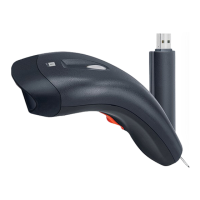
Wireless Barcode Reader with Memory & Vibration
WBS-272MV
Quick Start Guide
www.iBall.co.in
Note:
* Product specifications are subject to change without notice. * All trademarks, logos, brands & product names are properties of their respective owners.
* Warranty: All iBall products are governed by iBall Warranty terms. Refer www.iball.co.in for details. • For any technical help on iBall products, please
contact support@iball.co.in


 To Next Page