ENGLISH
IBERITAL
98 INSTALLATION AND OPERATION MANUAL
2.9.3.2.1. User menu display
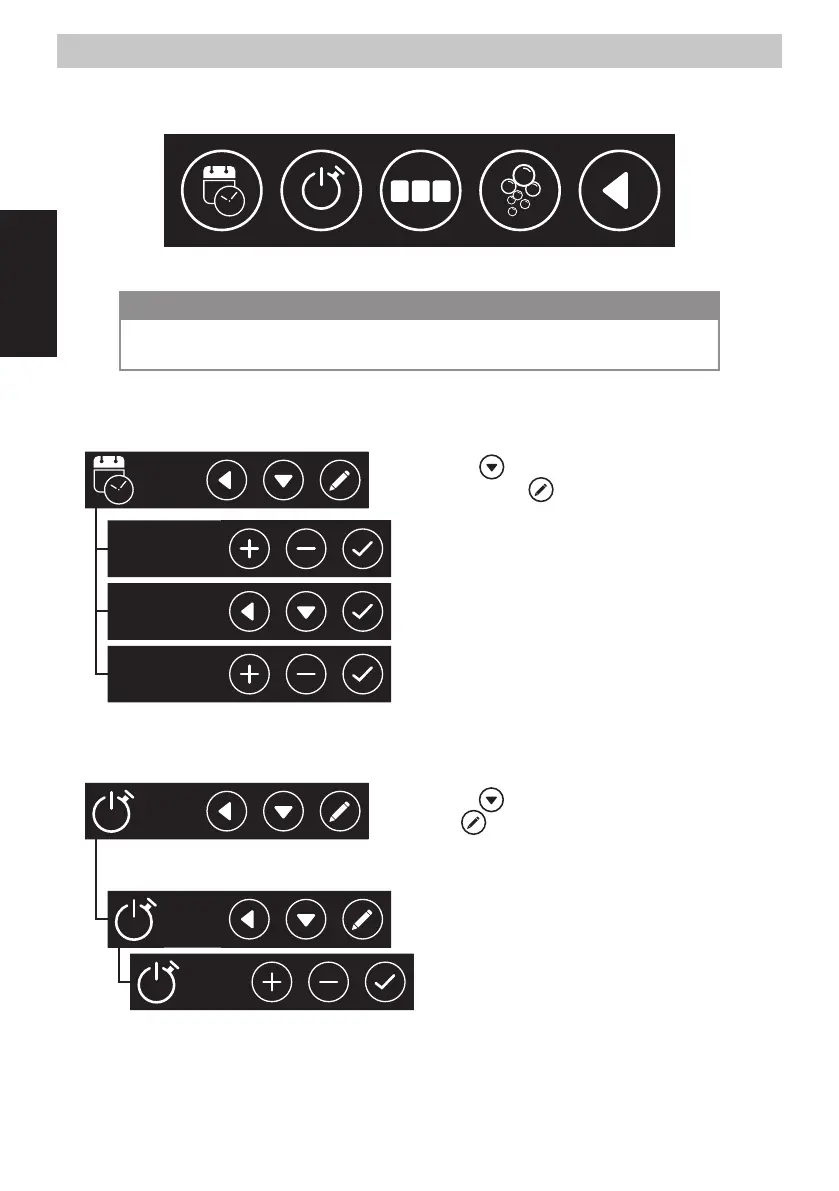
Once we are in the user menu, we can select any of the options shown on the screen. by pressing any of the icons.
0 0
0
1
Hour/Data Auto ON/OFF Counters Auto wash Cancel o Go back
NOTE
If the machine is in the OFF position, the auto-wash option will not appear on the display. In that position
the machine will not be sufficiently hot to perform that function.
- DATE-TIME: Through this menu we can change the settings for the time and date, and the
way this information is displayed.
Day
Hour format
Hour
By pressing the icon, we can move through the various menu
options. By pressing the
icon, we can enter the various sub-
menus.
Day:
Monday
Set the day of the week.
Hour
format:
12h
24h
Set the time format as either 12 or 24 hour, according to our
preferences.
Hour:
00:00
am
Set the time.
- AUTO ON/OFF: Through this menu we can set the settings for switching the machine on and
off automatically.
Monday
Enabled
ON: 06:13 am
OFF: 23:34 pm
By pressing the icon we can change the day of the week. By
pressing the
icon, we access the settings for the selected day.
The first option is "every day". By setting this option we erase any
individual setting, and the machine will behave in the same way every
day of the week.
Monday
Enabled
Disabled
Once a day of the week is selected, we can enable or disable it
independently of the other days.
Monday
ON: 00:00 am
OFF: 00:00 am
When a day of the week is enabled, we can set the time for
switching the machine on and off automatically.


 To Next Page