IBERITAL
INSTALLATION AND OPERATION MANUAL Page 77
ENGLISH
2.9.3.2. TFT display screen (touchscreen)
Once the machine is on, the display screen will remain lit.
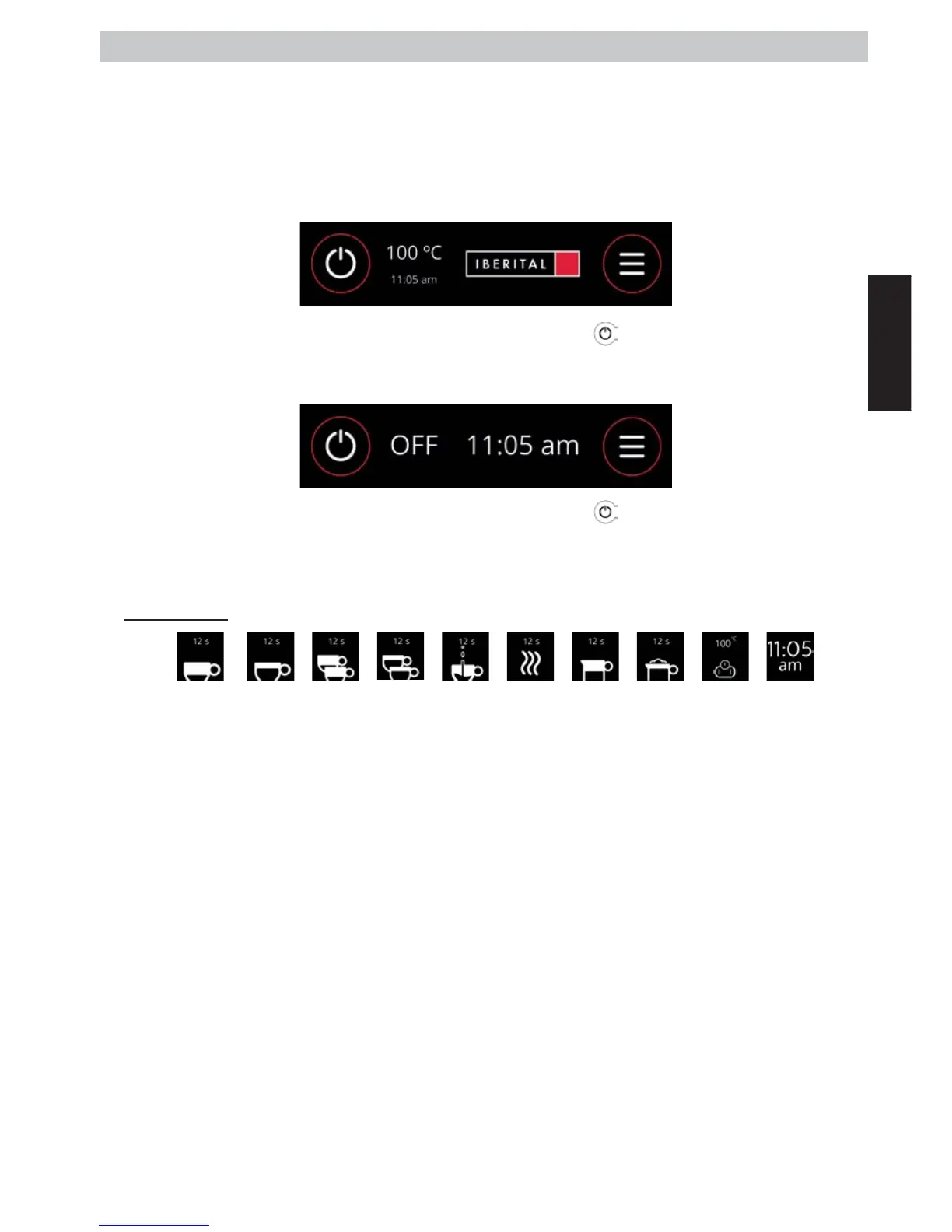
NOTE: Initially, if no customised image or text has been inserted, what we will see on the screen is the Iberital
logo. In the TECHNICAL MENU - Display config is an explanation of how we can customise the display.
- ON position: When the main switch on the coee machine is activated and the display is in the ON
position (the screen shows Temp. Boiler | Time | Logo).
In order to set it to ON: when the display is in the OFF position, press the icon on the screen.
- OFF position: When the main switch on the coee machine is activated and the display is in the OFF
position (the screen shows OFF | Time).
In order to set it to OFF: when the display is in the ON position, press the icon on the screen.
The display screen during service, the normal operation of the machine, will vary based on the number of groups on
the model, whether or not it has a frother, and the type of services we have selected at any given time.
SERVICE ICONS:
SHORT
COFFEE
LARGE
COFFEE
2 SHORT
COFFEES
2 LARGE
COFFEES
CONTINUOUS
HOT
WATER
HOT
MILK
FROTHED
MILK
BOILER
TEMP.
HOUR
Note: On the upper part of the service icons, we will see additional information: a clock for the service icons, or the
temperature on the boiler icon.


 To Next Page
 Loading...